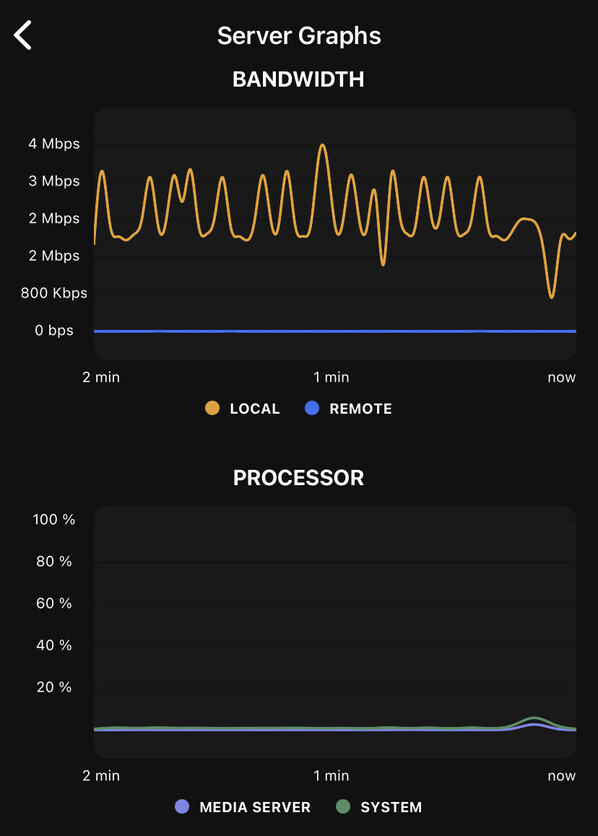
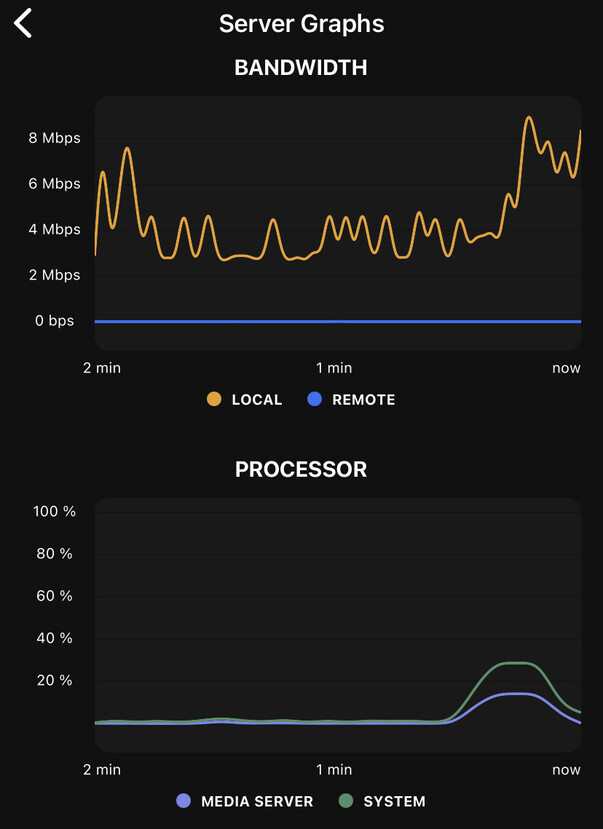
Still happening for me and still corresponds with a bump on processor usage and dip in bandwidth.
Yes it has got better but is still there.
A different video on the below link. Can see it happening towards the end. Also see the 0 dropped frames and come the end of the clip there is 107…super frustrating.
Can someone from plex Pls acknowledge this and file a bug after a year? It’s bothering…
Come on Plex folks, there are ample members of the community who want to try and help sort this problem, but it needs some Dev input.
Please enter into some dialogue with us.
Hi everyone – I’ve had the same problem for some time now (9+ months or so) and have actually narrowed things down to a specific time on the AppleTV that is causing the stutters and am curious if other have identified the same ting (or can check the next time it happens to them). Whenever I am watching something in DirectPlay mode the stuttering occurences always coincide with either the top or bottom of the hour ins real time (not playback time). So, if I start a movie at 8:37pm, I’ll do fine until 9:00, and it’ll stutter just like in the videos above; and then be good until 9:30 when it happens again; etc. Switching to transcoding (using the old video player) generally resolves the issue, but then is a bear on my server which doesn’t cope that well…
anyway, this is an interesting clue I found out and am curious to see if it consistent elsewhere or specific to my setup somehow. I have a 4th gen AppleTV (1080p) that it is an issue on. I don’t notice it on my AppleTV4k, but I use it much less for Plex. The issue with that one is that my built-in player on my Sony TV (Chrome OS) can DirectPlay 4k videos while the AppleTV cannot (maybe its a wifi bandwidth issue between the two radios), so I typically use the built-in Chrome app for movie-watching there.
Yes. I notice that too. Also, if I add content while I’m watching something, frame stutter occurs when PMS updates library.
That’s really interesting - hiccups being aligned to the wall clock is very strange indeed.
There’s a setting on the Apple TV, Settings → General → Background App Refresh. You could test disabling it!
I wonder if other processes on your Apple TV are distracting it from playing the video.
I tried disabling the background app refresh on AppleTV, but no help…
I also just built an entirely new UnRaid server and started hosting from there – also no help… But now I really need a solution because fixing this problem was my excuse to my wife for building a new server!! 
We’ve all been there.
same here. disabled but not working.
I try it too. Its quite a shame the beautiful Apple TV app is useless for me, now I rely on my smart tv samsung tizen app. At least, I can watch content without frame dropping.
Are you using Plex DVR ?
I do have a HD HomeRun setup with Plex TV+DVR, but it is rarely used for DVR’ing anything other than an occasional sporting event (maybe 5-6 times a year in the Fall).
@stridemat - me too. Exactly the same.
Plex people - HELP!!! What do we have to do to get this sorted out??? It’s been going on for years now.
HDHomeRun gives me flawless TV with no stutter, Infuse accesses my Synology files and plays them with no stutter.
Come on, Plex. You are the product that I like the most, please get this sorted out!
I’ve read on another thread a user mentions that stuttering begins once he activate Plex DVR, he never noticed it before
I replaced my PMS server almost 4 months ago. Backed up all my PMS data and migrated it to a new server. This one has more RAM and a newer CPU, but unlike the last one, I’ve put in an RTX 2070 and it’s now doing hardware transcoding.
I haven’t noticed the issue since.
I’m not suggesting to anyone to go out and replace their PMS server or spend $1000 on a graphics card, I just thought I’d post this up whether or not it’s helpful to anyone. I’ve been battling with this issue for years but now it’s gone.
Sorry to say but that is non-sense. This is not a server issue as I described above that killing the app and restarting the already running stream is flawless. Just to mention I got the RTX2080 as well. It’s def a client issue.
Have you tried a clean OS install of your PMS?
Because apart from the hardware change, that’s the only other change for me. And now I’m not experiencing the issue.
I didn’t say hardware transcoding is the solution, I just stated what changes I made to my PMS which unintentionally and coincidentally fixed the issue.
Non-sense? It’s fact - kinda hard to dispute. Is it purely a client issue? Dunno, but when a server change fixes the issue, it makes you think, doesn’t it?