Server Version#: 1.22.3.4523
Player Version#: 8.17.1.25326
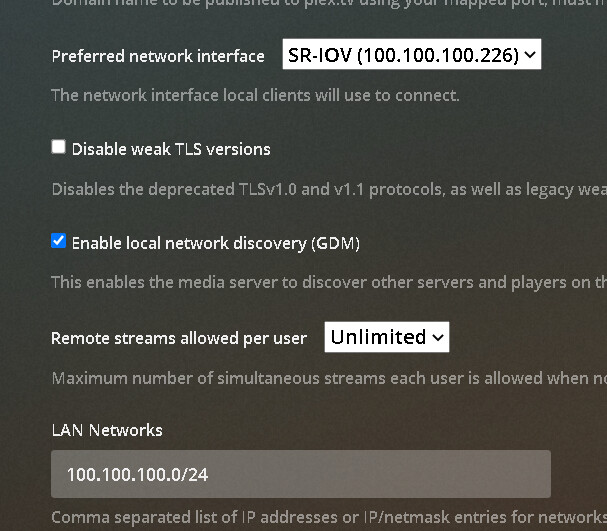
I have a comprehensive LAN network, 100% Unifi hardware from end-to-end. PMS is running on a HyperV Virtual Machine, Windows Server 2019 with teamed NICs. PMS only sees one single network adapter however, which is assigned a static IP on the LAN, Network section of PMS settings configured as follows:
I have multiple Players, all ethernet connected on the 100.100.100. LAN, all running on newer NVIDIA SHIELD TVs, and ALL default to a 2 Mbps transcoded stream, instead of “Original Quality”. I cannot for the life of me get this to stop, and it’s driving my absolutely nuts.
I remember Plex does not particularly like non-RFC-1918 LAN networks.
Can you verify Plex is determining streaming within your 100.100.100.0/24 network to be remote (e.g. by checking out the “now playing” details from your server’s dashboard or by removing the remote video quality restriction on one of your Shields to confirm it’ll play in original quality instead of using 2 Mbps)?
Unsure if this applies to Windows Server 2019, but might be worth checking.
Windows 10 Home/Pro has a local/public setting for network interfaces (Settings → Network & Internet → Properties).
If set to public, the system is isolated from others on the same network.
Plex client connections to a Plex server on such a system connect indirectly, via Plex Relay, and are limited to 2 Mbps for Plex Pass holders (1 Mbps w/o a Plex Pass).
As tom80H mentions, monitor playback via the Plex Dashboard.
If the connection shows as Indirect, check for a local vs public setting on the network interface in Windows.