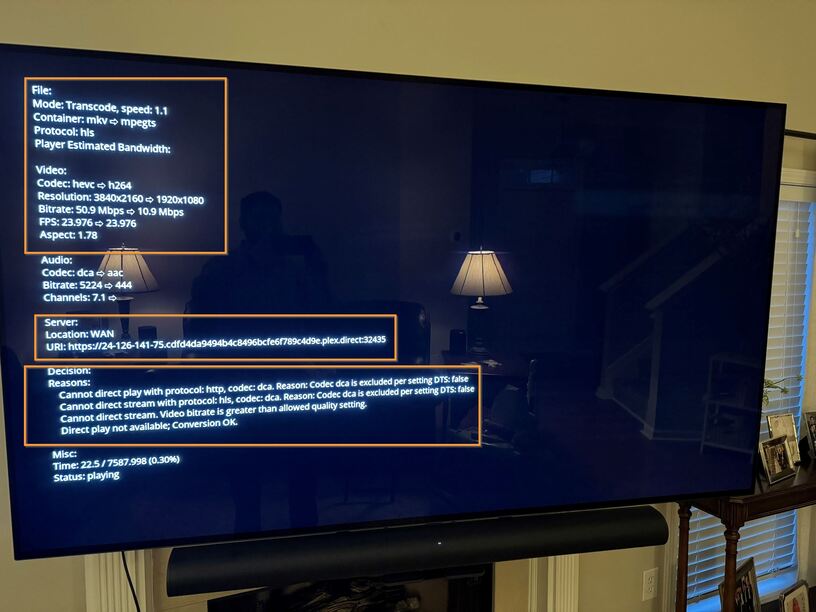
Server Version#: Version 1.32.8.7639
Player Version#: Plex for LG Client Version 5.76.2 Platform Version 6.4.0
Hi everyone,
I’ve been using Plex for many years and I’ve never been very confident about my setup and settings configuration. I’ve been interested in really fine tuning my settings and network setup.
A couple factors at play that are imporant to point out. I do use Private Internet Access for my VPN, but I use the Split Tunnel feature to bypass the VPN for Plex. I don’t think I have issues with Remote Access, like most, but I’m not satisfied with the performance whether local or remote. I feel pretty confident with my undrestanding of Port Forwarding and beleive I have Port forwarding setup properly.
The main issue that has me really perplexed is that when using Plex on my LG CX’s Plx App, it appears to be transcoding and not Direct Playing/Direct Streaming. The transcoding is not good and I don’t believe I’m utilizing my setup and hardware.
HTPC/Plex Server Specs below:
Processor - AMD Ryzen 7 2700 Eight-Core Processor 3.20 GHz
Installed RAM - 16.0 GB
GPU - NVIDIA GeForce GTX 1050 Ti
Operating System - Windows 11 Pro
I am able to connect to the Plex Server using a dynamic dns I have setup and DIrect Play to a Plex Web Player on the local network.
I’ve looked through many, many of the Plex Support articles and most of them cover remote access issues. I would love to tune up my settings, but I don’t feel confident in what they all are and how they are affecting my network experience.
I know it’s a lot to ask, but I would love to have someone who is knowledgeable about network setup help me with my setup so I can get this figured out. I will be glad to answer any questions I can and am eager to learn! I would be so grateful!