Server Version#:1.41.9.9961-46083195d
Player Version#:
investigating lost playlists and rebuilding collection on multiple occasions.
Maybe unrelated but I am getting these errors
Aug 29, 2025 03:02:03.518 [13672] ERROR - [Req#89146b/Transcode/16749245-488f-422d-a547-490c967a28db/ab69328c-7a24-45b2-b719-149129857dea] Error while decoding stream #0:1: Invalid data found when processing input
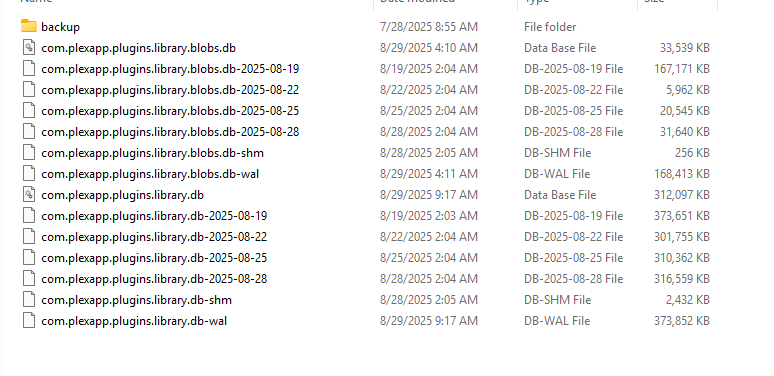
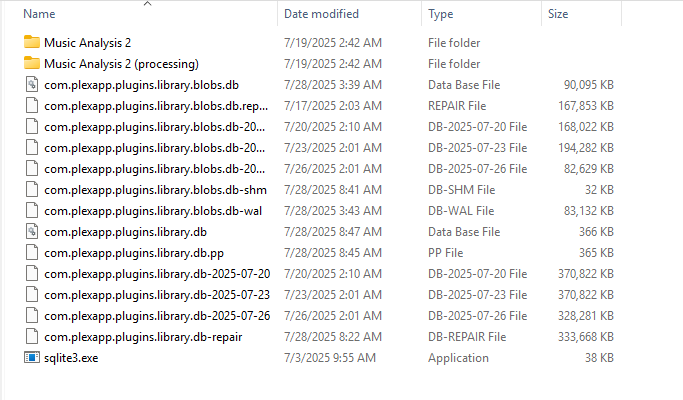
I cant find any log entries related to rebuilding the db but here is a screenshot of the db files
Was this sqlite3.exe in the folder screenshot copied from the plex server program folder?
Is this database folder located in the very same machine where Plex server is running?
Is there an anti virus running which is allowed to interfere in the plex data folder?
Is the plex server machine part of an active directory with roaming user profiles?
Are the media files stored on storage volumes inside the server machine?
If not, is “Empty trash automatically after every scan” still activated in the plex server settings?
That is very likely the reason for your empty playlists.
A network connection is not as speedy as local file access. If you also allow the NAS to spin down the platters of the HDDs, it can take sometimes too long to spin them back up. That can be long enough for Plex server to consider (some) media files as deleted if they are not returned timely enough when accessed. With that checkbox active, they get ousted from the database immediately. Even if the media files are later re-added by an automatic/periodic library scan, they remain absent from the playlists.
Try (at least for a time) to restrict any real-time anti virus guard from interfering and potentially locking files in the plex data folder. This can be a potential reason for database corruption.
Other typical reasons would be
originally Empty trash automatically after every scan was unchecked but i checked it after experiencing this corruption issue. i unchecked it.
i excluded the servers %appdata% dir from malwarebytes
sometimes after a reboot my network drives dont always reconnect without manually browsing the folders first, this only happened once that i know of- i dont think it is the cause.
plex data dir is not on a network drive its local to the server host (laptop). only the media is on NAS.