Plex adding media from share with erroneous dot (.) in path

Server Version#: 1.41.2.9134
Player Version#: 4.141.0
I have a TV library with two shares:
\Eds-FS\TV
\Eds-FS2\TV

One is a copy of the other, so they have the exact same content in.
Scanning my library files, an “unknown show” has been added with hundreds of unmatched files, and checking the info, they all seem to have an erroneous dot in the file path:


Anyone have any idea what the heck is happening here?

I’m also now unable to remove either folder from the library folder list.

Thanks
Eds

What is Eds-FS2 - Synology, Windows Server, etc.?

Does that file path actually exist on the server?

Wondering if the server has some hidden directories for snapshots, etc. and Plex is inadvertently searching them.

It’s a TrueNAS scale SMB share.
I’ve checked, and there is no directory called “.”
I’ve had a look for hidden folders, and cannot see any.

Thanks
Eds

I have had a look through some of the Plex log files, and whilst I’m not overly familiar with the structure and content, I did come across this in the Plex Server log file:


Nov 15, 2024 13:16:35.484 [5016] ERROR - SQLITE3:0x872f21dc, 11, database corruption at line 84326 of [a29f994989]
Nov 15, 2024 13:16:35.484 [5016] ERROR - SQLITE3:0x872f21dc, 11, statement aborts at 22: [SELECT DISTINCT di.`id` FROM directories di LEFT JOIN media_parts AS pt ON di.`id`=pt.`directory_id` LEFT JOIN media_items AS mi ON pt.`media_item_id`=mi.`id` WHERE mi.`section_location_id`=:C1] database disk image is malformed
Nov 15, 2024 13:16:35.485 [5016] WARN - Caught exception while scanning TV: Unknown exception
Nov 15, 2024 13:16:35.697 [5016] INFO - Notification: Library scan complete - Extra information may still be downloading from the Internet

I have disabled the Eds-FS2\TV share on the new storage box, to prevent Plex adding thousands of TV shows to this one unknown show.
I wonder if this is what is preventing the scan from running?

Unfortunately I had no other choice, as I’m also unable to remove the extra folder from the library.
If I try to remove the folder, I see these entries:

Nov 15, 2024 13:20:20.824 [7348] INFO - Request: [10.0.0.234:55934 (Allowed Network (Subnet))] PUT /library/sections/2?name=TV&type=show&agent=tv.plex.agents.series&scanner=Plex%20TV%20Series&language=en-US&importFromiTunes=&enableAutoPhotoTags=&location=%5C%5CEds-FS%5CTV (7 live) #6dc06 TLS GZIP Signed-in Token (Eds89) (Microsoft Edge)
Nov 15, 2024 13:20:21.915 [1364] WARN - [Req#6ec5a] QueryParser: Invalid field 'contentDirectoryID' found, ignoring.
Nov 15, 2024 13:20:21.916 [1364] WARN - [Req#6ec5a] QueryParser: Invalid field 'pinnedContentDirectoryID' found, ignoring.
Nov 15, 2024 13:20:23.125 [7348] ERROR - [Req#6dc06] SQLITE3:0x872f21dc, 779, index corruption at line 94622 of [a29f994989]
Nov 15, 2024 13:20:23.125 [7348] ERROR - [Req#6dc06] SQLITE3:0x872f21dc, 779, statement aborts at 26: [delete from media_parts where media_item_id=?] database disk image is malformed
Nov 15, 2024 13:20:23.125 [7348] ERROR - [Req#6dc06] Exception inside transaction (inside=1) (D:\gha\plex-media-server\plex-media-server\Library\MediaItem.cpp:911): sqlite3_statement_backend::loadOne: database disk image is malformed
Nov 15, 2024 13:20:23.154 [7348] ERROR - [Req#6dc06] Exception inside transaction (inside=1) (D:\gha\plex-media-server\plex-media-server\Library\Scanner\SectionLocation.cpp:52): sqlite3_statement_backend::loadOne: database disk image is malformed
Nov 15, 2024 13:20:23.154 [7348] ERROR - [Req#6dc06] Exception inside transaction (inside=1) (D:\gha\plex-media-server\plex-media-server\Library\LibrarySectionEndpointHandler.cpp:358): sqlite3_statement_backend::loadOne: database disk image is malformed
Nov 15, 2024 13:20:23.156 [7348] ERROR - Got exception from request handler: sqlite3_statement_backend::loadOne: database disk image is malformed
Nov 15, 2024 13:20:23.156 [5728] INFO - Completed: [10.0.0.234:55934] 500 PUT /library/sections/2?name=TV&type=show&agent=tv.plex.agents.series&scanner=Plex%20TV%20Series&language=en-US&importFromiTunes=&enableAutoPhotoTags=&location=%5C%5CEds-FS%5CTV (9 live) #6dc06 TLS GZIP 2331ms 530 bytes (pipelined: 1)

I do have a backup of the VM from a few days ago, before I started doing any migrations, so is it likely I will need to restore from backup?

Thanks
Eds
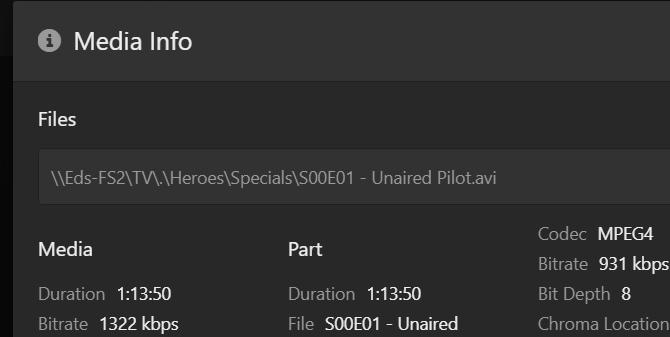
Ah… ha. And there it is.

Under *ix/*bsd, there are 2 entries in every directory, ‘.’ and ‘…’. The ‘…’ entry points to the parent, and the ‘.’ entry is a reference to itself (circular, if you will.) Running ls without a -a option customarily doesn’t show these 2 entries along with other hidden entries (directory names beginning with a ‘.’.)

You have a corrupt database see GitHub - ChuckPa/PlexDBRepair: Database repair utility for Plex Media Server databases

Makes sense, however I don’t understand why Plex would see these to scan, when this is an SMB share and those entries aren’t visible (hidden or otherwise) when browsing the share?
Also, the Plex server is running on Windows, so would ignore these anyway?

Will take a look. Is it likely this could be the cause of the issues I’m seeing?

And now that I’m sitting in front of Windows for the moment… as I thought I recalled, same behavior, both on NTFS and on SMB mounted shares (Synology NAS.)

IIRC, the native system calls in both environments return both dotted entries, it’s up to the process calling for the entries to decide how to handle the situation.

No argument that something odd is happening, and running @ChuckPA’s DB repair tool can’t hurt anything that I’m aware of (but make a backup first…) You won’t be able to remove the dotted entries either, I don’t think.

If the root folder for the library is defined as \\host\share\.
Everything found will have this prefixed.
e.g \\host\share\.\movies\Movie (year)

Check the library section definition

If you use my tool to correct the Index Corruption error,
Don’t use “Auto”, Jump straight to the REPAIR. function
Also Reindex afterwards (the Index is what’s broken)

1 Like

The library folder was defined as:

\\host\share

(No dot on the end)

I have run the DB repair, and am now able to start a scan of the library. :+1:

I had attempted to remove the secondary share, but it said it couldn’t save settings. Oddly, now that the library is mid-scan, I went back in to take a screenshot to show you, and the secondary share has now disappeared :man_shrugging:

I think what I’ll do at this stage, is shutdown Plex, migrate my remaining data onto the new file server, rename the file server to the old file server name, and power Plex back on.
Given I am replicating the content from one file server to another, I hope Plex will just pick up exactly where it left off, knowing nothing of the server change :crossed_fingers:

Thanks everyone for your help and input.

Eds

This topic was automatically closed 90 days after the last reply. New replies are no longer allowed.
