i have a vizio tv that has a small tablet that came with it. the tablet is android based… for months now both my Iphone plex app and the Android app on the small tablet for the vizio i could sort media by folder view… especially for home videos i like to view by folder which i have a special folder structure i use… some where along the past month or so the plex android stopped having this ability, i only have “grid” and “list”… the iphone app doesn’t have that issue. is this a BUG?? can we please bring back folder view for all apps for plex it is what i live by :(… i do use search but i love using my folder structures i have inplace and i prefer to use my nice tablet.
this is still an issue and extremely bothersome :(. i updated plex server to the latest today and also uninstalled the andriod app and installed it again on my small tablet… iphone still works fine and has folder view in browsing … is this going to be fixed anytime soon??
1 Like
I’m in the same boat. My wife’s iPhone still has the view by folder option but my Android phone doesn’t. I can get by for my normal movies like this. But for home videos where there’s no real meta data, it’s much easier to just toss them in a reasonable folder structure which always worked well. It worked fine for me until relatively recently. Could be around the same time the OP here mentioned it. I found some discussions of this issue with photos which apparently was fixed. But not for movies apparently.
Here also want the folder view back.
This level of stupidity is beyond my understanding. Why have the ‘browse by folder’ option been removed ? Why this company is not listening to their customers and don’t recognize that people are different and have their own preferences and don’t want to be forced to the only one good choice someone made for them. Option to browse pictures & movies by folders and subfolders or to have something as basic as IPTC photo description is an absolute must have for any media management software. Seeing how this company treats customers I’m not going to risk and invest my time for the solution that will only work with this software. Really, my plex media library is a mess now and I can’t find anything. All my pictures are categorized by folders e.g. Rome vaccation, Wedding etc. and sometimes have some subfolders e.g. Day 1 Colosseum, Day 2 Vatican etc. This is an easy way to quickly view what I want. But now in a web app I can see all subfolders messed together and additionally thousand of photos in the same one main ‘folder?’ which makes finding anything almost impossible. Really, I don’t understand who needs things like photos auto tagging when the basic functionality is not working and dosen’t seem it will ever be as we can see a move backward instead of any progress…
1 Like
Yes
Folder view please.
I might have to go back to Windows Media Center (not really)
Extremely dissapointed with the Android version of Plex. For me the folder view was the reason I used this application with my NAS media server. Please add folder view as this is still in the iOS version.
1 Like
What library type (e.g. music, movies, etc) is missing the folder view option?
I can’t seem to reproduce the issue on my end, all my libraries have this option.
@Able208 said:
Extremely dissapointed with the Android version of Plex. For me the folder view was the reason I used this application with my NAS media server. Please add folder view as this is still in the iOS version.
are you sure your checking the right place for it
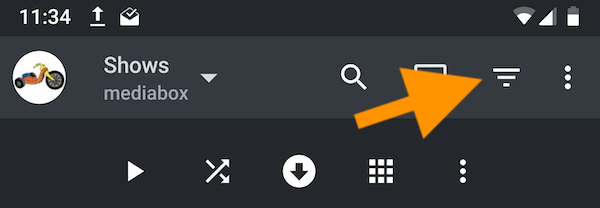
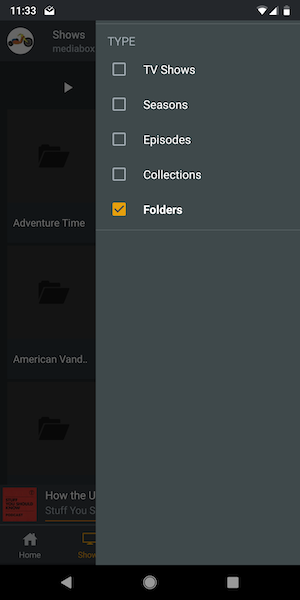
its not under the grid/list menu as one would probably expect it to be, its under the top right the upside down triangle with 3 lines, under type
1 Like
@dan-the-man- said:
@Able208 said:
Extremely dissapointed with the Android version of Plex. For me the folder view was the reason I used this application with my NAS media server. Please add folder view as this is still in the iOS version.are you sure your checking the right place for it
its not under the grid/list menu as one would probably expect it to be, its under the top right the upside down triangle with 3 lines, under type
Thanks for this information! The view by folder option is not there when looking at my QNAP NAS media server (only album, artist, tracks). Interestingly however when I point Plex to my media libraries on my computer the “Folder” option is there as you have describled it. This setting is only missing on the Android app, The Plex app on an iphone can view by folder across both media locations.
@drzoidberg33 said:
What library type (e.g. music, movies, etc) is missing the folder view option?I can’t seem to reproduce the issue on my end, all my libraries have this option.
Any further information on this? As above the folder view option is still missing on Android when a library is opended from NAS
This crap really pisses me off. The fact that they removed view by folder option all together makes me want to dump Plex and look for another solution. The writing is already on the wall and Plex wants to shift towards being the software version of the Roku by incorporating live and internet streams. Paid content in other words.
This service sucks now.
2 Likes
Why is the option to view libraries by folders in Android app still missing?
Well, right you are. Thank you. Is it possible to go premium through the app?
Never mind. It is.
yes. on the home screen on the top right hit the three dots. and choose Activate. Or try to do anything Plex Pass feature like Sync and the activate screen will show.
then you will have two options
-
Subscribe to Plex Pass which will then give you the three subscription terms options. (FYI Lifetime is cheaper on our website)
-
Activate this only removes the 1 minute time limit on playback and is not a Plex Pass
1 Like
Browse by folder is missing in android today. Please add it back!
It’s in the same place it has been for quite some time, in the filter/sort menu as in the screen shots above
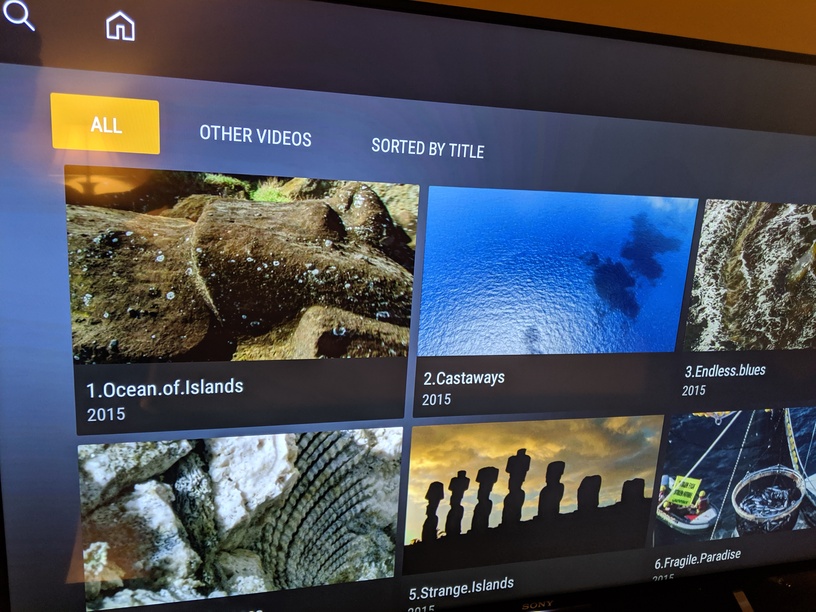
I don’t have that button to let me view by folder. See attached screenshot. This is a Sony TV with android system.
On Android TV the option to display your content by folder is one level up.
Directly when you select a library, Plex will display the “Discovery” view with lists such as newly added or released content. Above the discovery content you can pick from either browsing the entire library (referring to the poster wall) or in By Folder mode.
Once you’re within the browsing view (poster wall as shown in your picture) there’s no button to switch to folder view – instead you’ll have to return 1 step and select By Folder.
1 Like
