When I get media details from a url-based API call, it is not showing any metadata that I have manually added.
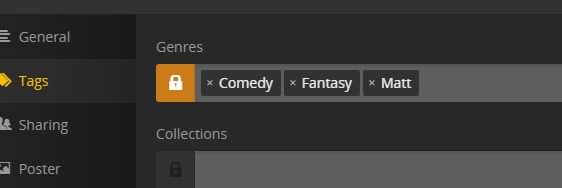
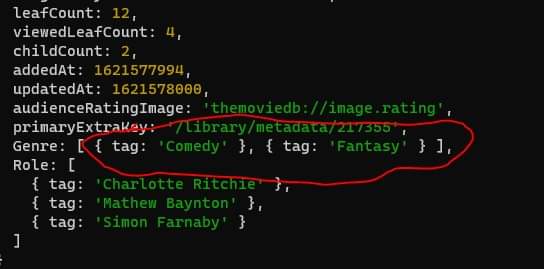
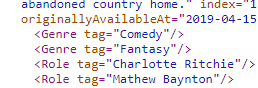
In this case, I added a genre tag to a title, via the UI. I can filter by this in the UI fine. But when I get that data from the API call, it only shows the original genre data.
I’m using the new plex movie and tv show agents. Weird thing is that I’m seeing the data now, a few hours later. I’ll close this and investigate further. thanks for the response.
@Volts Okay, i’ve found the issue. When i use the /library/metadata/{ratingKey} url, then it works. BUT, if i use the serverIP:32400/library/sections/2/all?X-Plex-Token=??? URL to list everything, then the corresponding item does not have the updated genre.
Will check it out and advise. But it’s very strange to see it in one set of data immediately, but not another. Have tried refreshing metadata and rescanning, but no change. Advise later when I get a chance to restart
Only the first two genre tags are stored inline in the metadata_items table and update immediately. And only the first two are returned when querying /library/sections/{librarySectionID}/all
Other tags are stored in the tags table, and are returned when querying individual items.
In your example above you’ve added a third tag, so you need to query the specific item directly.
oh hang on … so you dont see added genre metadata beyond two items? Damn… that just feels cludgy from a data perspective… unfortunately, it’s not feasible for me to individually query every item in a list. Would just slow it down too much when i am talking a full list of all titles.
I bet it’s a performance optimization. The database design is slightly de-normalized for performance, while keeping the flexibility to use as many genres as desired.
Are the top two genres enough for your app in the overview?
Pull it from the DB directly! (heh)
Or - more seriously - schedule it async and cache the results.
trouble is that genres are seemingly populated in any order, with no preference. plus, some of my users want to add their own genres. (like ‘monster’ for monster movies)
Im not keen on the idea of connecting to a db directly, when there is an existing API. Too easy to cause performance issues, plus DB schema changes would be a nightmare. I already do async calls and cache results, but the data is quite dynamic. This, coupled with response time considerations means that pre-caching everything is not really an option. (have you seen the size of some peoples libraries?)
anyhow… we have an answer, if not a solution. Thanks for your help in figuring this out. Give Posterr a try if you get a chance.
Long and the short of it is that “filter by genre” may not stay in my app.