I searched high and low for keywords like “repeat” and auto restart… came up with nothing of interest (or they were really old) - guess I need to work on my search game 
Thank you for the update. I appreciate you staying on top of this so us users can experience playback as before. I know how these things can go. My company developed two very successful software platforms for radio stations and record labels over 15-20 years, the 2nd of which took nearly 3 years of development so I know first hand how these things can happen and how tricky it can be to identify and resolve.
So thanks again. I’m sure you will but please update me as soon as it’s released to the public.
I have a new wrinkle that I discovered last night quite by accident.
As I reported, with a TV series, when it finishes it shows the Just Played and the Up Next and it won’t continue playing unlike a movie which just repeats the same one over and over until the battery dies or I wake up before.
Last night I fell asleep to a TV series as I’ve been doing while waiting for the movie repeat issue to be resolved. I happened to wake up and looked at my iPad screen and saw the Just Played and Up Next showing. For some reason I decided to hit Play on the episode that had already played (Just Played) and when I woke up this morning, episodes were still playing and Plex had played probably 4-5 more episodes instead of stopping.
So that seems to be an additional bug that should be investigated. I realize it’s unlikely someone might repeat the episode as I did last night but someone might want to watch again to see how it came out or whatever. I just thought I’d let you know.
You mentioned early last week that the dev thinks they fixed the issue and it was in QA testing. Do you happen to have an update on that?
Thanks.
There was a fix in in todays release a few hours ago in version 2025.18
- [iOS][tvOS] Resolved an issue where playback would unexpectedly restart, either at random or following a network disruption.
Is that did not fix it please let me know. may be a different reason causing same symptom
Thanks for the info and details about the tv episodes issue I will make report to investigate
Thanks for the quick reply. So the release a few hours ago fixes a movie restarting after finishing as reported? Meaning that Just Played shows after it ends but a second or two later it restarts the same movie. That’s the issue you’re referring to I assume? I just want to make sure before I do the update.
Unrelated, is there any other key item(s) the release addressed?
Thanks so much!
All the fixed things are listed in the link I posted ( the orange text of version number). There were a lot of fixes in this one.
Oh, I didn’t think to check that. Wow, you’re right, that’s a lot of fixes. I’ll check it out and report back. Thanks so much!
I waited to update Plex until today when I updated it with the most recent version available a few days ago. I was hoping to give Plex devs time to make sure this was done.
A quick update to let you know that I tested whether the movie repeats after it finishes playing. Sadly, after the movie ended and the credits rolled and ended, it started over.
So whatever was done to fix this has not resolved this problem. This really needs to be a priority to get fixed. I’m trying to remain patient but this is a very frustrating problem that happened about a month ago or so.
I also need to update you that a TV episode is going into the next one and is not stopping after the originally selected episode plays. While the movie was repeating as reported, the TV episode was behaving as expected. However, with this latest Plex update, it keep going. I started on episode 5 and woke up and it was in the middle of episode 9. That’s new behavior with the update.
I just returned from breakfast and thought to check if auto play was enabled and it was. So I disabled the auto play. But you said that wouldn’t affect the repeating of movies and TV episodes.
I tested further. I played an episode from a TV series after disabling auto play (which enabled itself after the Plex update we did) and it didn’t play the next episode. It just showed Just Played. But it also didn’t show the Up Next for the next episode if I decided to play it. It used to.
I then played a animation movie of 25 minutes and it did not repeat itself. I then tested a movie that’s 65 minutes and it repeated.
I then went to my desktop and played on Plex (launched from my Synology NAS) and it didn’t repeat.
It seems like it’s an issue with my iPad or iOS in some way perhaps? It it has not been resolved in the latest Plex update.
Please let me know your thoughts.
Thanks you.
I’m on version PlexMediaServer-1.41.8.9834-071366d65-x86_64_DSM72.
The performance of TV series has been inconsistent. Some testing showed it didn’t repeat, but others did. But I only tested a few episodes.
Movie testing repeating still. You indicated 11 days ago that all things fixed were listed in the posting but I didn’t see anything that indicated fixing repeating movie or TV episodes. Perhaps you can point that out?
I’d appreciate a reply so I can get back to enjoy the simple pleasure of watching a movie and not having it repeat over and over in the night. This didn’t happen for several years so it should be fairly simple to address I should think.
Please let me and other users know that it is indeed working.
Thanks.
We are still looking into it. It happened to me the other day as well on Apple TV. For me it only seemed to happen if i had restarted something I have previsously watched some of. But this also does not always happen so it is just really weird. If we need more logs from you I will ask
I’ll be happy to provide the logs. Just let me know if you need them.
The repeat for me is on my iPad (and maybe iPhone but I don’t watch my Plex movies on my iPhone generally). When I playback a movie on my Apple TV, I never wait for all the credits after the movie, I’ll just go pick something else to watch. The repeat annoyance is on my iPad which I use when I’m in bed and going to sleep. I just thought I should make sure I confirm my use conditions.
The last couple of nights I used a TV episode as I was drifting off to sleep. It didn’t repeat either time as I woke up and that episode was showing as Just Played and the Up Next episode. I’ve not tried a movie again at bedtime as I don’t want it running all night and wake up to a dead battery.
In a way, it’s good to hear you had similar experience as I and others have had. Hopefully it will get resolved quickly. As you know I’m sure, this only starting happening in the past 6 weeks or maybe a little more. I never ever had the repeating movie prior to that. Hopefully the devs can isolate what changed the performance/behavior and fix it.
I really appreciate your reply. I’m sure you’re busy so thanks for the update. I’m anxiously standing by. 
Hello,
I am following up in the hopes that you have some good news on this issue. The playback of TV episodes at night as I drift off are not repeating and when I wake up and tap the iPad screen, it shows Just Played and Up Next. The Just Played represents the episode I started as I was drifting off to sleep so that seems to be working okay.
Unfortunately, as you know, the same movie keeps repeating and will play and play until the battery wears out or if I wake up and it’s playing. It’s been going on for at least two months now and it is really interrupting my usual nightly routine I’ve enjoyed for years with Plex.
Please note that this only occurs with my iPad. When I watch a movie on my Apple, Roku or Shield devices, I always pick another movie before the credits fully play out and the movie ends. My specific use at night in bed is with my iPad.
I’m on a 9th Gen iPad with iOS 17.6.1 My Plex app platform is 17.6.1, Client version 2024.18.0 (1109).
I know I’m reiterating the key points but I know you’re really busy so I thought it might be helpful.
I am really hoping you have good news for me.
Thank you.
You said: We are still looking into it. It happened to me the other day as well on Apple TV. For me it only seemed to happen if i had restarted something I have previsously watched some of.
My use is only with my iPad. Per previous input, using my Apple TV, Roku or Shield is different in that, when a movie ends (but credits start rolling), I always back out to choose something else.
Aside from a movie repeating itself again and again through the night, at some point with a new update within the past 2-3 months or so, here are some elements that, perhaps, could help solve the mystery?
I noticed the new layout while a video is playing, the X - to close that - is located in the top right hand side. Prior to that it was on the top left hand side. I actually prefer it like you have it now because, when I’m laying in bed and watching something and want to change to something else, I always try to avoid seeing the Time. In the past I always had to be careful not to see it while closing the X on the upper left. I know it’s crazy, but I’m one of those who doesn’t want to know the time at night.
I also noticed the behavior of the screen when a video is playing is different. I used to be able to just tap the iPod screen and the video would fill the screen. This is for those videos that don’t fill the screen. I really miss that capability. Now I have to go into setting choices for Quality, Subtitles, Audio and Playback options - which then takes me to the Display Mode - which is where I have to change form whatever setting isn’t filling the screen to Letterbox, Original, Stretch or Zoom. That’s a lot more to do instead of a quick tap of the screen. This is the same for TV episode or a movie.
What’s really perplexing is why a TV episode doesn’t repeat but a movie does. It must be in the settings in Plex for each (Manage Library/Edit/Advanced). TV settings are different than for a movie. I have looked over them after putting the captures of the settings into a Word document to compare but there’s nothing I can point to that could be the culprit. The only thing I see that’s different (that’s common between the two) is that, in movies I checked both Use local assets & prefer local metadata. In the TV settings, I only have Use local assets checked. Could it be something as simple as unchecking prefer local metadata? I like using my own posters so I think undoing that could affect that. Otherwise, it seems to be something with the new layout? Or it must be something simple. I’m hopeful that this information might help.
I know everyone is super busy but I’d really, really appreciate it if your team can get this resolved. As I said, I played a movie most every night for several years and it stopped (Just Played) without repeating. It seems to be this new layout, and/or some other tweak in an update that is causing this frustrating behavior.
Thank you for your time.
Still having these issues as of version 2025.19.0 on ipad, very annoying.
Hello again. It’s been just over 3 weeks since your last reply and I was hoping you had an update to report saying it has been fixed. Any news on this?
The TV episodes are NOT repeating. That’s good news, but… it’s not how I usually use Plex at night.
The movies continue to repeat as you know. It’s been several months now where I can’t use Plex as intended. That’s a real drag.
I hope you have good news for us.
Unfortunately they are still trying to figure this out. One of the QA folks just reproduced it but not sure how consistently they can. but hopefully their own logs help
That is disappointing but at least they just reproduced it.
The issue came up in early May or so. It seemed to be with the splitting of music and photos from movies where individual apps are now used. The new layout with the X in the upper right corner instead of the left is a way I know to reference it whereas prior to this, the X was in the upper left.
For some unknown, unthinkable reason, TV episodes aren’t repeating. When I start an episode as I drift off to sleep and wake in the morning, it shows Just Played and Up Next. You’ll notice the time of 7:42 on the capture below from when I captured it last week. The same behavior continues every night/morning. The iPad screen is off when I wake up. You can also see the 89% battery life indicating the one episode that played didn’t use up much battery.
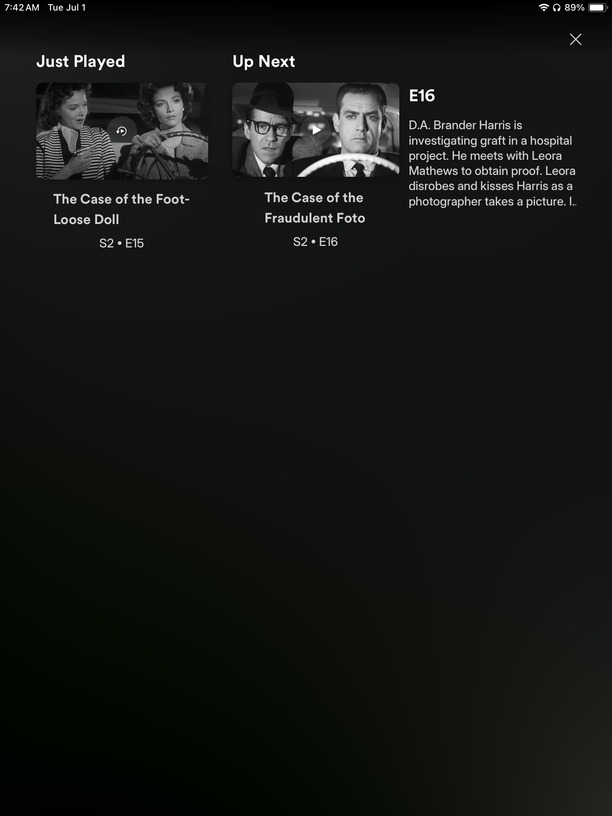
The only thing I can think of is that a series has multiple episodes so if I select Season 2, Episode 4 for example, there are multiple elements (episodes) as part of the series, whereas when I start a movie, I’m selecting only one movie. None are in queue. Perhaps that might help the QA folks.
A further observation: If you start a movie from the very start and let it play until it completely ends, it will repeat in a loop until I either stop it after waking up, or the battery died because of the constant repeating. In testing during the day a couple of times, it seems that if I pick up at a point in a movie where I paused it from viewing earlier, it might not repeat? But not enough testing on my end has confirmed this with 100% certainty.
Also with the earlier version before May or so, I could tap the screen on my iPad and it would bring a movie to fill the screen fully. Tap it again and it goes back to the original version. That does not work now. I have to go into Settings and choose from the display options there. I NEVER had to do that with the previous version, meaning I never went into any display settings.
I hope these observations can help get this bugger fixed. If there’s anything I can provide from my iPad, please let me know.
Thank you so much for the reply. I’d appreciate the update as they figure this out. I know everyone is busy so I’ve tried to not bother you with this.
I’m anxiously standing by.
I’d like to add something that might help reproducibility:
When I watch TV Shows (iPad), I usually long press on the item in Continue Watching and press watch/resume from that popup. When I do that episodes repeat. But when I do a normal press so it opens the episode page and if I press watch/resume from there it seems not to repeat.
What about if you play the TV episode from the start?
For me, after the episode ends, the Just Played and Up Next show. I don’t usually do continue watching as you describe, but anything that can help them is certainly appreciated I’m sure.
A movie still repeats all night after starting from the beginning as I’ve reported.
I’m certain they’ll get this resolved.
I have a couple of observations to add. If I try to use the settings / Playback options / display mode and select “Original”, the audio plays but there is no video showing. And if I have subtitles, those show, but again, no video, only audio. That is new behavior just in the past week maybe (as I was able to switch between these choices not too very long ago). If I choose any of the other three choices, the video shows and audio plays.
Also, if I am in TV episodes and want to go to a series that starts with the letter S for example, I used to be able to tap the letter on the right side and it would take me right to the S’s, but that does not respond. If I try that in one of the movie folders on my iPad (try to go to movies starting in R for example), it also doesn’t respond not matter what I do seemingly. This also is new behavior lately.
The movie I select still repeats over and over. I did notice that when I brought up a movie that was about 30 minutes in (from a previous watch, but not completed), and it finishes playback, it goes back to the 30 minute mark, not back to the start of the movie. Some weird behavior going on obviously. 
As far as movies repeating, could any of this have to do with the number of movies in my various folders? I wouldn’t think so but I’m trying to think of anything that might help your QA figure this out. The player is not performing as it once did for several years as I’ve mentioned before.
Anyway, I just thought I’d offer these further observations.
I really hope this can finally get solved. Thanks!
