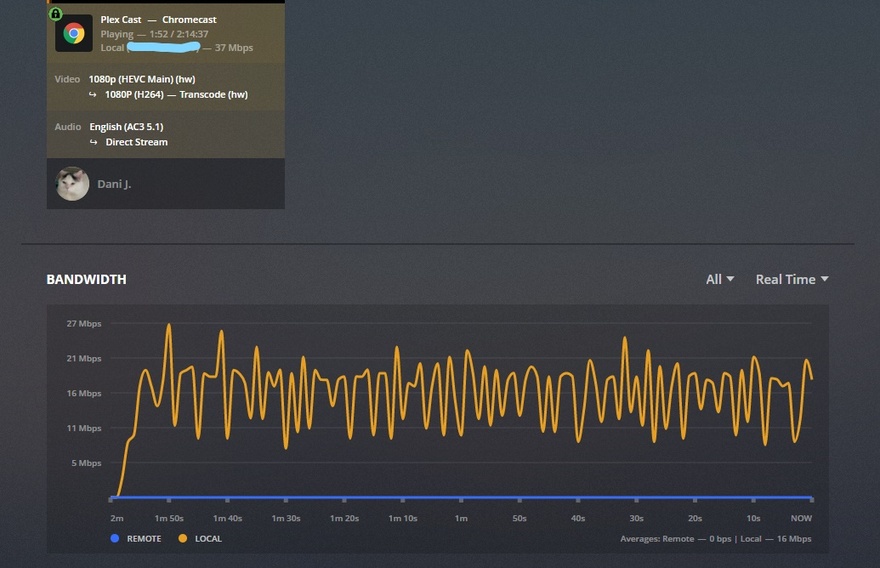
Plex Version: 1.15.8.1163
Plex running on: Synology DS218+
Hey. So lately my plex bandwith is really high. About a week ago I switched to a provider with better Internet (mostly for plex) from “25mbps down / 10mbps up” to “500mbps down / 40 - 50mbps up”. Maybe my bandwith was always this high and I just wasn’t paying attention?
Another thing is that yesterday I reset my plex media server, installed it again, (deep) scanned all the librarys and set the settings like i had them before. Before I reset it there was a video that direct played 5mbps on my phone. When I tested that video again after I reseted my server it said it needed 19mbps, where it previously said 5mbps. Maybe I did something wrong there but I thought I’d mention it just to be sure.
I know that the bandwith gets 4x or 5x times higher than what the quality says but still.
There was also this video I wanted to test out before I put it on my plex server (that was along time ago, so also before I switched providers). I remember selecting the original quality for a 9,1mbps x265 movie, and then playing it, without any buffering or problems, on my chromecast gen 3 (which doesn’t support x265, so it got transcoded). When I want to play it now, the movie goes as high as 40 - 50 mbps which my previous provider wasn’t even able to handle. Note that I’m watching all the way on the top floor, so the wifi is way lower than 500mbps. Usually I have something around 35 / 80mbps, depends on the time of the day.
Like I said I know about the bursts and maybe I’m just thinking too hard about this all, but it just seems weird to me. So yeah I’ll just leave the logs here and maybe someone can find something? If not then thx in advance anyways and I’ll try to let the whole thing go.
Plex Media (77.2 KB)
plex-log-Dani J..zip (137.6 KB)