Plex Buffering / Green Artefacts with 4K HEVC Movie

Server Version#: Version 1.25.1.5286
Player Version#: Google Chromecast Ultra / Google Chromecast TV. Latest version as of 01 Dec 2021

plex logs.txt (561.4 KB)

I was trying to watch this on my FullHD TV:

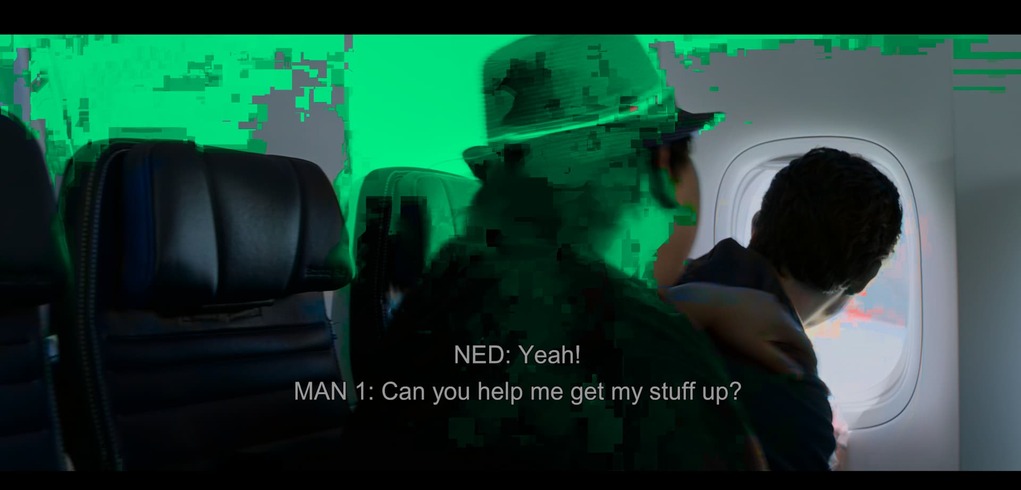
The video was buffering every 5 minutes.

If I play the same on my Win10 computer with 4K monitor, using the Plex Player there is no buffering, but colours are all over the place.

Everything is fine if I play from Chrome on my Win 10 computer

HW Transcoding works fine, the LAN network is all wired 1Gbps.

The server just has PLex on it and plenty of resources.

Why the buffering? Why the colour aberration with artefacts?

Please note, I have attached the logs JUST for the buffering, I can attach the logs for the artefacts as well.

  1. What’s the CPU being used?
  2. What subtitle format or are they already embedded (burned into) ?
  3. Nvidia GPU in use ? Drivers version?

You’re getting a breakdown of video in the Nvidia. Don’t know if the GPU can’t keep up with the demands of tonemapping + trancoding or not but that’s what it looks like.

stalling could be anything at this point. No idea what the ChromeCast can keep up with. My ChromeCast is useless at this level.

EasyAudioEncoder/EasyAudioEncoder'
Dec 01, 2021 21:27:15.185 [0x7f15dd22bb38] DEBUG - [Transcode/JobRunner] Jobs: Starting child process with pid 1031320
Dec 01, 2021 21:27:15.185 [0x7f15dd22bb38] DEBUG - [Transcode] [Universal] Using local file path instead of URL: /STORAGE/PLEX/MEDIA/Video/Movies/Spider-Man Far From Home (2019)/Spider-Man Far From Home (2019) Bluray-1080p.mkv
Dec 01, 2021 21:27:15.185 [0x7f15dd22bb38] DEBUG - [Transcode] TPU: hardware transcoding: final decoder: nvdec, final encoder: nvenc
Dec 01, 2021 21:27:15.185 [0x7f15dd22bb38] DEBUG - [Transcode/JobRunner] Job running: EAE_ROOT='/tmp/pms-19f2ed0b-1965-4c63-b00a-dfe334848433/EasyAudioEncoder' FFMPEG_EXTERNAL_LIBS='/mnt/SSD/PLEX/metadata/Library/Application\ Support/Plex\ Media\ Server/Codecs/fb9eae3-4185-linux-x86_64/' X_PLEX_TOKEN='xxxxxxxxxxxxxxxxxxxx' '/usr/lib/plexmediaserver/Plex Transcoder' '-codec:0' 'hevc' '-hwaccel:0' 'nvdec' '-hwaccel_fallback_threshold:0' '10' '-threads:0' '1' '-hwaccel_output_format:0' 'cuda' '-hwaccel_device:0' 'cuda' '-codec:1' 'eac3_eae' '-eae_prefix:1' '78tavwcqkqsv04jrho4ddve1_' '-analyzeduration' '20000000' '-probesize' '20000000' '-i' '/STORAGE/PLEX/MEDIA/Video/Movies/Spider-Man Far From Home (2019)/Spider-Man Far From Home (2019) Bluray-1080p.mkv' '-filter_complex' '[0:0]hwupload[0];[0]scale_cuda=w=1920:h=804:format=p010[1];[1]tonemap_cuda=mobius:nv12[2]' '-map' '[2]' '-metadata:s:0' 'language=eng' '-codec:0' 'h264_nvenc' '-b:0' '681k' '-maxrate:0' '909k' '-bufsize:0' '1818k' '-preset:0' 'hq' '-forced-idr:0' '1' '-r:0' '23.975999999999999' '-filter_complex' '[0:1] aresample=async=1:ocl='\''stereo'\'':rematrix_maxval=0.000000dB:osr=48000[3]' '-map' '[3]' '-metadata:s:1' 'language=eng' '-codec:1' 'aac' '-b:1' '256k' '-f' 'segment' '-segment_format' 'matroska' '-segment_format_options' 'live=1' '-segment_time' '1' '-segment_header_filename' 'header' '-segment_start_number' '0' '-segment_list' 'http://127.0.0.1:32400/video/:/transcode/session/78tavwcqkqsv04jrho4ddve1/2677056d-9c8e-4a53-b1dd-4dd6c9e9c2ac/manifest?X-Plex-Http-Pipeline=infinite' '-segment_list_type' 'csv' '-segment_list_unfinished' '1' '-segment_list_size' '5' '-segment_list_separate_stream_times' '1' '-avoid_negative_ts' 'disabled' '-map_metadata' '-1' '-map_chapters' '-1' 'chunk-%05d' '-map' '0:2' '-metadata:s:0' 'language=eng' '-codec:0' 'ass' '-f' 'segment' '-segment_format' 'ass' '-segment_time' '1' '-segment_header_filename' 'sub-header' '-segment_start_number' '0' '-segment_list' 'http://127.0.0.1:32400/video/:/transcode/session/78tavwcqkqsv04jrho4ddve1/2677056d-9c8e-4a53-b1dd-4dd6c9e9c2ac/manifest?stream=subtitles&X-Plex-Http-Pipeline=infinite' '-segment_list_type' 'csv' '-segment_list_size' '5' '-segment_list_separate_stream_times' '1' '-segment_format_options' 'ignore_readorder=1' '-segment_list_unfinished' '1' '-fflags' '+flush_packets' 'sub-chunk-%05d' '-start_at_zero' '-copyts' '-init_hw_device' 'cuda=cuda:' '-filter_hw_device' 'cuda' '-y' '-nostats' '-loglevel' 'quiet' '-loglevel_plex' 'error' '-progressurl' 'http://127.0.0.1:32400/video/:/transcode/session/78tavwcqkqsv04jrho4ddve1/2677056d-9c8e-4a53-b1dd-4dd6c9e9c2ac/progress'
Dec 01, 2021 21:27:15.185 [0x7f15dd22bb38] DEBUG - [Transcode/JobRunner] Jobs: Starting child process with pid 1031321
Dec 01, 2021 21:27:15.187 [0x7f15dd3d1b38] DEBUG - Request: [127.0.0.1:52526 (Loopback)] PUT /video/:/transcode/session/78tavwcqkqsv04jrho4ddve1/2677056d-9c8e-4a53-b1dd-4dd6c9e9c2ac/progress?status=startup (16 live) Signed-in Token (theluke79) (range: bytes=0-) 
1 Like

Thank you @ChuckPa .

The server is pretty old:

  • Intel(R) Core™ i7-4790K CPU @ 4.00GHz
  • 32 GB Ram
  • Dedicated SSD for the library
  • GeForce 1050Ti Driver Version: 470.86 CUDA Version: 11.4
  • Subtitles came with the file, I used “English PGS”

I started to have issues the moment HEVC files became more widely available; looking at the Nvidia GPU comparison table, am I right in saying that AT MINIMUM I should get one of these?

If I upgrade the GPU, would this solve my problems?
The stalling takes place on both my Chromecast devices, but there does not seem to be any stalling when playing from web on my MacBook pro, 4K

What info can I provide you with to solve the problem?

It seems weird that the GPU suddenly becomes such a big bottleneck, I only have a single stream, also, upgrading the GPU from the one I have, means spending immediately a LOT of money.

I would love to dig more into this and find out if this is again about a configuration issue (like the last problem I had and was solved by you).

Does the CPU play a role here? Upgrading that would be cheaper for me than the GPU.

We use a GTX 1050 Ti in our QNAP machine.

[~] # gpuhal_app -l
f:NVIDIA Corporation:GP107 [GeForce GTX 1050 Ti]:external:7

Yes, that’s as low as you can possibly go.

I would urge you to curate your media and avoid image-based subtitles whenever possible. (PGS, VOBSUB, DVDRIP). They are VERY expensive to process.

ChromeCast stalling is, IMHO, a direct reflection on the WiFi speed.

You can’t give it 2.4 Ghz and expect it to work properly at these datarates.

The ChromeCast Ultra really needs 5 Ghz 802.11ac support from the WiFi AP.
The regular ChromeCast (2.4 Ghz) is probably ok up to 20 Mbps (1x2 wifi)

As for GPU bottleneck – before pointing at it, I would use the Nvidia cli app and see what the actual load on it is.

I think you’ll find it’s networking or CPU and not the GPU itself.

They do not pay you enough man!

Ok, thank you very much, let’s address your points:

  1. I will ensure to get SRT subtitles and I will also test it that way
  2. Chromecast Ultra is wired 1 gb, Airflow reports a steady 90mb/s speed
  3. Chromecast TV is connected to a 5Ghz Network, with a steady 60 Mb/s speed
  4. If I force transcoding to 1080p 12 Mb/s on the Chromecast TV, this is the output from nvidia-smi

I changed the subs to SRT: same artefacts with green colors when playing from Win10 client, 4k.

I do not think networking is an issue here, I think too it is a CPU problem

Download some test videos (known good) https://jell.yfish.us

They have known good H264 and H265 test files.

Download the files (get a variety including the higher bitrates)
Create an “other videos” type library section.

Let PMS add that section.

Now start running through the suite of them until you get to a failure.

Let me know where it fails.

1 Like

Ok I got these two.
image

I am going to run these tests:

  1. Win 10, player, 4k monitor, 1 gbit wired
  2. Win 10 Chrome 4k monitor, 1 gbit wired
  3. Crappy Plex player from my Viewsonic projector (wireless)
  4. Chromecast Ultra (wired)
  5. Chromecast TV (wifi 5g)

Results:

  1. 400Mbps file: Stuttering, loads of artefacts unless I force conversion to 1080 20mbps. 250 Mbps file: stuttering, unless I force conversion to 20 Mbps, but even then, I do not see the Plex process in nvidia-smi
  2. 400Mbps file: Stuttering unless I force conversion to 1080 20mbps. 250 Mbps file: 60 sec waiting, then crashes and goes back to the PLex page.
  3. Perfect both files
  4. TBD
  5. Perfect both files

400 and 250 are pretty unreasonable for what you’ll get from a BluRay rip but the results seem pretty conclusive

Now try 150, 125, 100, 80, and 60. Those are much more common.

Where I’m going with this is profiling the capabilities .

  1. Determine if the failure falls into the “reasonable expectation of performance” bracket.

  2. What to target as you curate your media to ensure best results.

  3. If the test files played perfectly on everything except windows – that’s conclusive that Windows can’t keep up nor would I expect it to in Chrome.

  4. As for the Plex player – need to talk to engineering about reasonable expectation range

1 Like

I will work on it this w-e with more testing

Dear @ChuckPa

I have been running more tests, using more files, and a movie; below are the results:

  1. Win10, 32GB, dedicated GPU, Plex Player, 4K Monitor, 1gbit Wired :

    • 400 Mbps file: Stuttering, loads of artefacts unless I force conversion to 1080 20mbps.
    • 250 Mbps file: stuttering, unless I force conversion to 20 Mbps, but even then, I do not see the Plex process in nvidia-smi
  2. Win10, 32GB, dedicated GPU, Chrome, 4K Monitor, 1gbit Wired :

    • 400 Mbps file: Stuttering unless I force conversion to 1080 20mbps.
    • 250 Mbps file: 60 sec waiting, then crashes and goes back to the PLex page.
  3. Crappy Plex player from my Viewsonic M2 projector (wireless):

    • 400 Mbps file: no problem
    • 250 Mbps file: no problem
    • Movie: TBD
  4. Chromecast Ultra (wired)

    • 400 Mbps file: no problem, nvidia-smi does not show any transcoding, unless I force it.
    • 250 Mbps file: no problem, nvidia-smi does not show any transcoding, unless I force it.
    • 60 Mbps had hevc 10bit: no problem
    • 60 Mbps had hevc: no problem
    • 180 4k uhd h264: no problem
    • Movie: LOTS OF STUTTERING AND BUFFERING, after about 15 min. nvidia-smi does not show any transcoding, unless I force it.
  1. Chromecast TV (wifi 5g) : Perfe

    • 400 Mbps file: no problem
    • 250 Mbps file: no problem
    • Movie: no problem
  2. _Plex Player included with Full HD Samsung TV (from 2015), wired:

    • 400 Mbps file: .
    • 250 Mbps file: .
    • Movie: no problem

Movie Specs:
please note that I was using .srt subtitles, not PGS.

I think the results are conclusive now.

  1. Having a 200 Mbps limit is not an unreasonable limitation. There are very few cases where the video is changing at that SUSTAINED rate

  2. It is very normal to see traffic flow spikes up to 150 Mbps, sending 180-200 Mbps TCP/IP traffic load, over WiFI. (I see that here on ALL my WiFi devices)

  3. It is my experience that movies run stable in the 80 Mbps range for a top-notch rip from your own physical media. MANY will actually be in the 40-50 range (with HEVC HDR) due to the benefits of native HEVC HDR mastering.

Let’s break down the CPU and what’s going on.

  1. CPU - i7-4970K. I will based this on 8000 passmarks, 4 core/8 thread:
  1. That’s more than enough to burn the subtitles for 2, maybe 3 streams DEPENDING ON bitrate of the video (higher bitrate = more bits to burn the image on == exponential CPU load increase )

  2. I keep going back to this image

https://global.discourse-cdn.com/plex/optimized/4X/e/6/5/e65edc4c28cc382fa2c4804206edb59cfa960c25_2_690x330.jpeg

What I can replicate here, on any version of PMS, didn’t have color breakdown.

I did bury the i7-8809G though. Audio + transcoding + Subtitle burning + Tone Mapping was too much for it.

Turn off the PGS subtitles and no problems.

Throughout the stuttering – there was no color breakdown.

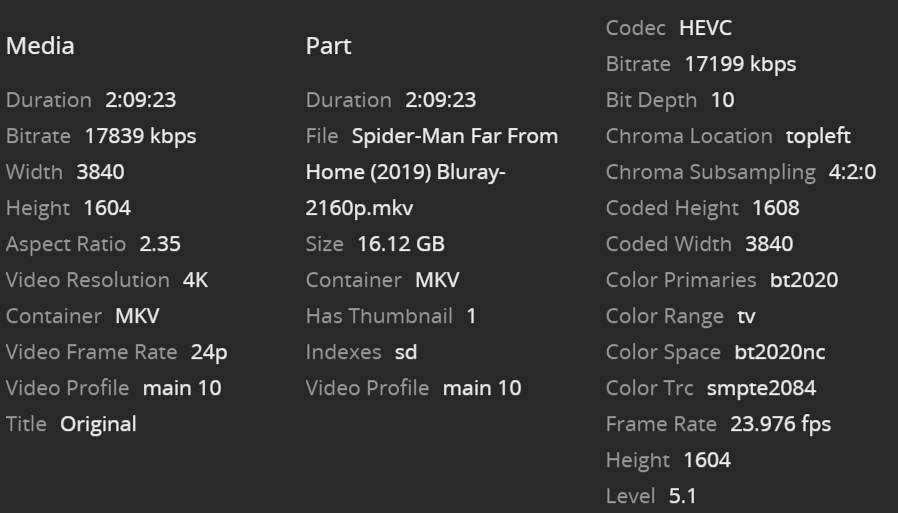
I will point out here. 17 Mbps for HEVC HDR at 2160p of THAT movie ?

Somebody ‘cooked’ it down to under 1/3 of what it should be. Please observe.

General
Unique ID                                : 223401887890052546224593509361182744120 (0xA811A37824FC7B035AC40316E0EA9E38)
Complete name                            : /vie/mmg/Spider-Man: Far from Home (2019).mkv
Format                                   : Matroska
Format version                           : Version 4
File size                                : 53.9 GiB
Duration                                 : 2 h 9 min
Overall bit rate mode                    : Variable
Overall bit rate                         : 59.6 Mb/s
Movie name                               : Spider-Man: Far from Home (2019)
Encoded date                             : UTC 2021-12-16 19:16:16
Writing application                      : mkvmerge v63.0.0 ('Everything') 64-bit
Writing library                          : libebml v1.4.2 + libmatroska v1.6.4
IMDB                                     : tt6320628
TMDB                                     : movie/429617

Video
ID                                       : 1
Format                                   : HEVC
Format/Info                              : High Efficiency Video Coding
Format profile                           : Main 10@L5.1@High
HDR format                               : SMPTE ST 2086, HDR10 compatible
Codec ID                                 : V_MPEGH/ISO/HEVC
Duration                                 : 2 h 9 min
Width                                    : 3 840 pixels
Height                                   : 2 160 pixels
Display aspect ratio                     : 16:9
Frame rate mode                          : Constant
Frame rate                               : 23.976 (24000/1001) FPS
Color space                              : YUV
Chroma subsampling                       : 4:2:0 (Type 2)
Bit depth                                : 10 bits
Default                                  : Yes
Forced                                   : No
Color range                              : Limited
Color primaries                          : BT.2020
Transfer characteristics                 : PQ
Matrix coefficients                      : BT.2020 non-constant
Mastering display color primaries        : Display P3
Mastering display luminance              : min: 0.0001 cd/m2, max: 1000 cd/m2
Maximum Content Light Level              : 9978 cd/m2
Maximum Frame-Average Light Level        : 614 cd/m2

I challenge the encoding but have insufficient evidence to conclude.

In my head, I’m going through all the subsystems in the i7 cpu and where this could fail.

The only place it would jam up (stutter) is tone mapping + burning subtitles (too much traffic for the internal PCIE to handle. iGPU does the tone map. CPU does the burning and managing of the tone mapping (OpenCL). QSV ASIC does the transcoding here where you have the Nvidia)

I can cut you a test file of what I have, subtitles included, for you to try if you’d like and see if you can replicate my results.
1 Like

This is super interesting!

Sure thing I am more than happy to work with you and provide you as much feedback as I can.

It is a great benefit for me since I would be able to optimize my configuration and the most out of it.

One thing to note: most of my players are wired 1 Gbit and the Server is wired 1 Gbit too.

I see that you never mention my GPU, the transcoder works, shall we test her too?

Please send over all you want me to test

@ChuckPa hey man, can you please share with me the test file?

@theluke79

Check PM

This topic was automatically closed 90 days after the last reply. New replies are no longer allowed.
