Plex buffering Issues suddenly

Was having this same issue. Have numerous remote users but only one that streams virtually every day. Reports of buffering started about 2-3 months ago. Tried many measures to fix the problem but none worked. User could dial quality down to sub-1Mbps and would still get buffering. User in question has been streaming from my server for over 4 years and never had issues. Nothing has changed on my side other than the version of Plex Server.

Found this thread a few days ago and set LAN networks to 0.0.0.0/0 and the problem went away. No more buffering issues now. Hopefully the Plex team figures out the problem and resolves soon as leaving stream quality decisions up to the users pretty much defeats the purpose of the controls being added in the first place.

Been having this issue for months with my local players. It seems something was changed in the coding or settings, not 100% sure but both my internal players were going to the external IP of my plex server.

I have two connections, one where the plex is connected to for downloading and one where my general network connects to. So my internal players were going out their internet and over to my plex internet connection. I added the local IP of my plex server in the client players and they stopped doing this ( the plex server is dual homed, sits on both networks, which of course windows doesnt like ).

The only reason i realized this was going on is because i tried to play a 4k movie and it was playing at 720p 4Mb. I looked at the setting in the player and the max setting available was 1080p 8mb, which i then remembered i had set the “limit remote stream bitrate” to that on the plex server remote settings. Locally i was allowing original(unlimited). Which got me thinking, was the plex server going out and back in again? I did a netstat -a > E:\test.txt ( dump the output to a file ), did a quick search and sure enough, it was going to the public IP. As soon as i added the manual entry, i got 4k.

I wonder if there is a way for the plex folks to make plex aware of both interfaces since plex registers with the online services and hands off that information to clients for connection to the plex server. If the server has a local ip that matches the local ip of the client and they can contact each other directly, then force that connection instead of the internet one. I could see how this could lead to issues since most folks use the 192.168 space though


Maybe it should be broadcasting locally but because windows wont let me have two gateways, it doesnt broadcast properly? ( well windows does, but i dont want my downloads accidentally going through my main internet.

I’m seeing this issue as well now. The issue showed up after updating to 1.13.9.5456.
This machine consistently has 6-7 active streams with no issue, and has done so for years. All remote streams over a fiber connection.
Can confirm this issue now surfaces after 2-3 concurrent streams, then all users are affected. When checking netflow info, bandwidth utilization is rather low. CPU sits around 5% and etc. It almost seems as if Plex is now treating the “Limit remote stream bitrate” as a global setting, not individual setting.
Did eventually add the default 0.0.0.0/0 to the list of “Local” networks. This seemed to stop the buffering issue for clients.
It’s not desired to keep it this way of course, so if anyone finds a root cause on this one, or a real fix, please feel free to let us know.
I don’t want to have to revert to an older version of PMS just to retain remote stream limitations.

1 Like

Adding my note here as a +1. Recently seeing a rash of clients that have never buffered ever (Server on a gigabit fiber connection) seeing buffering daily.

Added 0.0.0.0/0 default route as noted above = issue cleared right up.

I didn’t even have LAN clients limited at all. Why would Plex throttle or mess with that?

1 Like

I rolled back to version 1.13.8.5395 3 days ago.
Have had no issues with clients buffering since.
On version 1.13.9.5456, clients were seeing buffering issues daily.

On the newer version, Tautulli did display some odd information.
When a remote client was playing a video, it would show the video quality at 4.7 Mbps, however it would report the Streaming Brain estimate as WAN: 9.1 Mbps. Normally those numbers were consistently close. After rolling back to the previous versions, i’m seeing video quality and Streaming Brain estimates to be consistent.

I’ve been having this issue with remote clients for the past couple months, with it getting more noticeable in the last few weeks. I have Tautulli notifications enabled and tonight my phone was blowing up with buffer alerts. I have been sharing my Plex server for 5 years with no issues until recently. Migrated (app migration including DB) from a CentOS6 VM to CentOS7 about 8 months ago.

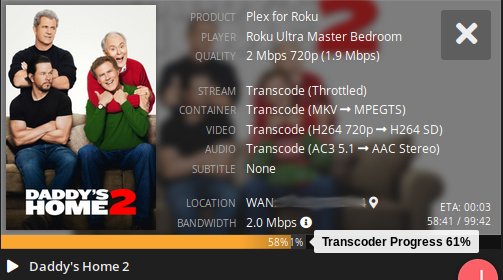
The clients that seem to be buffering I have noticed in Tautulli the transcode is only about 5% or less ahead of the stream. Some media on those same clients seems to transcode well ahead. I have also played around with the amount to transcode before throttle setting but it does’t have any effect.

Screenshot%20from%202018-11-21%2023-23-00

Symmetrical 1Gb fiber
CentOS 7 VM
Hyper-V, Dual Xeon CPU E5-2670, Adaptec RAID5 (8 drives)
16 cores
6GB memory
Sophos XG Firewall

Added 0.0.0.0/0 default route as noted above = issue cleared on my side.

I have no alert from tataulli since the change before having a tons of email.

Back to normal even with last version install yesterday on my pr4100 and my synology also.

I added PMS Version 1.13.9.5456 Settings -> Network -> LAN Networks 0.0.0.0/0 to turn off additional WAN processing and asked a remote non-technical friend to try again using her Comcast service. The user reported continuing problems, little or no change.

I talked to an IT person who said both Comcast and Frontier drop packets when their networks become fully loaded, and he is able to verify this using regular “ping” and “traceroute” tools. We discussed why Netflix would work and Plex wouldn’t. The only hypothesis we were able come up with is Netflix uses TCP communication for the data stream instead of UDP. TCP has the advantage of detecting lost packets in the sequence and requesting a re-transmit, as part of the transport layer and transparent to the application.

Is there a way to force Plex to use the TCP protocol for the buffered data stream instead of UDP (to eliminate data corruption “Buffer Error, Server too slow” type messages)?

Craig, it’s a common misconception that ping and traceroute “loss” equal packet loss on a circuit, even in IT people. ISPs rate-limit ICMP traffic to the control planes of their routers, so that the CPU doesn’t get overloaded. This CPU is NOT responsible for packet forwarding, but for management functions and monitoring like SNMP. There is a great presentation on this on NANOG, here:

Latency to the router versus through the router are very different things and handled by completely different pieces of hardware, even in the same piece of equipment.

The only truly accurate way for a consumer to test their path from client to server to do iperf with UDP. I’d recommend you setup an iperf server and have your client test it out bi-directionally. Using the default route in advanced settings has worked around the issue 100% of the time, so your user might have other issues they’re dealing with like a bad Wifi connection or a congested path between your ISP and theirs.

Source: I’m a network engineer with 11+ years experience working on global Fortune 100 networks.

I’m glad one of us knows what we’re talking about (that would be you). :slightly_smiling_face:

The question still remains, can PMS and the PMS (Roku) client be configured to use TCP instead of UDP for the media stream to rule out dropped packets? When I say dropped, I don’t care where; WiFi, Router, Comcast, Frontier
 all I care about is the loss detected and packet re-transmitted, which appears to be why Netflix is successful and Plex not successful using the same equipment at different times of the day at the problematic location. My cousin in Norway says the US based Frontier FIOS 30/30 based Plex server works great, at all hours! This is about the connection which doesn’t work (not my cousin’s).

Sorry for being verbose, but I think for this discussion this detail is important.

There is more information I didn’t explain earlier such as I setup a new Synology DS918+ Plex Version 1.13.9.5456 server with hardware transcoding in another home location on Comcast network (physically 40 miles away) with the same media collection. I also connected the Roku Ultra using CAT-6 cable to the router at the problematic 3rd location to rule out WiFi as a source of problems. In all cases the problem remains, Netflix works, Plex doesn’t at different times of the day. i.e. when you’d expect light internet traffic, Plex 1080p movies and 720p shows play. At peak times when you’d expect heavier Internet traffic, Netflix still works @ 1080p, Plex doesn’t even @ 720p. It doesn’t matter which server (Frontier/Comcast) I use for the test, both fail, Netflix does not fail at the 3rd location. I’ll be using the more powerful Frontier server with 30/30 FIOS connection for iperf testing.

I read the presentation, nice to see someone identified sources of delay and actually added numbers. They match roughly what I’ve calculated in the past for VoIP and TOR delay. BTW, I’m an Electrical Engineer who’s been solving his own home/lab network problems with ~70 IP devices (half are lab equipment) since 1996 (using tools like WireShark to follow and analyze packets when higher level tools fail). Not my day job, and I know a lot, but I’m never certain. And always ready to learn something new, in this case iperf.

I just tried iperf3 on my local gigabit wired network From a 4-core I7 SSD Win10 machine to a Linux Server 8-core 4GHz
 and received results 1/3 of the 110MBytes/second reality I normally see when copying large GB size files. Is this an iperf limitation? I tried different packet sizes, nothing seems to change this iperf limit, but when I copy a 12GB file (no iperf running) it runs over the same equipment at 1Gb or 110MB/Sec. I’m trying to understand this before I take a laptop 70 miles south and try the same experiment remotely on a problematic Comcast circuit, at slower speeds, whatever SpeedTest.net says should work. Speedtest.net reports 3mS 28.95 Mbps/28.64Mbps at the Frontier FIOS location from the Windows machine, through the server with QoS traffic shaping and other concurrent internet traffic. i.e. plenty of bandwidth and low latency for remote Roku Ultra Plex units.

S:\install\windows\iperf\iperf-3.1.3-win64>iperf3 -c pluto -u -4 -b 1G -l 48K --get-server-output
Connecting to host pluto, port 5201
[  4] local 192.168.90.89 port 51175 connected to 192.168.90.3 port 5201
[ ID] Interval           Transfer     Bandwidth       Total Datagrams
[  4]   0.00-1.00   sec  37.6 MBytes   315 Mbits/sec  803
[  4]   1.00-2.00   sec  41.3 MBytes   347 Mbits/sec  882
[  4]   2.00-3.00   sec  41.5 MBytes   348 Mbits/sec  885
[  4]   3.00-4.00   sec  41.5 MBytes   348 Mbits/sec  885
[  4]   4.00-5.00   sec  41.4 MBytes   348 Mbits/sec  884
[  4]   5.00-6.00   sec  41.4 MBytes   348 Mbits/sec  884
[  4]   6.00-7.00   sec  41.5 MBytes   348 Mbits/sec  885
[  4]   7.00-8.00   sec  41.5 MBytes   348 Mbits/sec  885
[  4]   8.00-9.00   sec  41.4 MBytes   348 Mbits/sec  884
[  4]   9.00-10.00  sec  41.5 MBytes   348 Mbits/sec  885
- - - - - - - - - - - - - - - - - - - - - - - - -
[ ID] Interval           Transfer     Bandwidth       Jitter    Lost/Total Datagrams
[  4]   0.00-10.00  sec   411 MBytes   345 Mbits/sec  0.090 ms  0/8762 (0%)
[  4] Sent 8762 datagrams

Server output:
-----------------------------------------------------------
Accepted connection from 192.168.90.89, port 55403
[  5] local 192.168.90.3 port 5201 connected to 192.168.90.89 port 51175
[ ID] Interval           Transfer     Bandwidth       Jitter    Lost/Total Datagrams
[  5]   0.00-1.00   sec  32.2 MBytes   271 Mbits/sec  0.104 ms  0/688 (0%)
[  5]   1.00-2.00   sec  41.3 MBytes   347 Mbits/sec  0.096 ms  0/882 (0%)
[  5]   2.00-3.00   sec  41.5 MBytes   348 Mbits/sec  0.128 ms  0/885 (0%)
[  5]   3.00-4.00   sec  41.5 MBytes   348 Mbits/sec  0.092 ms  0/885 (0%)
[  5]   4.00-5.00   sec  41.4 MBytes   348 Mbits/sec  0.105 ms  0/884 (0%)
[  5]   5.00-6.00   sec  41.5 MBytes   348 Mbits/sec  0.130 ms  0/885 (0%)
[  5]   6.00-7.00   sec  41.4 MBytes   348 Mbits/sec  0.115 ms  0/884 (0%)
[  5]   7.00-8.00   sec  41.5 MBytes   348 Mbits/sec  0.091 ms  0/885 (0%)
[  5]   8.00-9.00   sec  41.5 MBytes   348 Mbits/sec  0.091 ms  0/885 (0%)
[  5]   9.00-10.00  sec  41.4 MBytes   348 Mbits/sec  0.085 ms  0/884 (0%)


iperf Done.

Using iperf3 -R doesn’t change anything. iperf3 is only using 6%-10% of 1-CPU during iperf testing.

That’s some good testing you did there! Iperf can be used to test 10Gb+ networks if tuned correctly, so there is no inherent Iperf limitation. I have a feeling you’re seeing single threaded CPU limitations, but that would be odd if your proc is as fast as you say. You also might be hitting drivers issues with your NIC or hardware limitations of the NIC itself, but that too would be odd if you’re getting full gigabit transfers with SMB. Set the -b flag to 10Gb and add the “-P 10” flag. You can also try in the reverse direction with “-R”. You’ll quickly discover that Windows is not the ideal method for testing. My result on my own network (Windows client and Ubuntu server) was the following:

[SUM] 0.00-60.00 sec 47.3 GBytes 6.77 Gbits/sec 2.169 ms 5695960/6197544 (92%)

I run a 10Gb network on the backend, but it took 10 parallel threads to get it close. The reason the packet loss is so high is that the server’s CPU was at 100% during the test. Iperf3 is only single threaded so that was a single core that was maxed out.

Also, from my own testing and observation, Plex is already TCP based. I ran a couple of tests and saw TCP at around 6Mbps while watching a movie earlier. Chrome inspect has it using regular old HTTPS.

Also, if you’re running on Windows, there a whole host of tweaks you can do for TCP for high latency and lossy connections. I use this little app called TCP Optimizer:

https://www.speedguide.net/downloads.php

It helps tune the TCP send and receive buffers in Windows, since the defaults haven’t been changed in over 15 years. Windows is horribly unoptimized for higher latency connections (>5ms) and has tiny buffers. The reason it works on your home network so well is because of the low latency and something called TCP window scaling, which is difficult to negotiate over the Internet.

I’m not sure what hardware client your friend is using, but there could be an issue with the hardware decode on the unit. I had an issue with Roku units where they didn’t support a particular codec natively and it would cause stuttering like you’re describing. My guess was that it was punting the decode to the tiny little CPU in the box instead of the hardware accelerated chip. Eventually a software update fixed it, but IIRC, I had to have that Roku set to transcode EVERYTHING, which was painfully slow to start large movies. It actually might have been an Ultra, but it’s been a while now.

Good luck! These are a pain to track down.

Tried to match your test. I’m also running Ubuntu Server (pluto), Windows workstation setup (mars), Media plays on Roku Ultra 4660x2, PMS is running under Ubuntu.

iperf3 -c pluto -u -4 -b 10G -l 63K -P 10 -R -t 60

[SUM] 0.00-60.00 sec 2.46 GBytes 352 Mbits/sec 2.067 ms 1531/40866 (3.7%)

If Plex is already using TCP, then I’m stumped why Netflix works, Plex sometimes doesn’t. Maybe iperf testing will show something new.

I have FireQoS Plex outgoing config from https://support.plex.tv/articles/201543147-what-network-ports-do-i-need-to-allow-through-my-firewall/ as:

  match udp port 1900
  match tcp port 3005
  match udp port 5353
  match tcp port 8324
  match port 32400
  match udp port 32410
  match udp port 32412
  match udp port 32413
  match udp port 32414

So maybe I need to change port 32400 to tcp only? Don’t know why that would matter, but I’ll try it.

When I use Opera VPN, everything still works with port 32400 set to TCP only when I play a movie, so next week when I’m down South, I’ll give it another try with
PMS Version 1.13.9.5456 Settings -> Network -> LAN Networks 0.0.0.0/0

pluto:~# fireqos status world-out
FireQOS 2.0.3
(C) 2013-2014 Costa Tsaousis, GPL


world-out: eth0 output => eth0, type: , overhead: 
Rate: 30000Kbit/s, min: 300Kbit/s
Values in Kbit/s

 CLASS   voip intera   plex surfin synack    ssh defaul torren 
CLASSI   1:11   1:12   1:13   1:14   1:15   1:16 1:5000   1:18 
COMMIT   1000   6000  14400   1500    300   6000    300    300 
   MAX  30000  30000  30000  30000  30000  30000  30000  30000 

PRIORI      0      1      2      3      4      5      6      7 
 QDISC fq_cod fq_cod fq_cod fq_cod fq_cod fq_cod fq_cod fq_cod 

 color code (packets):  backlog  |  dropped  |  delayed  |  requeued 
 Class Utilization on world-out (eth0 output => eth0) - values in Kbit/s
 TOTAL   voip intera   plex surfin synack    ssh defaul torren 
    81      -      -     50     26      3      -      1      1 
   147      -      -    105     40      1      -      -      1 
   204      -      2     93    107      2      -      -      0 
   186      -      -    120     64      0      -      -      2 
    57      -      -     41     13      -      -      -      3 
   118      -      1     83     26      -      -      1      7 
  3264      4      -   3238     20      3      -      -      - 
  5410      -      -   5262    143      1      -      1      2 
  8910      -      0   8726    182      0      -      0      - 
  6712      -      -   6523    185      -      -      -      5 
  5426      -      -   5297    125      1      -      1      3 
  6355      -      -   6143    179      3     12      -     19 
  6491      4      -   6317    164      1      1      -      3 
  6672      -      -   6485    139      4      -      -     44 
  6614      -      -   6434    167      9      2      -      2 
  5893      -      -   5771    116      3      -      -      2 
  6266      -      -   6135    118      5      -      5      2 
    61      -      1      6     26      4      -      2     23 
  3623      -      -   3579     38      1      -      4      1 
  2654      -      -   2570     51      1      -      -     32

That FireQoS is an unknown to me. Can you exempt specific connecting hosts, like your iperf client? Why are you using it in the first place?

https://firehol.org/
FireQoS: Traffic Shaping/prioritizing
FireHOL: Firewall

I’ll open the iperf default 5201 port for iperf testing in FireHOL config.

FireQoS is a frontend to iptables used to prioritize network traffic for applications like Plex and VoIP over high volume disruptive traffic like Torrent, SFTP, etc. QoS (Quality of Service) prevents Plex Buffering and VoIP stutter due to random latency caused by heavy network traffic which might otherwise cause “starvation” and “buffering” for the Plex feed. I’m one of the hosts for https://www.startrekcontinues.com/ BluRay and DVD images. FireQoS is the first program I tried which actually works right. It’s also easy to start/stop for testing and behaves in a sane manner when a new config is bollixed up. Its companion firewall product is called FireHOL.

Last year a little after Christmas when my feed was operating near 100% bandwidth delivering disk images, Plex worked fine because Plex traffic was able to jump to the front of the outgoing traffic Queue, ahead of Star Trek Continues disk torrent traffic which was attempting to use all available bandwidth. FireQoS has been tried by fire at my site. If you’re a “network expert”, you know how disruptive torrent traffic can be.

The public fights implementation of QoS by ISP’s mostly because large ISP’s like Comcast have a history of placing profit agendas above customer service needs. In the wrong hands QoS can be intentionally used to prioritize and bill for “different grades” of traffic. i.e. Comcast could screw up Plex traffic, then charge a premium for service to give Plex traffic “enough bandwidth” to operate correctly. I would suspect this for my “problematic” case, but remember the Robert A. Heinlein quote, “Never attribute to malice that which can be adequately explained by stupidity.” I’ll add “Sloth” to “stupidity”. Comcast knows the problematic area has no other choice for ISP’s, so they are in no hurry to take care of captive customer base problems. It will probably take litigation to motivate Comcast to do anything if competition doesn’t show up to take away their captive customers.

Which brings us back to the question, Why does Netflix, Hulu, and YouTube work at this problematic site, but Plex doesn’t during high traffic time windows?

Interesting, is that your only server? Generally you do QoS at your edge, because any one network device could potentially cause an issue for others on your network. And yes, you’re right torrent traffic is disruptive because of the sheer volume of connections it opens. It does this to maximize connection speed over high latency connections. For instance, with Windows’ standard 64KB TCP window and 200ms latency, you can expecft no more than 2.62 Mbps on a single TCP connection. The way around that is to divide the download into multiple chunks and download them each in a separate TCP connection simultaneously. The speed test you mentioned before (speedtest.net) uses 32 TCP connections by default iirc.

QoS over the Internet is pointless, and it was never designed to be used in that way. Internet is and always will be “best effort” in terms of packet delivery. If you need better than that, there’s a host of technologies you can get for private connectivity between 2 or more sites that will honor QoS tags. Over the Internet, once it leaves your network, you have zero control over it.

As far as your issue, I think you might be chasing the proverbial goose and/or dead-end. The issue you have only happens with one client, right? Logical troubleshooting would take me in the direction that it’s an isolated case and probably related to something in that environment. What you hope it isn’t is a congested link between your ISP and hers. There’s really nothing you can do about that. Your next step would be to go down there and do iperf from her connection to your server over the Internet. Also, try wired versus wireless. If it comes back clean, you know it’s not the network.

Nobody pays me for Plex, it’s a hobby, not a business, and the end-points are family/friends, i.e. very tiny group. No “clients”. Plex supports our once a ~month dinner/movie night social event. Think of it as bringing a rented BluRay to the event. So when this problem acts up there are about 7 of us hanging in suspense. It’s embarrassing while everyone looks around wondering what happened. It’s about the same level event as the power going out in the middle of a show or movie. I now carry a copy of the event video on a USB stick which I can insert into the Roku Ultra for playback if this “Plex buffering” is expected to be a problem.

Otherwise, I’m about ready to put this one location in the “dead horse” category because I can’t change Plex underlying packet handling. However Plex is doing its thing, it isn’t as robust as Netflix, Hulu, or YouTube. The only network things I can control are at my server and at the client receiving side. I can’t change how Plex or Comcast operate. Comcast oversells its bandwidth which I believe is causing the problem here. Bandwidth (data throughput) isn’t reliable or guaranteed by Comcast. iperf may still come back “clean” under these conditions, especially if Comcast is using gigantic “buffers” to compensate. Most of my wildly varying bandwidth problems went away when I switched service from Comcast to Frontier. QoS requires network bandwidth to be above QoS network bandwidth settings, otherwise all the prioritizing and shaping in the world won’t get data through in a timely manner.

Yes, I only run one server which also acts as a router and is the “edge” or boundary between my network and everything else Internet. FireQoS lets me determine which traffic needs special handling (like VoIP) to operate correctly under high local Internet connection usage. My internal network doesn’t use FireQoS or FireHOL. These two applications are internet facing only on my server. And VoIP does start to burble if packets regularly get stuck behind a large torrent generated data packet. VoIP call quality goes way down with the jitter that one large torrent data packet represents. VoIP data packets have to be the first out of the gate. VoIP doesn’t “burble” if VoIP traffic is the first data packet sent from the queue. VoIP is very sensitive to jitter, Plex is not. There is enough buffering in Plex that all that matters is it gets enough priority over torrent traffic so it doesn’t get squeezed or choked out causing the Plex Buffer to empty and “under-run”. As near as I can tell, Plex isn’t sensitive to jitter like VoIP. VoIP is bidirectional (two way conversation, latency of even 100mS really matters) and Plex is largely unidirectional (latency doesn’t matter much), as long as media streams delivered to an end point remain synchronous so video, audio, subtitle streams stay in sync during playback.

Sorry for the misunderstanding, “clients” meaning devices that consume your network, not clients of a business. It’s an IT term. https://en.wikipedia.org/wiki/Client_(computing)

Just spitballing here
 maybe you could try bringing your laptop or a different Roku to the same location next time? Might at least isolate it to being related to that location, or perhaps to a single device.

FYI, everyone oversells bandwidth. It’s a term called “oversubscribing” and is a common practice in all network engineering, even for “dedicated” connections. Now if Comcast is overselling what a single neighborhood node can handle to the point that they’re maxing out their transit links, that’s a different problem, and you’re right it sucks. I had a similar issue with Time Warner Cable (now Spectrum) in an apartment complex community that had seen a lot of recent growth. They never upgraded the node to handle more clients so it was horribly oversubscribed to the point that my 100Mb connection would crawl to 3-5Mbps and latency would jump through the roof. They eventually fixed it, but it was months before it was fixed. Off-peak was fine though.

So this server is also the primary firewall for your network? That’s unusual, but I understand better now if that’s the case. If you’re running VoIP on your network, you should be putting that traffic in a “priority queue” so that’s always the first one processed, no matter what. The reason VoIP is jitter sensitive is that it’s UDP based. Out of order packets matter with UDP streams, where TCP based traffic has a mechanism to reassemble in the correct order, or re-request the missing packet if it never arrived. That’s a very slow process for a real time application, which is why you almost never see VoIP or other style applications using TCP for transport, even if it is more reliable. VoIP can take some pretty crazy latency if it’s tuned correctly (think satellite connection), but jitter or loss is what will really kill it.

Iperf will 100% show you what that circuit is capable of in either direction. It’s an industry standard testing tool to do exactly that. If you discover you’re having issues while watching Plex, fire up Iperf and see what your bandwidth is. It will also report if there is any loss and at what time that loss happened. You can even switch the test over to TCP if you want to simulate that traffic too. You can even run a simultaneous ping to see what your latency and jitter is during the test.

The reason I mention this is that you keep going back to Comcast overselling it’s bandwidth, but you say Netflix works just fine when Plex does not. If it were Comcast’s issue, it would affect all applications. The issue, however, could be transit links between Comcast and Frontier in your area, and that’s a problem that would be completely out of your hands.

Yeah, I do, and maybe that isn’t right. The area is Gig Harbor Washington which has seen a lot of growth, and relative to Tacoma, Seattle, or Bellevue is “in the sticks”. But I also have a friend in New Castle, Renton WA also using Comcast/Roku Ultra who is experiencing the same issue with my Frontier FIOS server. That’s where the second Plex server (Synology DS918+) went, which is connected by Comcast. As I said earlier Plex Server from New Castle to Gig Harbor Roku Ultra experiences the same problem, both systems inside Comcast network, both using Roku Ultra for viewing. Gig Harbor has an older Roku 2 (~5 years old, I think), the Ultra is mine which I bring along. My Frontier FIOS setup seems to work fine, even to my cousin in Norway (SmartTV), and another friend in Shoreline WA also connected through Frontier FIOS/Roku Ultra. So it appears to be a Comcast/Plex/Roku Ultra issue. But it isn’t the Comcast/Frontier transit link because I have another friend on Comcast (Samsung SmartTV) in Kirkland Washington who isn’t experiencing problems, though honestly the only time Plex is run at that location is when I’m there because she feels starting and running Plex on her Samsung SmartTV is too complicated (this is a normal non-technical person staring at two remotes, each full of buttons). Norway is also a Samsung SmartTV. All the rest are Roku Ultra installations. So it is possible there is something wrong/weak with the Roku Ultra Plex application which is aggravated by the Comcast network (i.e. as you suggest, not a Comcast oversubscribing problem, so I’ll back down from that argument). I’ll drag my laptop running Windows down to Gig Harbor next week (120 mile round trip through fairly heavy traffic) for iperf testing. That should give us more information, and me, more iperf experience.

I’m new to Plex, bought it last year. Lots of variables, which I’m trying to nail down. Like everyone else here, I just want it to work, but there is a problem and it’s affecting a lot of people. I see all their messages all over this site. I hope we can find the problem and correct it.

Try rolling back to version 1.13.8.5395. That fixed me right up. I was having the same issues with all remote clients.

I’ll summarize what I said in email:

This problem with my setup appears to be narrowed down to Plex/Comcast/Roku. Change any of these things; [Comcast/Frontier FIOS], [Roku/Samsung SmartTV], [Plex/Netflix/Hulu/Youtube TV], and the problem disappears, i.e. probably not PMS. Comcast networking has always been a house of cards, but it’s starting to look like the Roku Plex App may need a little more work. PMS appears to work with other end point technology, something about how Comcast is currently operating appears to be messing up the Roku Plex operation resulting in a “Buffering” message. This is “good news” if true because it means it might be possible to fix.

For @sirianthe3rd I also have Asterisk running on the same PMS server box connecting a VoIP phone at Gig Harbor (the problematic location) to a VoIP phone at the server location. This VoIP connection operates problem free at all times through the same Gig Harbor router as the Roku box(s).