Server Version#: 1.24.3.5033
Player Version#: 4.63.0
Tuner Make/Model: HD Homerun Quatro
Guide/Lineup name: Local channels
Using XMLTV?: No
Channel number/Name: 12.1 (but happens on multiple channels)
So I have Plex Pass and have just started using Live TV feature more than I used to. As I watch, i’ve encounted issues where you get the spinning disc/buffering. I’ve isolated the issue to be something on Plex’s end. Here’s what my setup is:
Server is 10850K and using Integrated GPU for transcoding. Not much 4k so this generally works fine
HD Homerun Quatro – I actually talked to the support guy live when I was experiencing the issue. He was checking my logs live as we were on the phone. The support guy said I do not have signal issues. He had me run the HD Homerun app on my Windows PC and indicated no packet errors existed between HD Homerun device and my windows PC. When HD Homerun through LiveTV of Plex, he said there were packet errors constantly. We checked a couple things and concluded it had something to do with Plex’s end (wasn’t router, wasn’t HD Homerun Quatro device, wasn’t quality of signal, etc.)
Any thoughts or ideas on how to fix the communication between HD Homerun/Plex? Or maybe it’s just a Plex issue?
Also, one thing I did notice – i was messing around in plex settings (just reviewing all the options in Settings) and I noticed that my Plex kind of lags at the same time the player buffers on LiveTV. Everything here is hardwired (my plex server, viewing Windows PC, HD Homerun, etc.). Any thoughts on what I might have wrong in terms of settings?
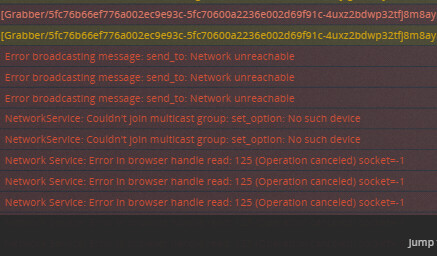
To try to figure something out, I went to the “Console” and turned on only logs for Warning and Error. I did get a “NAT: PMP, got an error: Not Supported by gateway.” Trying to see if this corresponds with a skip/buffer. Note that I run plex on a dedicated “powerful” server running Unraid. I also use Unifi/Ubiquiti network gear.
Update. This does not appear to be a transcoding issue. I get this error regardless of transcoding or Direct Play of Live TV. Trying to narrow out variables. Error starts with this and snowballs from here
Bumping. Any Plex support reps able to help? I can provide logs, etc. This is terrible that I can’t even get recordings to not skip with perfect/near perfect signal quality
Plex relies on network broadcasts (192.168.1.255) to identify clients and devices, a setting on your network seems to be blocking this activity. When this happens Plex stops and rediscovers the network.
What Clients are you using? If a browser then switch to one that natively plays mpeg2. Set the client to allow insecure connections on local network to minimize renegotiation.
What devices are wired and wireless? Can everything be wired to eliminate the Ubiquiti?
Currently, everything I am using to test is hard-wired. HD Homerun going through switch to my hardwired server. Server hardwired to network where my PC (also hardwired) is attached. I also checked my Unifi stats and nothing is coming through as far as packet losses, issues, etc.
Regarding my client, I have tested three different clients. First, I used my browser on PC where Live TV was being transcoded and faced the issue. Next, I downloaded the Plex App on my Windows 10 PC (“Direct Play”) and still faced the issue. Third, I downloaded the HD Homerun app on my Windows 10 PC and encountered no issues at all. In fact, I reached out to HD Homerun support and they were checking my logs live while we were on the phone together. I attempted all of the above with them. They indicated that when I was using Plex to view Live TV, I was experiencing consistent packet errors. When I used the HD Homerun App, I was receiving no packet errors and it was a clean feed. They told me signal strength/quality was high 90’s and not an issue. I’ve isolated the issue to be a plex issue.
I changed my “Secure Connections” setting from “Preferred” to “Disabled”. I tested and still experienced the same issue with buffering/logs. IPv6 is off.
Post your debug logs and add the Linux-Server tag. Keep in mind there are people with lesser systems not having an issue so it will require digging into yours to find the bottleneck.
Can you tell me what logs you need. Is it the one marked "Plex Media Server.1/.2/.3 etc.? Or all of them? Trying to limit amount of info being shared online if possible.
Thanks in advance for your help! Understand it’s a struggle but I am at a loss here.
Thanks. I disabled " Use hardware acceleration when available" and still got the issue.
After testing that, I disabled “Use hardware-accelerated video encoding” and still got the issue. I restarted Plex after the above, still got the issue.
The next thing i tried was disable HDR tonemapping (turned the other two options above back on). Still got the issue. Based on what I see, it appears to be some kind of network connectivity/communication issue between Plex and the HD Homerun device.
Regarding the logs, I prefer not to put all my logs out there for public viewing. I dont know what information is contained in the logs. Is there a way to send direct?
Posting all the logs plus the proper tag(server-unraid) is the hook to pull in support that allows for analysis before replying. PM me the “Plex Media Server.log” and I can look for any obvious issues.