Server Version#: 1.41.0.8994
Player Version#:
<If providing server logs please do NOT turn on verbose logging, only debug logging should be enabled>
Hi - I have an instance of Plex Media Server running on Windows Server 2022. Plex has an HD Home Run connected which is often used for DVR recording of OTA TV.
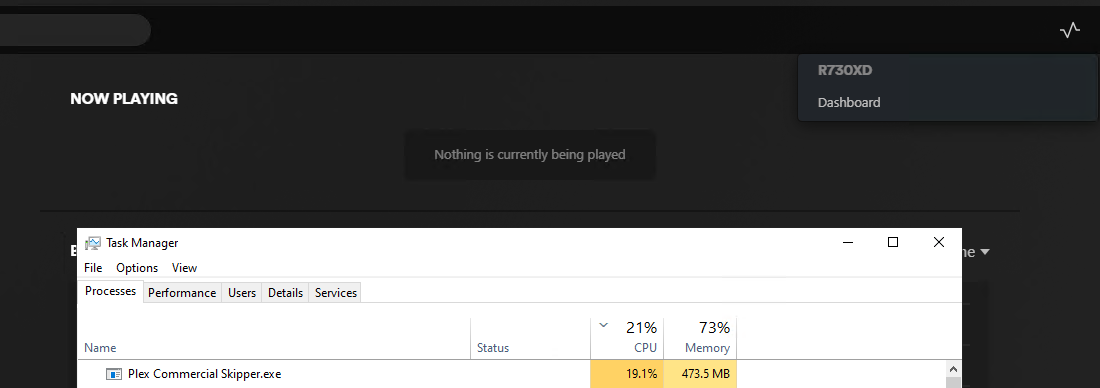
Lately my server has been using extra electricity and I have noticed that “Plex Commercial Skipper.exe” is constantly running and consuming a good amount of CPU. There is no Live TV or a recently added DVR show which requires skipping of commercials. If I close the processes it will automatically restart within a few seconds.
Does anyone know why this executable is constantly running, consuming CPU, even though there are no DVR Commercial skipping jobs (server is idle, no one is streaming).
Verify the status of this selector in the properties of each of your libraries.
It might have been set to detect commercials in all your media, instead of just in recorded content.
Oct 19, 2024 09:13:51.000 [6684] ERROR - IsFileWritable: failed to create file '"H:\e5da8dda-ef6c-4bc3-a043-4ef089360b26"'
Oct 19, 2024 09:13:51.000 [6684] WARN - IsDirWritable: directory '"H:\"' is not writable
Verify that you have a drive with letter H:
If this drive is permanently out of use, remove it from
Settings - ‘Show Advanced’ - Server - Transcoder
There are also reports about missing video files among your TV show library. See if there are any trashed items. Remove these by emptying the library trash.
Thank you for all the help! I think this Ad detection, setting all libraries to disabled & manually clearing out the Library Trash did the trick! I will update here if it returns.
Regarding the H drive, I was doing some maintenance and resizing that drive, which is a ram disk for live TV transcoding. I did not repair the database as I want to make a change and monitor its behavior, one by one.