I know. I dont mean to confuse you. Myplex is not needed when you do not have shared libraries typically unless you have one special consideration, an atv2 jb on ios 5.3. If this works you do not need plexconnect on your desktop anymore if you only use (1) atv2. Myplex on a jb atv2 creates local and shared libraries that is a long boring conversation but basically acts as if you were at home even though you were not which should work for you if you are home or not. My .debs are an automated way to install everything for you including certs and run plexconnect directly on your atv2 and git clone plexconect properly on your atv2 which has been debugged by multiple users mainly based off of baa’s code in that topic minus the debs i created using his method but modified to make the installation easier (i hope) and installs python completly and properly which is described in that topic in many pages.
Typically myplex is used for viewing remote libraries as in not yours (family/friends). I recommend this due to whatever error you are having be it your os/network. If you wish to continue to debug be my guest, just trying to give you a way out that will more then likely work for you since you have a jb atv2 on ios 5.3. I can go on and on about the history of local and shared libraries upon other things that have been developed but it is boring and not required to solve your issue. Baa has developed many ways to get plexconnect on many devices. I have coded many apps and created many deb’s based off of his methods but modifed to automate installations of plexconnect to help assist new users. My apps are for osx. My deb’s work successfully on any jb atv2 so far that anyone has tested as far as I know. I have installed them on 3 users other then my own personal atv2’s.
Follow the tut post 231 and sign into myplex and you should be set assuming your pms port has been setup properly on your router.
Or:
Debug (windows/your network) further, your choice.
Im going to try a fresh install of my atv 2. I hope i didnt give the impression i didnt think u knew what u were doing because I didnt mean to. I believe there have been many sucessful runs of your install.
As far as myplex goes thought, am i logged into myplex when my pms has my username posted on the upper right corner when i move my mouse cursor over the pic of the silouette?
Im didnt get that impression at all. Myplex will load a new tab called shared libraries if someone has shared a library to you. On a atv2 on ios 5.3 it will populate both your local library tab (and shared library tab if you have added users to it).
You need to still forward your pms port to your pms server IP address on your router and sign into myplex on your pms if not already done so. You need to find out your pms port in your pms settings and forward that port to your pms local IP address. A successful pms port forward will give you a green check in the myplex settings in pms settings.
Myplex users/sharing is managed here http://plex.tv (servers link at top)
There is a lot to take in but once you get the hang of it and use it, it begins to make sense. Pms is your content server. Myplex is your pms sharing to and from your pms. Plexconnect is script to hijack a desired app on your Apple TV to access pms (plex) content. A plexconnect app can be created on jailbroken atv’s on ios 5.x to avoid needing to hijack a app since it creates its own app and is pretty involved but @baa has developed a way to avoid this. I made a .deb to make it easier (i hoped) and wrote a tut based on his jb app injection plexconnect installation method on jb atv2’s.
@wahlman.j sssoooooo. I have tried scouring my pms settings for the last 30 minutes or so and there is NOTHING about myplex on there. Under myplex in the forums it states General user help for the myPlex cloud service. this makes me wonder if i need to subscribe to plexpass to get cloud services. Is it an optional paid service? Do i need to install it? Download it? Where is myplex. Im so frustrated right now. How do i find my pms local ip address? how do i port forward? I am sssooooo lost right now i just want to throw my atv into the bottom of the ocean. lol.
I am confused... you show pictures of your aTV clearly displaying PlexConnect stuff, but then you state that - when setting your DNS to manual and stuff - the trailers app won't even load.
Please try to enlighten me... what machines are involved, where do you run your PMS, where PlexConnect. What is the real issue here? What settings are used. See thread "read before posting".
I am confused... you show pictures of your aTV clearly displaying PlexConnect stuff, but then you state that - when setting your DNS to manual and stuff - the trailers app won't even load.
Please try to enlighten me... what machines are involved, where do you run your PMS, where PlexConnect. What is the real issue here? What settings are used. See thread "read before posting".
The confusion is between the different installation types that yourself and whalman.j use. I have used wahlman.j method which puts plex connect on your ATV with its own button. It does not replace the trailers butt. there was some confusion going on until post #28 where I have already posted the "read before posting" information. You can look there for it if you would like. The "Real" issue has been stated and is the same as it was. I cannot get my libraries to populate in plexconnect on my atv2. I think in the confusion of what i was using this got all jangled up. It was my fault as i should have put in my first post the log and everything else. I just didnt know how to open my log. as soon as i figured that out i posted my log immediatley. thanks btw for telling me how to open my log.
Im didnt get that impression at all. Myplex will load a new tab called shared libraries if someone has shared a library to you. On a atv2 on ios 5.3 it will populate both your local library tab (and shared library tab if you have added users to it).
You need to still forward your pms port to your pms server IP address on your router and sign into myplex on your pms if not already done so. You need to find out your pms port in your pms settings and forward that port to your pms local IP address. A successful pms port forward will give you a green check in the myplex settings in pms settings.
Myplex users/sharing is managed here http://plex.tv (servers link at top)
There is a lot to take in but once you get the hang of it and use it, it begins to make sense. Pms is your content server. Myplex is your pms sharing to and from your pms. Plexconnect is script to hijack a desired app on your Apple TV to access pms (plex) content. A plexconnect app can be created on jailbroken atv's on ios 5.x to avoid needing to hijack a app since it creates its own app and is pretty involved but @baa has developed a way to avoid this. I made a .deb to make it easier (i hoped) and wrote a tut based on his jb app injection plexconnect installation method on jb atv2's.
Ok so after taking a breath I have and WITH A CLEAR HEAD I reread your post. I believe my problem is with both MyPlex and not having yet done the port forwarding.
First things first. Since I have never seen anything for MyPlex in PMS i took a second look with fresh and clear eyes. However, I still cannot find anything to do with myplex in my settings on PMS. I went through ever different setting and sub setting and there is no mention of Myplex. I looked in the MyPlex forums and it didnt help. However I noticed that it stated something about the cloud services. Do i need an additional service for MyPlex? Do i need to signup for the plexpass so I can get access to the cloud services?
As far as port forwarding how do i find the PMS Ip address to setup the port forwarding for? This part is WAY out of my depth. It is asking for External and internal start and end ports, service name, server ip and a internal ip address.
So I made an atempt at fixing this problem. I also thought you may like to know that when i do go to settings -> Devices it does show an apple tv plex connect device.
Is this what your refering to as the checkmark in myplex?
[
](http://s327.photobucket.com/user/leont1972/media/photo21.jpg.html)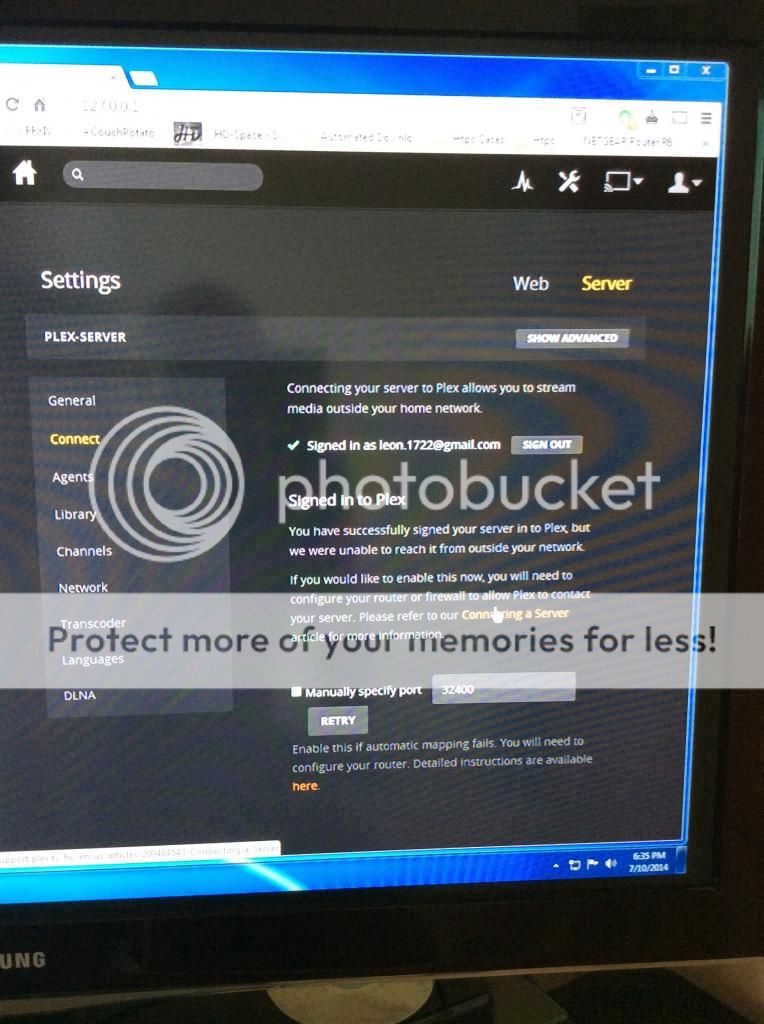
It did not work. I turned off my firewall so i can make sure the problem is not my firewall. Im wondering if it is my settings? I clicked the retry button after adding port forwarding to my router. both with the manual in the pic above checked and unchecked. I got the ip address for the port forwarding from running ipconfig on the computer PMS is on.
Here is a pic of my port forwarding settings. do they look correct?
[
](http://s327.photobucket.com/user/leont1972/media/photo11.jpg.html)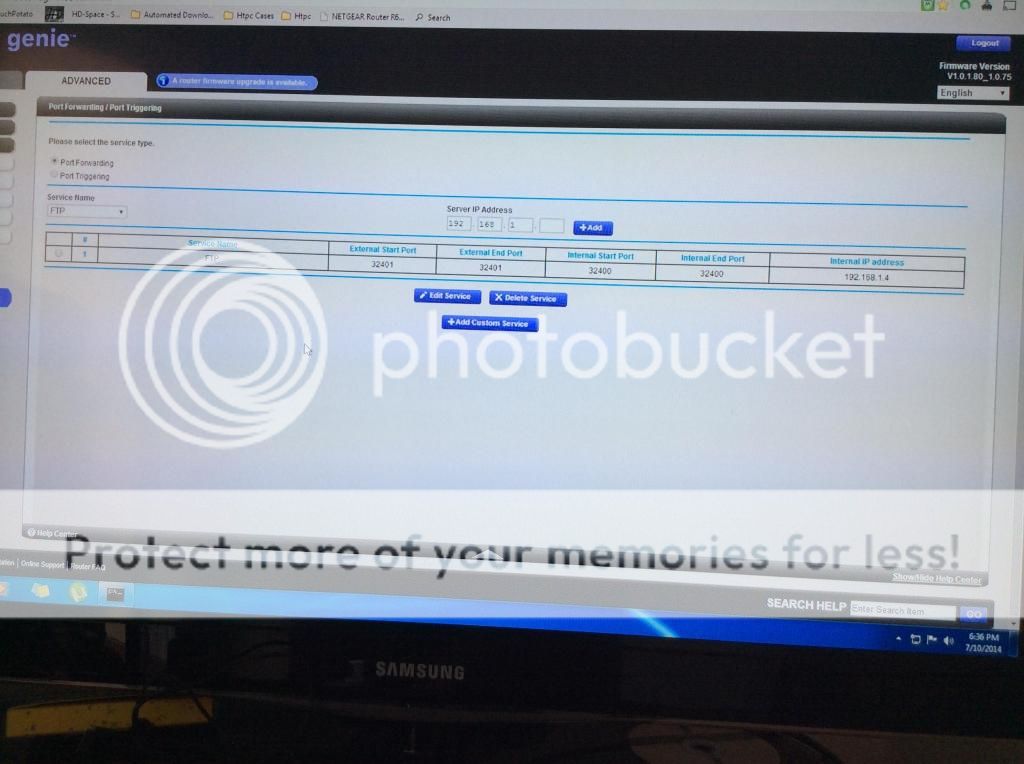
I looked online to see how i should set it up and i figured out that internal is lan and external is wan. This makes sense to me because one of the things I DO know is the difference between a lan, wan and a man. lol.
...with aTV and PMS in the same local network, there is NO NEED to be signed into myPlex. (okay, provided you didn't set "requeire authentication" option PMS).
What do you want to achive now? Getting your PMS content to your aTV? Getting access to other, foreign shward servers?
...with aTV and PMS in the same local network, there is NO NEED to be signed into myPlex. (okay, provided you didn't set "requeire authentication" option PMS).
What do you want to achive now? Getting your PMS content to your aTV? Getting access to other, foreign shward servers?
Why do you ask if i NOW want get my PMS content to show in my apple tv? I have been saying this whole time that is what I want to do. I DO NEED to sign into myplex. I am not using your plex build. I am using wahlman.j plex modification. According to him I have no need for plexconnect and I DO need to sign into myplex.
Ok let's go back a step here. Originally you were going to use iBaa's plexconnect to view your pms from your pc to your aTV which should of worked without myplex working or not on pms or being signd into myplex on your atv (plexconnect) It did not work due to your os/network layout or whatever so i recommended using my .debs which is just a modified debian file that installs iBaa's plexconnect directly on your aTV. In order to attempt this method you need to login to myplex on your pms successfully which in your pictures has not been done properly and/or successfully since pms says it hasn't been sucessful. What I would recommend is in pms settings manually specifying your pms port by checking the box to manually specify your port and setting the port to 32400, point that to your pms server in your router and attempting to login to myplex using the pms settings again to get the green arrow (sucessful signin). If you get a green check mark then you have signed in, you can use my modified .deb that just git clones iBaa's github (plexconnect) and creates certs and installs the plexconnect app (button) on your atv and then you can attempt to sign into myplex on your atv. In your router settings all of your ports should be set to 32400 internally and more importantly externally for this method to work. If this does not work installl teamviewer, send me a pm and I will attempt to setup your network and atv remotely so it will work correctly, hopefully.
In the end all roads lead back to iBaa's github be it my modified .deb that git clones baa's current github commit (version) or the official method. Numerous people that have forked his github and modified plexconnect to create new themes based on his original code as well as many other apps or webgui installation methods to all to attempt to assist users to install PlexConnect on numerous os/devices. There is a official way and there are many variations to install PlexConnect. None of them will magically correct your pc/network/user issues that you may have or not be aware of that is not your fault but you have to deal with to get this work work. It is a pain to troubleshoot what the issue is but in the end its worth it. In the end the forums are used to assist users to get to where everyone else is enjoying plex content on their appletv which is best done in my opinion by using plexconnect since it allows plex content on the Apple TV using whichever method you choose. The old plex app used to much memory on atv2's then ibaa and others created a way to hijack a set of desired apps to view content on their Apple TV then let the Apple TV play content natively which in my experience is the best for the atv2 due to its low memory size and creates less memory crashes.
Without setting this all up for you via teamviewer my best option in my opinion would be to install plexconnect directly on your atv2 using my modified .debs or baas original method. It requires everything to be setup properly to do so:
pms, atv, and your router
All of this is in a attempt to fix whatever issue you have be it your router or pc or network layout that none of us know better then yourself without logging into your pc or you giving us as much information as possible to troubleshoot your issue(s).
Fixed with my atv2 5.x deb. macaffe antivirus was blocking myplex/pms. Mark answered if desired.
Why do you ask if i NOW want get my PMS content to show in my apple tv? I have been saying this whole time that is what I want to do. I DO NEED to sign into myplex. I am not using your plex build. I am using wahlman.j plex modification. According to him I have no need for plexconnect and I DO need to sign into myplex.
Well, topic title says something like "can't sign in".
But okay then... Good luck.
Fixed with my atv2 5.x deb. macaffe antivirus was blocking myplex/pms. Mark answered if desired.
I would recommend Avast over any other AV honestly.
Thats why I run OSX, not a virus yet and i never need to defrag my OS. No more winblows for me.
This topic was automatically closed 90 days after the last reply. New replies are no longer allowed.
