Server Version#: 1.18.0.1944
Player Version#: not relevant
Hello Plexianer
My Plex Server on Synology 64bit Crash every time i scan the (large) Music-Library. Plex eat all Memory (Ram, 32GB) and then the Linux-Kernel kill Plex.
This is only when i run the scan in Music-Library.
Scan in Movie, Series or Photos work fine.
Kernellog:
2019-10-14T07:32:31+02:00 server kernel: [1125081.133222] Out of memory: Kill process 4232 (Plex Media Serv) score 850 or sacrifice child
2019-10-14T07:32:31+02:00 server kernel: [1125081.141726] Killed process 1696 (Plex Script Hos) total-vm:974476kB, anon-rss:25892kB, file-rss:0kB
2019-10-14T07:32:31+02:00 server kernel: [1125081.155939] SYNO.Core.Syste invoked oom-killer: gfp_mask=0x201da, order=0, oom_score_adj=-999
…
2019-10-14T07:32:31+02:00 server kernel: [1125083.977768] Out of memory: Kill process 4232 (Plex Media Serv) score 850 or sacrifice child
2019-10-14T07:32:31+02:00 server kernel: [1125083.986271] Killed process 1730 (Plex Script Hos) total-vm:974476kB, anon-rss:25972kB, file-rss:0kB
2019-10-14T07:32:31+02:00 server kernel: [1125084.001210] Plex Script Hos: page allocation failure: order:0, mode:0x50
2019-10-14T07:32:31+02:00 server kernel: [1125084.008070] CPU: 2 PID: 1730 Comm: Plex Script Hos Tainted: P O 3.10.105 #24922
…
2019-10-14T07:32:31+02:00 server kernel: [1125092.916833] Out of memory: Kill process 4232 (Plex Media Serv) score 851 or sacrifice child
2019-10-14T07:32:31+02:00 server kernel: [1125092.925336] Killed process 4232 (Plex Media Serv) total-vm:34248472kB, anon-rss:29644848kB, file-rss:0kB
Original Plex Logs are send with “Send crash reports to Plex”, so the Logs should be there.
Ah ok, i think the Logs are automated in the Crash-Report. I will download and send it later.
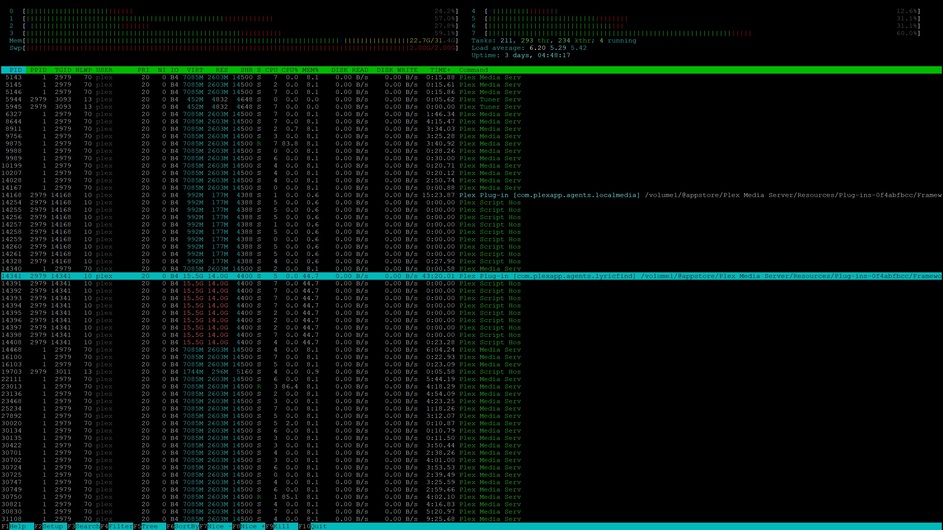
The Synology is a DS3615xs with 32GB of Ram. The Plex use (see in Kernel-Log) up to 29GB of this Ram and then the Kernel kick Plex out.
-Yes, the Memory itself is ok, i have Test it.
-See Screenshot for other Services on the Synology and the Ram-Usage below.
Blockquote
If Plex crashes every time you scan your (large) music library, then I think that would be a good place to start, don’t you?
Perhaps you should delete that library, and create a new one to take it’s place, or perhaps you should create several smaller libraries to help pinpoint which files are causing you grief.
Yes, i see, this could be one solution, but i prefere to hold this big Music-Library when is possible.
Do you think it is a File, that cause this Plex-Memory Crash?
I watch the Logs, but didn’t found any Errors, so i will upload the Logs from Plex for you.
since updating Plex on Syno 918+to the last Version, my plex stops every day too. between 11 am and 12 am. Planed task are just running between 03:00 and 07:00.
Ive seen, that the dvr is searching for a device with ip 192.168.78.41 but this is allreade removed from the dvr-setup. Where can i delete this device in a config file?
Now i have deleted the Music-Library and create now a new one and upgrade Plex to the lastest 1.18.1.1973. The Ram Problem is still here.
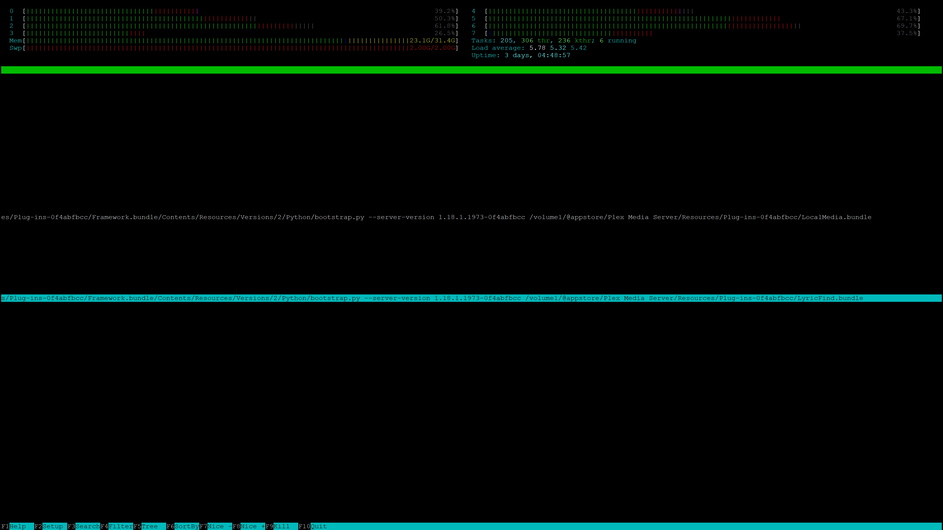
On the Linux Console, i see that lycricfind can be the Problem. See the Screenshot attached.
Yes, i will do correct the Certificate Error, but what can i do? The certificate its from lets encrypt. The WebBrowser say its correct with a green lock. Only Plex have this Error 51 in curl.
I had the same issue on my DS716+II
Now I’ve disable the automatic scan for libraries and leave enabled the update when content is added.
Since that my Plex server is working fine.
All my issues has begun when the music scanner has been changed. If I add some album to my music library after a while the RAM of Plex go over 2GB.
I have disabled custom letsencrypt certificate, but sill crash. Then i changed the new Plex Music agent with Plex Music Scanner, now works fine. Ram usage now round 1GB while scanning.
So, the Crash Bug is the new Plex Agent, not Router, not Network, not me, not certificate, not Synology, only Plex.
I have to agree with @bangaa. Today I’ve added more then 10 episodes to Plex and everything was fine. Then I’ve added 4 albums to my music collection and then ram usage grown to 86% and NAS system was pretty unstable.
I’ve stopped Plex and everything has back to normal.
So Plex has a big issue with his own Plex Music Scanner on Synology.