Server Version#: 1.41.8.9834
I’m running the official plexinc/pms-docker on Unraid and I’ve been having several recurring (and probably related) issues:
- During scheduled maintenance I get a deluge of alerts that my Unraid vdisk docker image is running out of space. I have a 100GB vdisk and its only 42GB full, so whatever is going on rapidly sucks up 60GB of space before eventually failing. After it fails the Plex service crashes, and my vdisk plummets back down to 42% full. This is confusing because the vdisk should only be the docker image itself. All app data is mapped to my 4TB cache drive, so I don’t understand what is happening here:
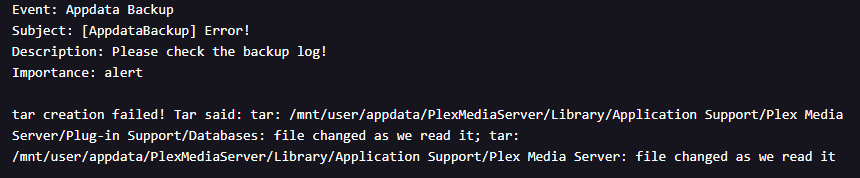
- My Unraid appdata backups have been failing:
-
When I manually run the ‘optimize database’ task from the settings it runs for hours and then eventually crashes. I have to restart the docker to get the service back up.
-
My database seems unusually big at 178GB:
I came across PlexDBRepair and decided to try it (by running the “automatic” command). However its been stuck on Checking the PMS databases for over an hour now and I’m getting worried. Does anyone know how long this tool usually takes? Is there some way to tell if it’s actively working vs crashed?
Is there something else I should be doing in this situation? Or is PlexDBRepair my best option to fix these problems?
I’m scared to stop it now that its started, but I’m also worried this is going to bring Plex down all evening and my family is gonna be upset.
(Edit) Went to upload my logs but I see that the crash reports were moved from config/Library/Application Support/Plex Media Server/Crash Reports/ to /tmp/ … and honestly I’m not sure how to access that path in my Unraid docker setup. Usually everything is in /config/ (mapped to /appdata/ on Unraid).
Plex Crash Uploader.1.log (1.8 KB)
Knowing that this docker is writing data to the /tmp/ folder (which exists in the docker image file, and isn’t mapped to /appdata/ on Unraid) is a big hint as to what’s going on in my first point above. I cancelled the PlexDBRepair and mapped /tmp/ to /appdata/Plex/tmp/ on Unraid, so moving forward I should be able to easily see what’s being written there and access those crash reports. Also it probably won’t run out of space since I have 2TB available so maybe it won’t even crash now.
There’s still definitely something weird going on. I was looking at my DB backups and the size seems to fluctuate wildly. It went from 78GB on 6/02/25 to 178GB on 6/11/25 - I haven’t added a crazy amount of new media or anything.
I’m going to wait until late tonight and try the built-in optimize database task again. Maybe it will work now that /tmp/ is mapped to a drive that won’t run out of space. I’d still like feedback on whether PlexDBRepair is a good option in this situation though, and how long it might take. Would really appreciate any input at all frankly.
Yeah I’ve been busy and my server has been on autopilot. Thank you for the link!
Wow, that is quite a lot to read through. My first thought was “Wait, if this was an issue with a beta release how did I get affected?!” but then I saw this:

I missed that memo. I guess I need to turn off auto-updates, wait for the stable release to catch up to me, then change that tag to :stable.
Anyway, if I’m understanding correctly then this script from ChuckPa is what I need to run - and it’ll probably take a long time. I’ll wait for my users to log off tonight and give it a shot.
If I may?
Looking at this image:

it’s major cleanup time.
- Stop Plex
rm *-shmrm *-walrm *-tmprm *-journal
Now, with those huge files gone,
Use my Deflate script (paths set for your container) and let it clean up the DB.
When it’s done, use DBRepair to optimize the resultant DB back to normal.
- Start Plex
- Confirm everything back as it should be.
- Stop Plex
Lastly, some of the PMS DB backups SHOULD be deleted (they are the bloated ones).
- Make a backup of the current main & blobs DBs.
- After those are done, DELETE the bloated backups PMS made.
You’ll recover over 1TB (closer to 2TB) by first glances.
When all done backing up and deleting, Start Plex again and enjoy
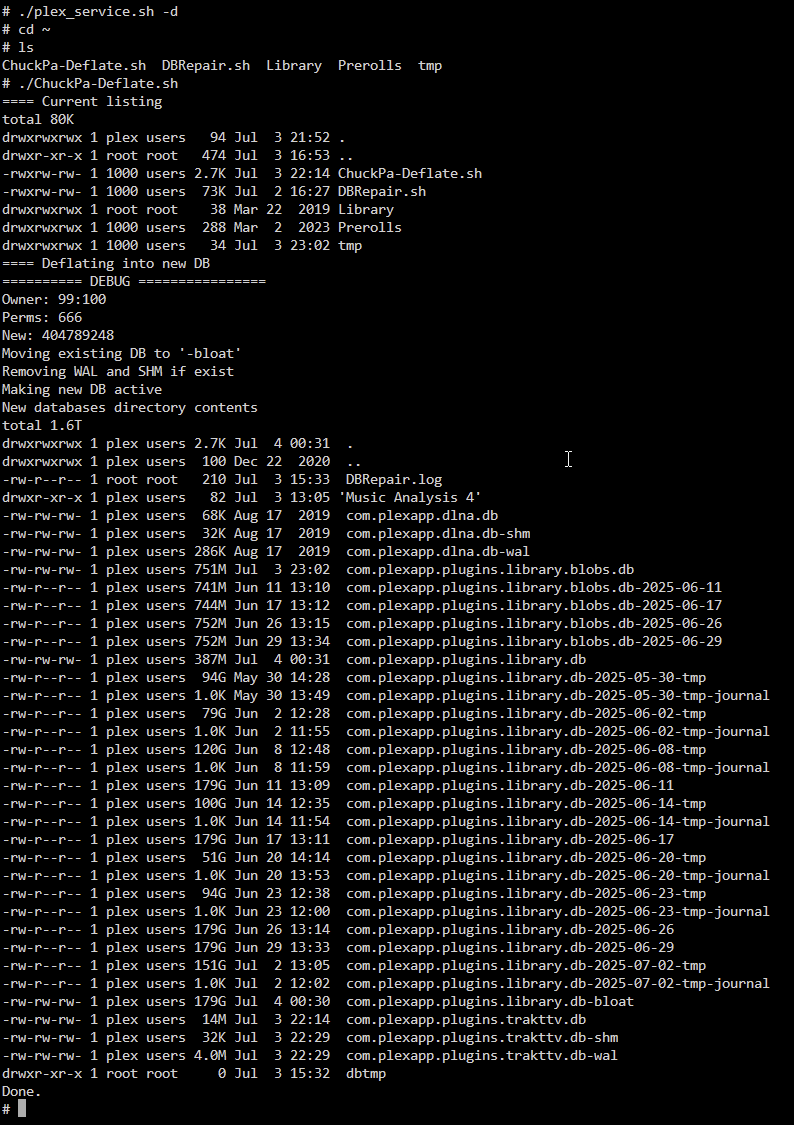
Thank you! I started the Deflate script before I went to bed last night - so I did this in a slightly different order, but I woke up to this:
And my DB file had plummeted down to only 367 MB:
I just did the other things you recommended and now my Databases folder looks much better:
@ChristianKent & @ChuckPa : Thank you both very much. Everything seems to be running really smooth now and after cleaning out my long term weekly app-data backups I’ve freed up like 6TB of space!