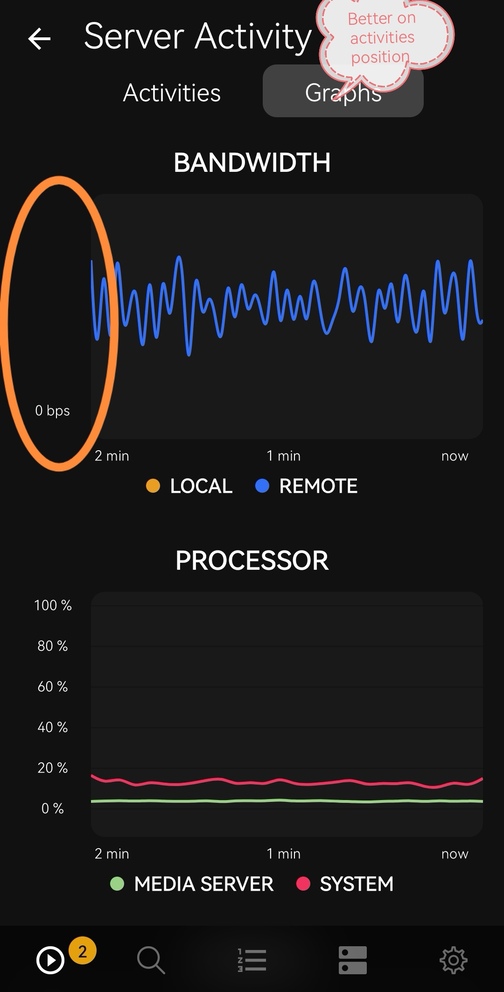
Plex dash 2.0.0 Issue at bandwidth graph. Internet speed does not appear
In my opinion it looks better with the “Graph” screen on left side, than the “Activities” part.
Looking into the Y axis bug.
As for the other part, the activities button on the home page should open to the activities page, especially when it’s lit up due to ongoing server activity (and behaving differently depending on whether it’s lit up or not seems confusing).
A useful workaround you might not know about: if you long-press on the activities button on the home page, it’ll take you immediately to graphs
I really wish to solve real problems, not add or “break” options that not many users needed. Sorry that is sound bad but are many topics with big problems and bugs where no plex employees are answering.
I’ve reported new ones without any luck. This are the real issues… Not activities first or second option…
I know that the threads are going to be closed without any official response, but at least I’ve reported.
I understand your frustration, however I’m not able to help much in either of those areas. I’m on the team that builds Plexamp and Plex Dash, and I try to read all posts tagged in those categories (and reply where I can). That’s why I’m replying here.
It may be worth noting that a lot of my colleagues were away towards the end of last week and over the weekend for Thanksgiving in the US, so delayed replies should be somewhat expected as they catch up on missed work etc.
If you don’t get any further answers over the next couple of days, ping me again and I’ll see if I can raise your issues internally with the right people.