Plex Dash Android v1.0.1
Latest Server Betas (Win10x64)
Hello Plex Team!
First of all, thanks for continuing to develop Plex. I think the idea of this app is good. I also think it’s good that it’s a separate app for now. I hope I haven’t missed a thread with this problem.
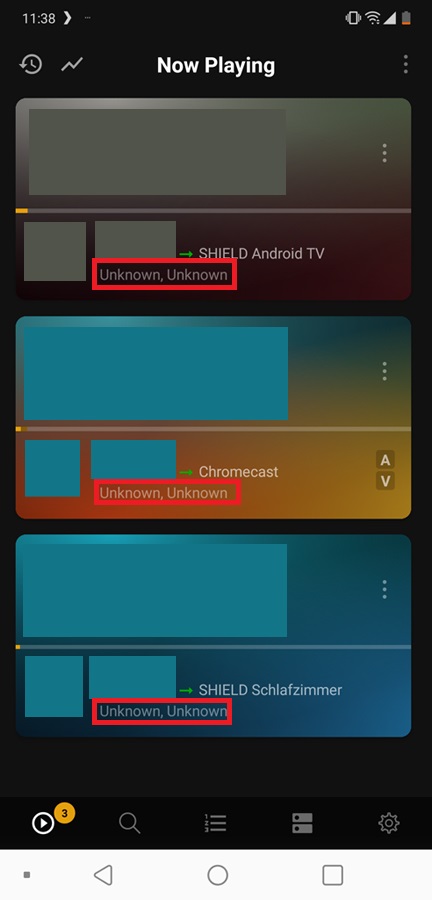
Plex Dash shows me the streaming information as Unknown:
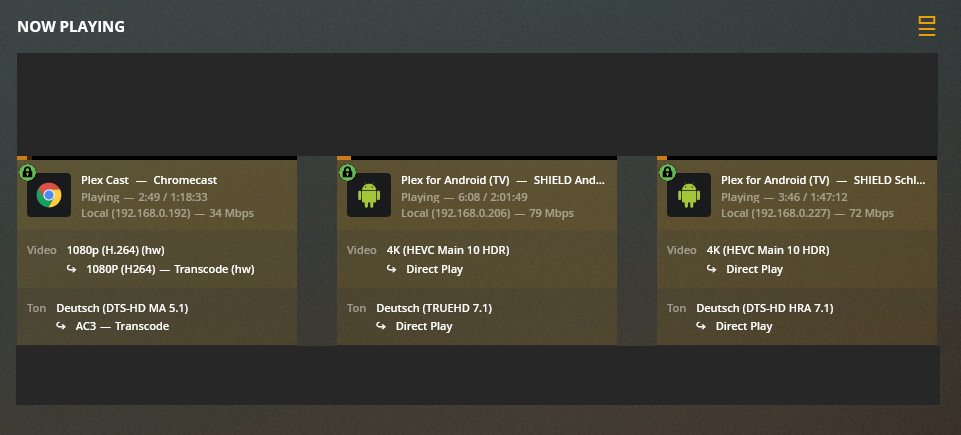
I am not sure, but should I see the same as in the server dashboard?
Sorry, the “unknown” is a failure to geolocate an IP address, we’ll fix that in the next release.
A/V mean the audio and video streams are being transcoded. If you only see A, then it’s a video remux. If it’s all clear and no icons, you’re direct playing! When you expand you also get an HW icon for hardware transcodes.
Just to hijack this thread, I’m seen very strange geolocation from PlexDash (and app sign-in emails) the location of playing devices shows as Belfast whereas I’m in the centre of England. PD is the first time I’ve noticed this. I’m not going through a VPN, the IP address in email is my actual public address. All other sites report my geolocation to within a few miles using the same IP address.
Ahh ok got it Can of course be useful info for some users. Looking forward to your updates
Would it be possible to get more information about the stream or transcoding, like in the Server Web Dash? That would be great Is also an “S” indicated when the subtitle is transcoded?
It might be possible to add another menu item under the other settings with the three dots. For example “Show Stream Details” Then the exact details become visible as in the server dash


 Can of course be useful info for some users. Looking forward to your updates
 Is also an “S” indicated when the subtitle is transcoded?
 Then the exact details become visible as in the server dash
