Just a bit, if this results in me having to start from scratch database wise I just cant be assed anymore.
While I do get very annoyed by it and have vented a couple of times due to the stress, I think a large part of why its going on so long @sa2000 please correct me if I’m wrong, is partly cos there’s only of a handful of us reporting the issue.
The Diagnostics actually take SA2000 a few hours each to go through, and then the Team have to go through each process in the Diagnostics and try to work out what one is the problem process that’s coursing the cascade effect, and deadlocks.
However saying this the more people that get this and report I do strongly believe will ultimately help the team find the course better, as for the first few months I was the only one with the issue and it was far far worse that it was in recent builds, yeah I can still have really bad days with it but in the grand scheme of things its most definitely in a better state than 6 months ago.
Also from what I have been seeing is pretty much everyone bar I think 2 people with this problem are on windows so this could also be a windows issue that’s interfering, hard to say though as I’m not a dev I can only go on what I see and read
1 Like
I completely get that these things take a huge amount of detective work, sifting through this stuff must be massive work and then getting a fix in place is just another headache.
Hopefully things will be back to normal soon but yeah the more people that report this and submit diagnostics, logs etc will definitely help us get back to stability.
1 Like
The best thing to do is each time it happens is grab the bits and send them over, while SA2000 cant go through all of them, one of them is bound to hold the key they need to pin down and bash the bug
Will do and also I just noticed that the server is pulling in way more data than usual, almost three times as much, I’ve checked back on the history and it’s been doing this allot.
Usually the high amount of received data is when Plex is scanning a large amount of new media, finding metadata, generating previews etc because the actual files are on a NAS but I’ve been doing hardly anything new media wise, I wonder why it’s pulling so much through.
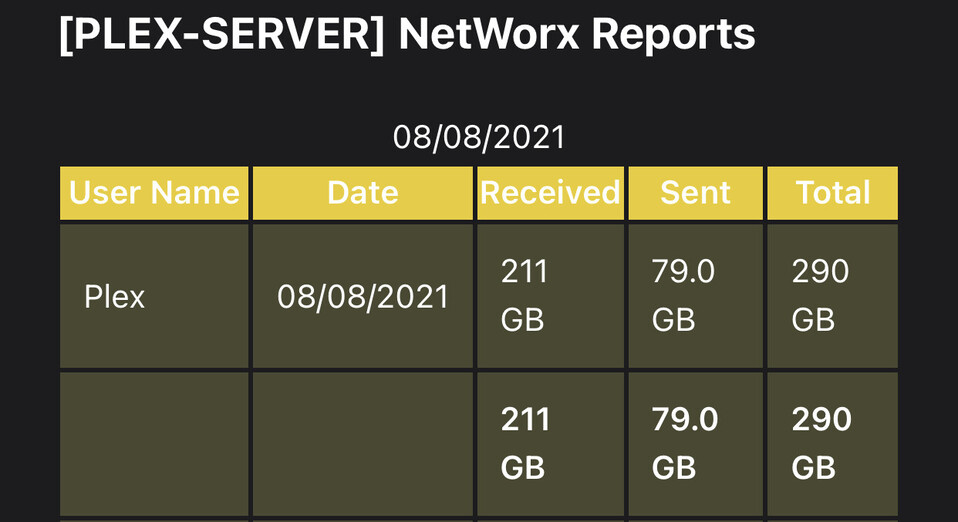
Interesting, also what did you use to get that info?
It’s a program called Networx, it’s free and pretty lightweight, just install it and it will keep track of how much data is passing through.
I definitely know that this is down to Plex because this server is only used for Plex and it literally does nothing else whatsoever hmmm…
Well the deadlocking has happened again on 1.24.0.4916-ce9f9dc95.
@sa2000 I’ve added dump, logs, connections to the same OneDrive folder.
Curiously it does seem to mainly happen between 7-10pm for me too, although I’m AEST (GMT+10/11). It is also the busiest time for my server, also currently in our 6th lockdown here.
I didn’t know there was a new update, it sucks that it hasn’t resolved the issue though.
Maybe the coincidence in time is just down to it being the busiest time for most servers.
Looking into your dumps and logs
FYI Networx has caused issues before and loops in the PlexSriptHost processes -after it forced disconnection of some loopback connections
You can find the old forum topics by searching forum for networx and PlexScriptHost
Please do not use this product on a Plex server machine
I have processed your dumps and logs etc and have referred the diagnsotics to the development team
FYI we have identified one cause for deadlocks and a fix will get released but this does not appear to be the issue that led to the deadlock showing in your diagnostics
Oh ok it’s been installed for the past 5 years and I haven’t noticed any problem at all, I’ll uninstall it anyway, don’t suppose you can recommend a bandwidth monitoring program that doesn’t have any issues with Plex?
Should I just keep updating to the latest versions of Plex as they are released and report back with a new dump/logs each time Plex deadlocks on each new version or just wait to hear more on here?
May be it was some bandwidth control option that caused the issues before. Passive monitoring ought to be harmless if the application does not force close connections
Always best to have diagnostics from latest version. As it takes hours to process each set of diagnostics and then add to the development team set of open issues , I would suggest waiting for a while before reporting further examples from later versions of Plex Media Server,
At the moment your current set of I am only available one day a week which is Tuesday so will try and pick up latest set of diagnostics then - time permitting and would expect that to be from a recent release, beta or public.
Oh that’s interesting, is it something some of us have experianced?
I have been having this issue for about 2 months now. The console doesn’t show much until plex eats up about 6gb of memory, then I get the SLOW db error. There was one build, I think the last one or the one before that, where I didn’t have this memory leak, but it came back… I have android clients, if that might be the issue.
Im on an unraid/docker. How are you installing/running the old docker images?
That sounds like a different issue, have a read over the OP and check out the Diagnostics steps, when it happens its the connection page that will tell you if this is the same problem has this or not!
I have also seen the slow query warnings in the log files recently. I’ll keep an eye out.
My machine is by no means… slow. haha.
Ok thanks for your help, hopefully a fix can be found soon.
@sa2000 I’m not sure if it’s helpful but according to my monitoring system it did go offline\deadlock once or twice overnight and then resolved itself after about 8 minutes.
