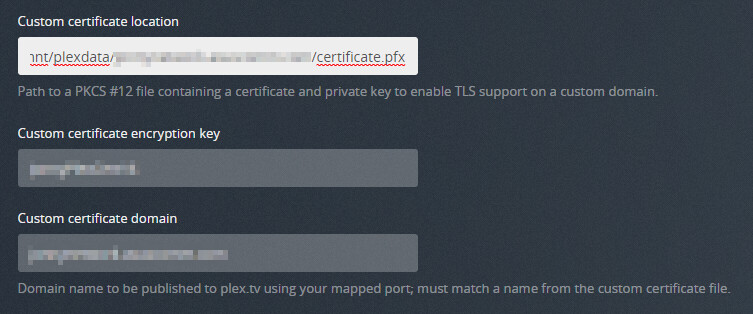
Server Version#: Version 1.24.1.4931
Player Version#: N/A
Upon creating a self signed certificate, pointing to it via the plex UI, and restarting plex, the service does not serve the expected certificate.
This issue seems related to Plex overwrites certificate.p12 on startup - unable to specify own SSL server certificate, but the mentioned fix does not work.
The certificate was generated using the following commands
openssl req -x509 -nodes -days 18250 -newkey rsa:2048 -keyout /var/lib/plexmediaserver/plex.key -out /var/lib/plexmediaserver/plex.pem -config /var/lib/plexmediaserver/plex.cnf
openssl pkcs12 -export -out /var/lib/plexmediaserver/plex.pfx -inkey /var/lib/plexmediaserver/plex.key -in /var/lib/plexmediaserver/plex.pem
The contents of the cnf file are:
[ req ]
default_bits       = 2048
distinguished_name = req_distinguished_name
req_extensions     = req_ext
[ req_distinguished_name ]
countryName                 = Country Name (2 letter code)
stateOrProvinceName         = State or Province Name (full name)
localityName               = Locality Name (eg, city)
organizationName           = Organization Name (eg, company)
commonName                 = Common Name (e.g. server FQDN or YOUR name)
[ req_ext ]
subjectAltName = @alt_names
[alt_names]
DNS.1   = plex8.DOMAIN.com
DNS.2   = plex.DOMAIN.com
DNS.3   = vkplex.DOMAIN.com
The generated PFX file decrypted:
Enter Import Password:
Bag Attributes
    localKeyID: A6 14 3C EC 2F AE 74 35 47 67 85 6B 1D 28 FE 5D BF 69 DA 51
subject=C = US, ST = State, CN = plex.DOMAIN.com

issuer=C = US, ST = State, CN = plex.DOMAIN.com

-----BEGIN CERTIFICATE-----
<REMOVED>
-----END CERTIFICATE-----
Bag Attributes
    localKeyID: A6 14 3C EC 2F AE 74 35 47 67 85 6B 1D 28 FE 5D BF 69 DA 51
Key Attributes: <No Attributes>
-----BEGIN PRIVATE KEY-----
<REMOVED>
-----END PRIVATE KEY-----
Public key decoded using https://www.sslshopper.com/certificate-decoder.html:

Plex configuration:

Plex\ Media\ Server.log on startup:
Aug 25, 2021 12:39:50.188 [0x7fd0bd04fb38] INFO - Linux version: 8, language: en-US
Aug 25, 2021 12:39:50.188 [0x7fd0bd04fb38] INFO - Processor Intel(R) Xeon(R) CPU E5-2690 v3 @ 2.60GHz
Aug 25, 2021 12:39:50.188 [0x7fd0bd04fb38] INFO - Compiler is - Clang 11.0.1 (https://plex.tv e0c29d5827bc4eaaa2ceb882cbeed224b0960173)
Aug 25, 2021 12:39:50.188 [0x7fd0bd04fb38] INFO - /usr/lib/plexmediaserver/Plex Media Server
Aug 25, 2021 12:39:50.310 [0x7fd0c05e3c68] INFO - [CERT/OCSP] Successfully retrieved response from cache.
Aug 25, 2021 12:39:50.312 [0x7fd0c05e3c68] WARN - [CERT/OCSP] Missing cert or issuer; skipping stapling
Aug 25, 2021 12:39:50.351 [0x7fd0bac40b38] WARN - Couldn't determine bundle identifier for plug-in at: "/usr/lib/plexmediaserver/Resources/Plug-ins-1a38e63c6/WebClient.bundle"
Aug 25, 2021 12:39:51.534 [0x7fd0bace4b38] WARN - [MediaProviderManager] Unrecognized MediaProvider feature: availability
Aug 25, 2021 12:39:51.534 [0x7fd0bace4b38] WARN - [MediaProviderManager] Unrecognized MediaProvider feature: availability-platforms
Aug 25, 2021 12:39:51.690 [0x7fd0baf4cb38] WARN - [MediaProviderManager] Unrecognized MediaProvider feature: availability
Aug 25, 2021 12:39:51.690 [0x7fd0baf4cb38] WARN - [MediaProviderManager] Unrecognized MediaProvider feature: availability-platforms
Aug 25, 2021 12:39:51.874 [0x7fd0ba5d6b38] WARN - [Transcode] Got a transcode session ping without a valid session ID.
Aug 25, 2021 12:39:51.911 [0x7fd0ba526b38] WARN - [Analytics] Attempting to send unrecognized metric (playback:server:itemstart). Skipping.
Aug 25, 2021 12:39:52.007 [0x7fd0ba68eb38] WARN - Held transaction for too long (../Library/MetadataCollection.cpp:500): 0.610000 seconds
Aug 25, 2021 12:39:52.009 [0x7fd0bac40b38] INFO - LibraryUpdateManager path watching is disabled
Aug 25, 2021 12:39:52.185 [0x7fd0bad4cb38] WARN - Crash: Crash reporting disabled
Aug 25, 2021 12:39:52.991 [0x7fd0bb1b4b38] WARN - [EventSourceClient/pubsub] MyPlex: attempted a reachability check but we're not yet mapped.
Aug 25, 2021 12:39:53.543 [0x7fd0ba95bb38] INFO - Sync: downloaded 0 sync list(s) with 0 sync items(s): 0 new, 0 updated, 0 deleted
Aug 25, 2021 12:39:53.543 [0x7fd0ba9edb38] WARN - Sync: local sync directory "/var/lib/plexmediaserver/Library/Application Support/Plex Media Server/Cache/Transcode/Sync+" does not exist
Aug 25, 2021 12:39:53.742 [0x7fd0bb1b4b38] INFO - [CERT/OCSP] Successfully retrieved response from cache.
Aug 25, 2021 12:39:53.745 [0x7fd0bb1b4b38] WARN - [CERT/OCSP] Missing cert or issuer; skipping stapling
And finally, accessing the server directly:

What needs to be done in my system in order to enable plex to utilize my generated certificate?