
I moved A brief history of time outside the library directory, I did scan to detect the change. Then I have empty the trash and clean bundles, and it’s still there. Is it normal ? I’ll put back A brief history of time inside the directory of my library and rescan, after that I’ll send you the log.
Nope, if not avail, and an empty trash has been done, then this could indicate a broken database, but again, logs will tell!
Plex Media Server Logs_2021-01-26_12-51-35.zip (5.8 MB)
Here you go 
Thanks again !
Do you think you’ll have the time to check it out, please ?
Thanks a lot !
Hi,
Of course, I can understand if you’re busy and you don’t have the time to check my logs.
But it would be very much appreciated if you could let me know.
Thanks for your time.
Your logs are showing that PMS can’t find files it thinks are there.
Plex Media Server.log:Jan 26, 2021 12:43:07.554 [0x7efbeffff700] ERROR - Error opening file ‘“/PLEXDRIVE/HOTE/PLEX/Animés/Sword Art Online/Season 3/Sword Art Online - S03E01 – Underworld.mkv”’ - No such file or directory (2)
Plex Media Server.log:Jan 26, 2021 12:43:34.817 [0x7efc2d7fa700] ERROR - Error opening file ‘“/PLEXDRIVE/HOTE/PLEX/Films LQ/A Brief History of Time (1991)/A.Brief.History.Of.Time.1991.BLURAY.1080p.X265.HEVC.VOST.DTS-HD.MA.5.1-JACKT.mkv”’ - No such file or directory (2)
It looks like you have a problem at wherever /PLEXDRIVE is.
If there indeed is no file at that location, Scan Files; Empty Trash, and Clean Bundles to update Plex.
A brief history of time is detected and available (but he doesnt get the ST) :
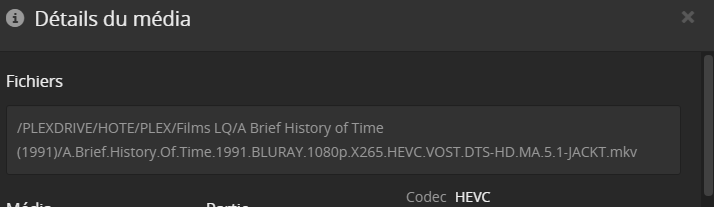
And this one, indeed, isn’t there (because it has been replaced) :

But when I do a scan, empty trash and clean bundles, it’s still like this… He does nothing ><
You have that stuck entry in the database.
I know of only one way to remove them.
- Move the series away from where PMS can see it.
- Scan files
- Empty trash
- Clean Bundles
- Optimize database.
If Plex still thinks it exists:
- Enable media deletion
- Delete the file (it is a fake deletion because there is no real file to delete but will remove from the database.
- Scan files again
- Clean Bundles
- Optimize Database
Now move the series back into position.
The alternative is to perform manual editing of the database itself which is always precarious.
I’ll check it out.
And for my biggest issue : the subtitles not being detected ?
The missing file being listed first is the likely problem – blocking proper retrieval.
This is why I suggest to deal with it first.
Once resolved then re-evaluate.
I did this :
Move the series away from where PMS can see it.
Scan files
Empty trash
Clean Bundles
Optimize database.
I still have it : 
Also I have deleted one anime, I can’t detect /scan it anymore…
I don’t know how to fix this problem.
My subtitles are still not being picked up ><
Guys ?
Sorry but I did not receive notification… (Not sure why… I will look into that)
May I have the directory listing (ls -la) which shows me the names exactly as you have them?
You may copy paste using
``` (backtick)
Paste here
```
Where should I do it ?
Get the listing from wherever you can demonstrate the video is found but subtitles are not. Any one example is good.

Thanks for the names listing.
That’s correct format. (just checking)
Did you “Refresh All Metadata” for that library section?
Scanning won’t find it but Refreshing will (the design).
Quick question: Should everything shown be owned by root:root ? The default user on Linux is “plex:plex”. Root owning things often leads to permission problems.
Well, i have not setup a user for Plex and it’s not running in a container. I don’t know if it’s a problem.
Refreshing metadata doesn’t solve the problem
