Server Version#: 1.32.8.7639
Player Version#: 8.28 & 8.29
I’m wondering if anything changed recently that may cause this?
Setup:
PMS is on Synology, 10Gb link to my router, 1Gb fibre to the outside world.
iPhone 14 Pro Max, on 5G or even 4G on my phone, not too far from the towers, speeds 50 - 360Mbps down, 10 - 15 up.
Previous behaviour (up until last month),
When I play a video, it would take ~5-10 seconds max for it to start/resume, with no interruptions at all after that. Never any buffering, issues, etc. I could watch several episodes without interruption.
Current behaviour
A video would take several minutes to start playing. You get a rotating circle in the centre of the screen and you wait… and wait.
Often it doesn’t load at all.. I close and re-open Plex and try again, and again, and again. Eventually it works.
Video works for a few minutes, then stops playing with the rotating circle again. Cannot play any more. I try closing Plex and starting again, and sometimes after ~3-5 minutes it’ll eventually (finally) play (rinse & repeat the above issue), or I end up giving up.
I enabled debug logging but failed to restart Plex - not sure if that’s required. If so let me know and I’ll try again another day. Some examples from today (7th) include
8.34am - episode “prisoner of love”
10:49am to 10.51am - episode: Out of the half-light
12:54pm
1:01PM, 1:02pm
The day before at 8.28am (and around that time too).
I just don’t recall it ever being this bad before. Something is strange.
Ta.
Dec 07, 2023 09:49:50.049 [140295225047864] DEBUG - [Req#2f374/Transcode] Audio Stream: 512116, Subtitle Stream: -1
Dec 07, 2023 09:49:50.051 [140295225047864] DEBUG - [Req#2f374/Transcode] MDE: Selected protocol http; container: mkv
Dec 07, 2023 09:49:50.051 [140295225047864] DEBUG - [Req#2f374/Transcode] MDE: analyzing media item 150271
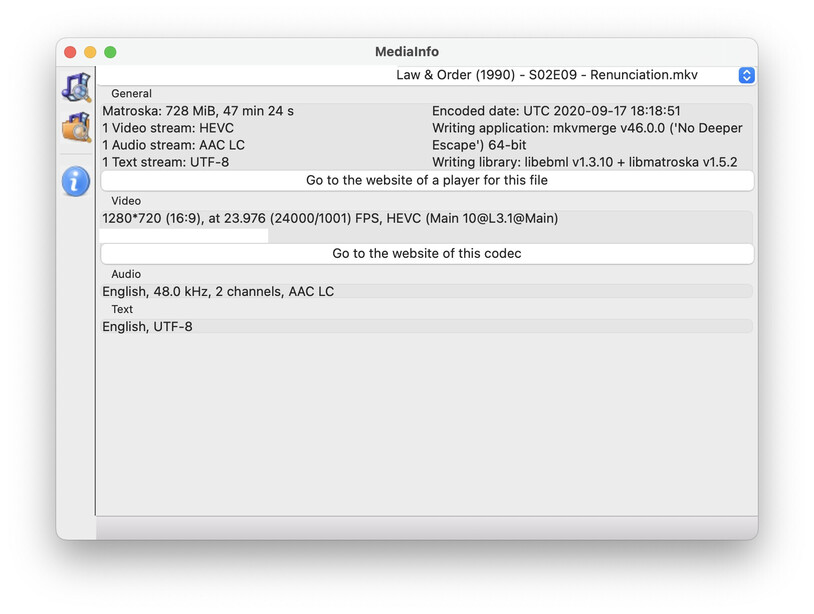
Dec 07, 2023 09:49:50.051 [140295225047864] DEBUG - [Req#2f374/Transcode] MDE: E11 - Out Of The Half-Light: Direct Playing due to no transcode profile
Dec 07, 2023 09:49:50.051 [140295225047864] DEBUG - [Req#2f374/Transcode] MDE: E11 - Out Of The Half-Light: DirectPlay
Dec 07, 2023 09:49:50.051 [140295225047864] DEBUG - [Req#2f374/Transcode] MDE: Law & Order - S1 E11 - Out Of The Half-Light: selected media 0 / 150271
Dec 07, 2023 09:49:50.051 [140295225047864] DEBUG - [Req#2f374/Transcode] Streaming Resource: Added session 0x7f991a081de8:8032C63F-8A68-4BD6-AA6C-CD0CBAF00441
Dec 07, 2023 09:49:50.052 [140295225047864] DEBUG - [Req#2f374/Transcode] Streaming Resource: Reached Decision id=7956 codes=(General=1000,Direct play OK. Direct Play=1000,Direct play OK.) media=(id=150271 part=(id=218693 decision=direct play protocol=http streams=(Video=(id=512115 decision= width=1280 height=720) Audio=(id=512116 decision= channels=2 rate=48000))))
Dec 07, 2023 09:49:50.053 [140295541910328] DEBUG - Completed: [192.168.1.211:49678] 200 GET /video/:/transcode/universal/decision
It’s acting like the player / network can’t get data fast enough. The server looks fine.
ever consider hard restart or reinstalling the iOS app? I’ve had iOS get goofy at times.
Hard-restart of the app fixes many evils.
current iOS behavior is VERY strange to me. I’ve encounted lots of bugs
When you say the iOS app, do you mean the Plex app on iOS? Or iOS itself?
I did try a hard restart of the phone just in case it had some odd bug with its network / mobile part, that didn’t help though.
I can give a reinstall of the app a try. As for iOS itself, the phone is a new replacement - about a week old, and had a clean install on it followed by a restore of my backup. I’m doubtful if it’s related, but honestly I wouldn’t be surprised if it were
I wonder if there’s any way to enable debug logging on the Plex iOS app, to offer more insight on the client-side…
Issue happened again (as expected) this morning. I deleted and reinstalled the app and that seems to have fixed it so far. I’ll keep testing today / tomorrow, and if any issues I’ll let you know.
Thanks for the help. Unfortunately the issue persists. Yesterday it happened just 3 times (that’s 3 times too many), but today it’s happening again non stop. From around 8.45am to 9.05am.
Something is definitely not right here. I’ve never experienced this in the years I’ve been using Plex. Something with caching/buffering/transmission is different, or has recently changed for the worse.
Speedtest is between 55-120Mb down, 1.2-20Mb up. 4G.
No worries, will do. Issue didn’t pop up today… but let me try and reproduce it in the next few days, and when I do, I’ll provide logs from iOS and server side along with timestamps.
Started 3.39PM NZT. Recovered 3.40PM.
Then again 3.40, recovered 3.41
Then again 3.41, and from what I can see, it should have enough buffered to not struggle like this (the darker yellow line at the navbar. Sometimes it was much longer too).
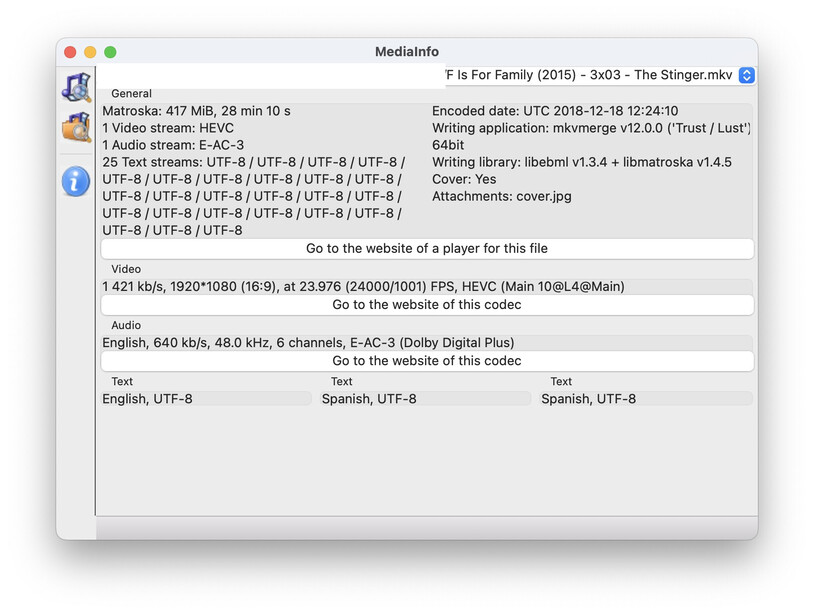
Here’s another instance from today, between 10:00am - 10:15am, with “F Is For Family (2015) - 3x03 - The Stinger”. Same issue, including what I understood as sufficient buffer downloaded, but it still ended up with the same problem few times. Speedtest was 90Mb down (forgot how much up) on 4G with 3 bars.
Edit, I can see several different types of errors on the iPhone logs, but one common error on both PMS and Plex player is:
PMS:
Dec 19, 2023 10:02:24.262 [140594131508024] DEBUG - [Req#b8766/Transcode] MDE: F is for Family - S3 E3 - The Stinger: selected media 0 / 159013
Dec 19, 2023 10:02:24.263 [140594101717816] DEBUG - [Req#b8766/Transcode] Killing job.
Dec 19, 2023 10:02:24.263 [140594101717816] DEBUG - [Req#b8766/Transcode] Signalling job ID 11340 with 9
Dec 19, 2023 10:02:24.263 [140594101717816] DEBUG - [Req#b8766/Transcode] Job was already killed, not killing again.
Dec 19, 2023 10:02:24.263 [140594101717816] DEBUG - [Req#b8766/Transcode] Stopping transcode session EF548E15-93B9-461C-A645-30C73ABFFDFF
Dec 19, 2023 10:02:24.264 [140594131508024] DEBUG - [Req#b8766/Transcode] Streaming Resource: Reached Decision id=75870 codes=(General=1001,Direct play not available; Conversion OK. Direct Play=3001,Not enough bandwidth for direct play of this item. Required bandwidth is 6092kbps and only 720kbps is available. Transcode=1001,Direct play not available; Conversion OK.)
Player:
(3131246) ➖ PMKPlaybackSession.m:484 | Play decision: {
    directPlay = "3001 - Not enough bandwidth for direct play of this item. Required bandwidth is 6092kbps and only 720kbps is available.";
    general = "1001 - Direct play not available; Conversion OK.";
    transcode = "1001 - Direct play not available; Conversion OK.";
}


(3131246) ➖ PMKPlaybackSession.m:484 | Play decision: {
    directPlay = "3000 - App cannot direct play this item. Direct play is disabled.";
    general = "1001 - Direct play not available; Conversion OK.";
    transcode = "1001 - Direct play not available; Conversion OK.";
}

(3131246) 🔧 PMKAppEventMonitor.m:128 | [AppEventMonitor]: Playback Decision did end 09:58:06,7070 | ⚠️ This event ended before?, this shouldn't happen⚠️
(3131246) ➖ PMKMPVVideoPlayerView.m:84 | Player moved to window (null) (screen: (null))
(3145050) ➖ PMKMPVVideoPlayerRenderer.m:100 | Deallocating mpv video player renderer...
(3131246) 🔧 PMKPlaybackSessionItem.m:329 | Destroyed transcode ping timer for <PMKPart:0x2827d9d90 iden=224131 key=/library/parts/224131/1639456954/file.mkv>
The player has a lot more errors.. some with decoding, some timeout, some TLS connection errors, etc. I’m not as familiar with these but still reading through them.


 )
)