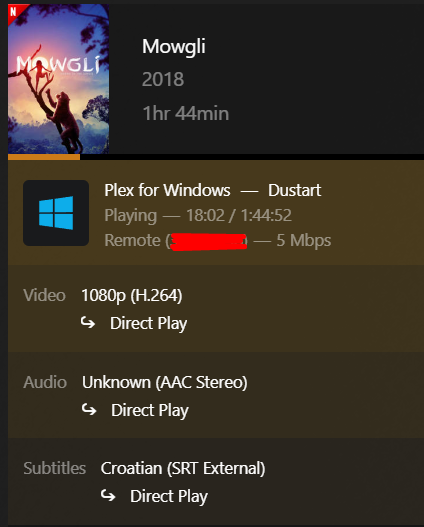
Hello guys, I have a problem the Plex for Windows desktop app is not showing subtitles. On other devices tv,phone,roku, everything works fine it’s only the desktop app that doesn’t display them. I tested it on two different desktop devices with the same result.
I also tried playing the same movie and subtitle file on a test Plex server instance, and it worked there. So the issue seems to happen only on my main server, and only with the desktop Plex app.
Also, it says that subtitles are being used with Direct Play, but I don’t see anything on screen. The only fix for now on Windows is to force transcoding then the subtitles appear. But that’s not a real solution, especially since it was working just fine a day ago.
Any ideas how to fix this?
Try and reset the video zoom to default.
Verify that your SRT file uses text encoding “UTF-8 with BOM”.
Do not use any national 8bit encodings anymore.
Tried all of this without success. I also tried using the “Search Subtitles” option in Plex and downloaded about 10 different subtitles from OpenSubtitles none of them worked. This issue only occurs with the Plex desktop app. On Plex Web, Plex TV, and mobile apps, everything works perfectly. The problem is only present with the Plex desktop app.
Go into Settings - Plex for Windows - ‘Show Advanced’ - Player
and try around with both the “Use Hardware Decoding” checkbox and the “Video Playvback Quality” selector.
Looking for a driver update for your display adapter might also be a good idea.
I tried this, and I don’t think the issue is related to the devices, because I tested it on two desktop PCs and one laptop always with the same results, subtitles only appear if transcoding. Also tried to restart plex server , and restarted pc with plex media server always is the same .. I think this is something with plex media server some bug .. Because all is working great on all another devices except Windows Plex APP..
Is Plex aware of this bug? The only solution seems to be to reinstall the Plex server but I have over 150TB of movies and TV shows, and that would require fetching all metadata again.
I also have around 1,000 movies and tv shows where I manually changed the titles because many were originally in a different language than English. That’s what’s stopping me from reinstalling Plex it would take hours of work to restore my library the way it was.
So right now, I’m stuck between two bad options: either subtitles won’t work in the Plex app on Windows 10, or I spend a huge amount of time rebuilding everything from scratch.
What makes you think that this would be a solution? I very much doubt that it would make any difference.
I tend to think that it is connected to “DNS rebinding protection”. That is a feature of many DNS resolvers, like the one in your router.
Have you ever tried to mux in the subtitle to the video file?
I’m not saying you should do that now with every video you have. It would be just an interesting data point to know if there is a difference between external and internal subtitles.
Because I created a new Plex server in Docker and added some movies and TV shows just for testing, I tried playing them in the Plex desktop app to see if subtitles would work and they did. I also tested it remotely on another laptop using a mobile data network, and it worked there too. That’s why I said creating a new Plex server might solve the issue.
I also tested with internal subtitles on the old Plex server they always show correctly. But when using external .srt subtitles, they only appear if transcoding is enabled. Otherwise, they don’t show up at all.