Not sure if it’s the same problem but i’m listening to a playlist with 500 tracks in it through the Edge broswer and after playing about 5 songs my whole browser starts to freeze when i scroll down the tracklist. I also tried chrome but the same issue. Browser tab for Plex is using 2GB memory and 190 CPU (this says chrome task manager, not sure what it means).
Here we are, years later with a pandemic and nothing changed with the app. Although it was updated every few months. This is very sad. There is no way I can work productively and hear music in the background when I have forgotten to bring the Plex app in the background. Super annoying and I don’t understand how this is so difficult to address.
At this point I’m pretty sure everyone is very much needing to see it to believe it. I’ve got some good music, uppercutting the high GPU usage. Will share a preview build when ready.
Are you saying this issue is being addressed?
Yep. Our release tomorrow includes the changes. Sorry, my intent to share an earlier preview build got lost.
Hi - I just tried the new version (1.31.0.2254-43df1e6e). I’m glad to see that it did get improved — it shows about 25% of GPU usage on Intel UHD Graphics now.
However, it is still too high because the only things that are changing on the window are the progress bar and the playtime counter. This is nothing to do with actual music playback — as soon as I minimize the plex window while music playing, the GPU usage basically goes to zero.
This issue is still prominent. I am running Windows app version 1.31.1.2262-74fdc6b7 (current) and my Lenovo Yoga laptop (client; not server) is spiking my CPU (i7-1065G7) to anywhere between 50-100% when I am not even playing any media. The app is just sitting there (visible or minimized). Power usage is Very High and I can almost watch my battery drain. GPU usage (Intel Iris Plus integrated) is next to nothing.
In task manager, CPU is spiked to 100% currently with Plex Windows app not playing any media and sitting minimized on the settings page. There are 2 tasks under Plex (2) in task manager - Plex and Qt Qtwebengineprocess. Plex is the one spiking the CPU.
Obviously this is not usable. What can be the issue here?
Note: I have another desktop PC running the same Windows app version and this does not happen to that machine.
Again, these are client machines and not the server. Server dashboard indicates no CPU usage of course since nothing is playing.
Let’s see if there’s an answer in the logs:
- Restart the app
- Allow it to sit idle while demonstrating 50-100% CPU usage
- Exit the app once demonstrated for several minutes
- Share
%LOCALAPPDATA%\Plex\Logs\Plex.log
Hi @scotch, I believe it’s the progress bar animating between positions. Constant/frequent animations drive up our GPU usage. The equalizer icon was one example, another is the spinning activity indicator in the header. Compare Plex GPU to Chrome GPU rendering the same user feedback:

I’m doing what I can to increase priority/awareness of our rendering deficiency.
1 Like
Hi Matt. I have noticed sometimes it causes the CPU to run around 50% and sometimes higher. Today it was around a solid 40% just sitting minimized. Even before logging in and just sitting on the Select User screen…it spiked my GPU to over 60%. Once logged in the GPU cleared and the CPU went up to a solid 40% while the Windows app was minimized and no content playing.
This only happens on my laptop and not my other desktops, and only using the Windows app. Usage is normal when using web/browser.
Several screenshots below.
Link to the log is here.
Sitting idle on Select User welcome screen - note GPU usage:

Sitting idle/minimized on home page after logged in to main user - note CPU usage:
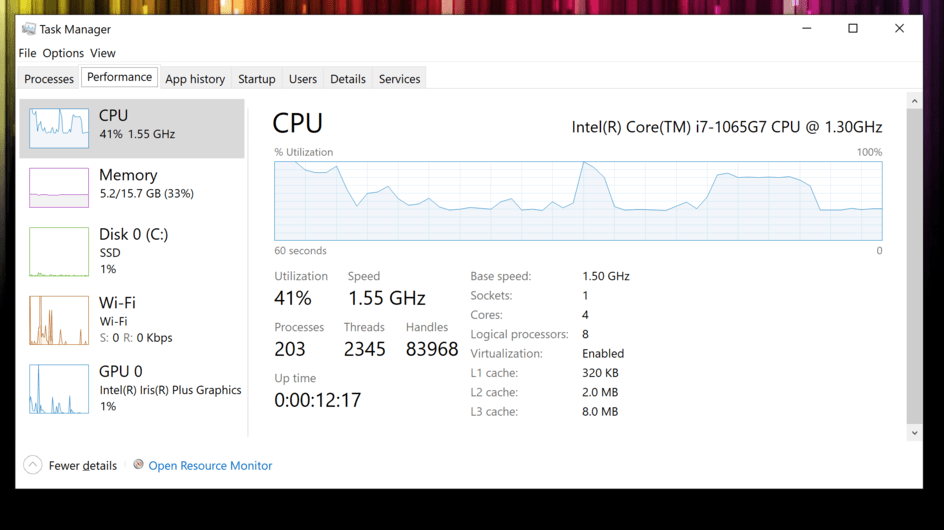

Thanks for any insight you may have. I’m wondering if it is related to display and/or screen resolution on my laptop since these issues are only present on this device.
Thanks a lot @ScoBoX . Plex.log was really handy. The logs show us testing connections during the idle time. That activity would show up in the Qtwebengineprocess.
One thought, and sorry, I should have thought of this initially, will you please attach %LOCALAPPDATA%\Plex\Plex Media Server\Logs\Plex Media Server.log too? It may be the nano PMS that we run in the Plex process which is grinding downloads work.
The high GPU could be related to activity spinner (see a couple posts up) rendering as the nano server processes downloaded media. We’ll see that work in the Plex Media Server.log above.
Thanks @deactivated here are updated logs files.
Plex Media Server.log
from the actual server machine
Plex Media Server.log
from the laptop running the problematic Plex Windows app. This log is from a different test session but shows no data really for a the couple of minutes I had the app open and the CPU was spiking at 40%.
1 Like
The high GPU usage is something I’m seeing as well. I don’t use Plex for music so I see this when browsing my shows and movies. The GPU usage then drops when I start a video.
However, it isn’t always so. I believe it’s like @deactivated said earlier – it’s the spinning activity indicator that drives up the GPU usage. I can scroll through my movies and the GPU usage peaks at around 21%, but when the activity indicator is active it can go as high as 60% without any navigating around the GUI.
It seems a little odd that such a small animation can be so expensive.
You’re totally right. The log PMS log from Plex Windows apps looks innocent. 
I don’t have any new follow-up. I’m advocating for getting the right folks engaged in refactoring our rendering. Improvements there would benefit the spinner-of-death case as well as a several other sore spots. Might look quiet up on the surface but as we work below.
You’ll be my hero, if so!
The “Activity” spinner on Plex Web (Chrome) also uses a excessive GPU. I can initialize a “Scan Library Files” to get the “Activity” spin, and it will use about 20% of my nVidia 1660Ti. The moment it finishes and stops spinning, GPU drops back to near 0% idle.
1 Like
I would be willing to accept a slightly lower-fidelity spinner if that reduced the load. 
this entire page of spinning loaders doesn’t even use as much GPU https://loading.io/css/
Fixed for me with 1.33.0 where there used to be high CPU/GPU usage whenever the Plex client was open. I never tried music playback.
I hoped this update would fix it for me, but sadly…more details:
I can run the Plex for Windows app without being signed in to Plex and it runs great. GPU and CPU usage remain low and vary according to usage (scroll, click, etc.) - but they never peg out at 40% or higher consistently.
However, once I sign in (and I signed in to two different accounts with the same results) the CPU and GPU usage started spiking high again as follows:
– Sitting on the Select User screen - not doing anything just sitting on the screen not selecting any user - CPU 100% / GPU 42% while app is in-focus; CPU 50% / GPU 42% while app is in-background but still on-screen; CPU 50% / GPU 0% while app is minimized.
– Logged in to a user and also after logging out but not closing the app yet - GPU varies according to usage (normal) but CPU still spiked between 50-100% - even when logged out.
If I restart the app after logging out it behaves normally until logging on again. Rinse and repeat.
So these CPU/GPU spikes only happen when logged into a server. Again, I tried 2 different servers; same results. Again, this only happens on my laptop; desktop runs fine with same app same OS environment. So weird. Web version works fine. Just the Windows app on laptop.
1 Like
