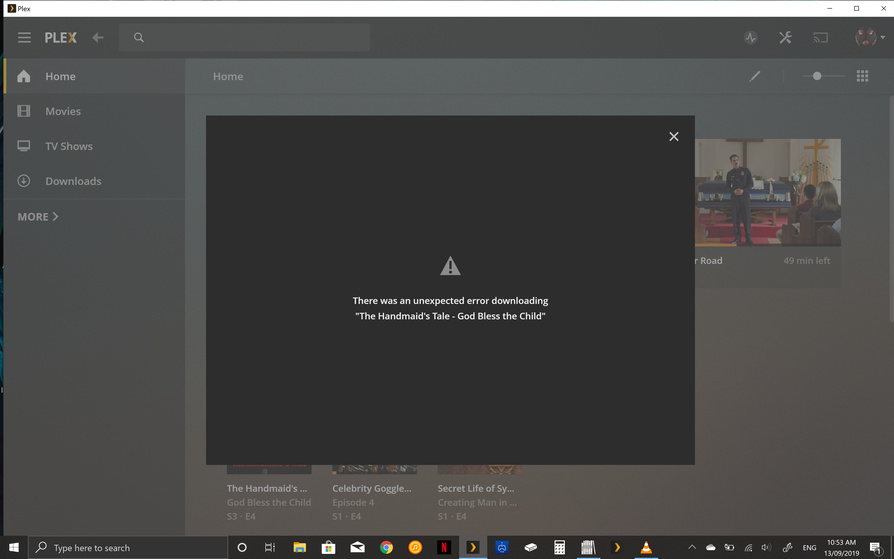
Hi there i have included my server and player versions below. I just installed the new Plex App for windows 10 and the performance in app is incredibly laggy and slow. This is on an XPS 13 2 in 1 with Intel Iris Plus graphics and Intel Core i7 - 1065G7 CPU. Performance in the Plex App is fine on my separate Dell XPS 15 laptop.
Also when i try to download anything on the XPS 13 i get the attached error message. Again this all works flawlessly on my other Dell XPS 15 laptop.
Any ideas what might be wrong? Is it a compatibility issue with the new CPU and Graphics?
Ok after some further investigation it looks like it is an issue with version 1.3. On my XPS 15 i had version 1.0.0.792 installed and it performed smoothly and downloads worked. I installed that same EXE on my new XPS 13 and performance was smooth again. It then auto updated me to version 1.3.0.910 and interestingly Downloading files are now working again but i still have the laggy performance in the UI. Any thoughts or does anyone know if a fix is in the works for this? Very interesting that version 1.3 has resulted in the laggy performance on bothy my XPS 13 and my XPS 15 so it doesnt seem to be a hardware problem with either laptop. Thanks!
I’m on version 1.3.1.916-1cb2c34d and I’m having the same issues with laggy performance. It’s a shame that the Windows Store version that was actually working and syncing is not available as a backup, because I have yet to have a working version of the new desktop app.
So I did a little fiddling and got some better performance. I have a Surface Book 2 with an NVIDIA GPU in the base. I went into the Windows display settings and then the graphics settings and manually set plex.exe to use the NVIDIA card. I then went into the NVIDIA Control Panel and manually set plex.exe to use the NVIDIA card in the 3D settings. Performance dramatically improved. That said, I would assume that the Plex devs would want the app to work well with standard Intel graphics.
Yeh this doesnt work for me since i only have integrated Intel graphics. It feels like them fixing the scaling issue has resulted in the laggy UI performance. Hope they fix this soon!
I also am seeing a vast decrease in performance on a Surface Pro 4 with Intel 520 graphics. In particular, download syncs have slowed to an absolute crawl!
Just tried the new desktop PMP (1.3.1.916) and get the same error as OP got when I try to download an episode. Also don’t get an option of what quality I want to download the media to, unless you get prompted for that after the error I’m getting. Running PMS 1.17.0.1709 on Shield.
I’m with you on this. There was nothing wrong with the old version. I’m not against the idea of moving forward, but this is a massive step back. I use my laptop when travelling and I am now just dragging and dropping files onto my desktop. This new version is buggy (has been since the new desktop app was released), awful for downloads and is like going back to a world before there was Plex. I’m on the lookout for an alternative, because this is just a waste of time for me now and it seems the devs just can’t get through all the issues as there’s just too many to resolve.
Step 1 should be put the old app back in the windows store and give themselves chance to solve the issues in this version.
downloads have been fine for me for the last few days. its just the crippling lag that is the issue! no word on a fix as yet and i am going back to watching the files directly through VLC for Windows until this can be resolved. Also have reverted back to Plex Media Player in the meantime as well. I really hope they iron out these bugs because the new app has a lot of potential!
Is anyone aware of and working on the performance issue? Are there logs or something you guys need us to provide? I’ve had to abandon plex due to this dire usability problem.
Also reporting in with Intel Integrated 630 GPU with new Plex Player, performance just moving the mouse cursor over the different libraries is very slow; it takes about a half second for the ‘glimmer’ to move from one library to another.
This was not an issue on Plex Media Player, which I just uninstalled today and switched to PP-Windows.
I also have PP on a desktop with an nvidia 1070, and there performance is great. But considering this is a QT based application, why would it have such terrible performance vs PMP?
Is anyone also having playback problems apart from the UI lag? Both in my local and remote servers, video playback is really laggy and choppy. I already tried reinstalling the program and my GPU drivers. I hope the new update comes soon.
I have playback as well as UI lag. As mentioned in another thread, choppy playback often seems to coincide with desynced audio as well. On the whole, the entire app is barely usable.