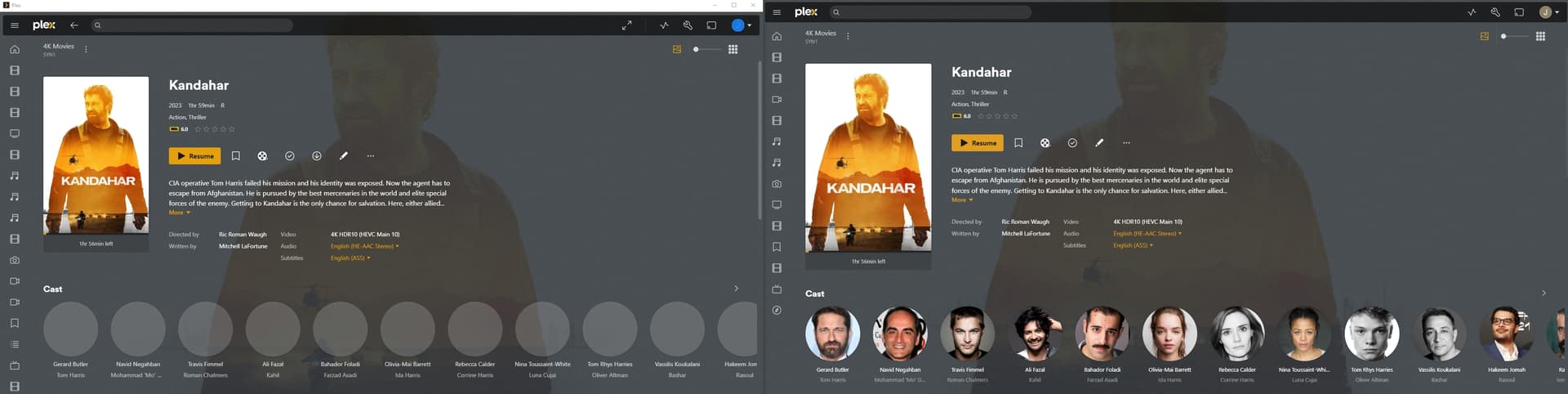
Since the Plex for Windows/Mac app updated today I lost all the cast pictures on both films and Tv, is it possible roll back to an earlier version of the Plex windows app as it was working correctly prior the update.
Sorry i cant check on a Mac as i do not own one, the pictures are both screenshots on the same computer, the picture on the left is the windows app and the one on he right is through the Web Browser.
Plex server is running on a Synology DS918+ , the problem only started after the update today on the windows app. Is there anyway to roll back to an earlier version and also stop it from updating automatically. I think this will solve the problem?
Plex Media server : Version 1.32.5.7349
Hello,
I have exactly the same problem, photos of the cast disappear on my PC’s web application ( Version 4.113.2) but also on the Macbook’s web application.
On the other hand, I don’t have the same problem with the HTPC program.
I have the same problem - cast images appear fine via the web browser, but when using the Plex desktop app in Windows 11 only some cast images appear, and they seem to change when moving from film to film.
Same issue here. Android and web app pictures show fine but Win11 player shows blank grey circles. Intel NUC running PMS on ubuntu docker container with synology file server. I messaged BigWheel my player log.
I have been able to reproduce but there seems to be some very specific conditions that need to be met to observe this issue. The issue has been filed. Please continue to share your logs, both app and PMS logs. Please!
When I wanted to stop the server to retrieve the logs, I stopped the linux service, then restarted it, and then I discovered that the problem had disappeared and that I had the photos of the actors again.
But 10 minutes later, when I came back to it, the photos were gone!
I understand the subtlety, I’m currently in my vacation home and to stop the server, I connected via my personal VPN to reach my server located in my main house. When I’m connected on the same network as my server, the display of actor photos works. When I’m outside the network, the images are no longer displayed.
For your information, the IP address of my second home is entered in the LAN NETWORK field.
My case is similar: the actual computer that hosts the content and on which the Plex server is installed, does not have this issue. On all the other ones, the actor images are greyed out. Same for the web version.