Server Version#: 1.22.0.4136 on Ubuntu 20.04.2 LTS
Player Version#: N/A
I updated this morning to plexmediaserver_1.22.0.4136, and I’m noticing now that any time I shutdown plex, it takes 1.5 minutes to shutdown, where it used to be very fast. The issue when digging into it is that plex is hanging on a clean shutdown, and systemd is killing it finally to get it to stop.
Mar  3 15:02:41 plex systemd[1]: Stopping Plex Media Server...
Mar  3 15:02:41 plex systemd[1]: plexmediaserver.service: Main process exited, code=exited, status=1/FAILURE
Mar  3 15:04:11 plex systemd[1]: plexmediaserver.service: State 'stop-final-sigterm' timed out. Killing.
Mar  3 15:04:11 plex systemd[1]: plexmediaserver.service: Killing process 4976 (Plex Script Hos) with signal SIGKILL.
Mar  3 15:04:11 plex systemd[1]: plexmediaserver.service: Killing process 4987 (Plex Script Hos) with signal SIGKILL.
Mar  3 15:04:11 plex systemd[1]: plexmediaserver.service: Killing process 4990 (n/a) with signal SIGKILL.
Mar  3 15:04:11 plex systemd[1]: plexmediaserver.service: Killing process 4995 (n/a) with signal SIGKILL.
Mar  3 15:04:11 plex systemd[1]: plexmediaserver.service: Killing process 4996 (Plex Script Hos) with signal SIGKILL.
Mar  3 15:04:11 plex systemd[1]: plexmediaserver.service: Killing process 5004 (n/a) with signal SIGKILL.
Mar  3 15:04:11 plex systemd[1]: plexmediaserver.service: Failed with result 'exit-code'.
Mar  3 15:04:11 plex systemd[1]: Stopped Plex Media Server.
I’m also seeing in my “Plex Media Server Logs.txt” while it’s trying to shutdown, it’s the only line in the log related to the shutdown.
Mar 03, 2021 15:27:10.804 [0x7f6323fff700] WARN - Timed out waiting for server to finish.
I have a friend running plex, and did a before and after test, and before the update he does not have this issue, then after he has the same exact issue. He rolled back to the prior version and the behavior went away.
“Make certain the database optimization is enabled in scheduled tasks and that it does run.” It is:
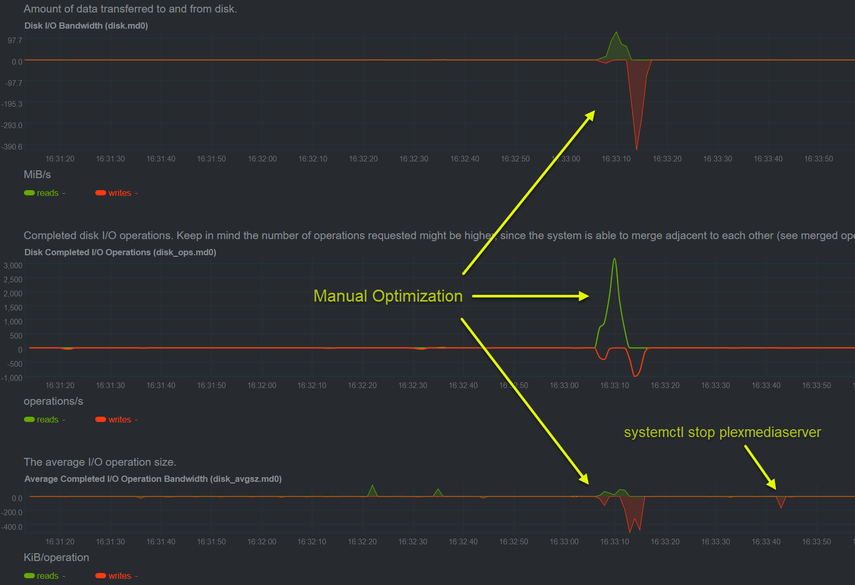
“Also, have you performed manual optimization of the database ?” I hadn’t, but after your post I did, it made no difference in the stop hanging and getting killed.
“It sounds like the server is taking longer than normal to flush / write all the transaction data (fragmented DB is the most likely cause)”. The database (actually the whole server) is on mirrored NVMe storage. If this were the case the system should be doing some IO in that minute and a half and I don’t see very much CPU or DISK activity in netdata.
I can confirm that rolling back to 1.21.4.4079 fixes that hang.
Here’s the section of the graphs from netdata during each action.
Disk IO:
Not that it helps, but this does confirm that prior to the update shutdowns or plex stops had no delay, but I looked back in my syslogs and found another entry, looks like I updated the server and rebooted for a new kernel. The logs show there was no wait on the shutdown of plex.
Feb 26 01:47:36 plex systemd[1]: Stopping Real time performance monitoring...
Feb 26 01:47:36 plex systemd[1]: Stopping Dispatcher daemon for systemd-networkd...
Feb 26 01:47:36 plex systemd[1]: Stopping PackageKit Daemon...
Feb 26 01:47:36 plex systemd[1]: Stopping Plex Media Server...
Feb 26 01:47:36 plex systemd[1]: Stopping Authorization Manager...
The lines after the Authorization manager were the system starting up.
The drives are WD_Black SN750 500GB NVMe drives (WDS500G3XHC-00SJG0).
|01:26:55|root@plex:[~]> hdparm -Tt /dev/nvme0n1

/dev/nvme0n1:
 Timing cached reads:   30226 MB in  1.99 seconds = 15212.83 MB/sec
 HDIO_DRIVE_CMD(identify) failed: Inappropriate ioctl for device
 Timing buffered disk reads: 2576 MB in  3.00 seconds = 857.49 MB/sec
|01:27:42|root@plex:[~]> hdparm -Tt /dev/nvme1n1

/dev/nvme1n1:
 Timing cached reads:   29108 MB in  1.99 seconds = 14645.98 MB/sec
 HDIO_DRIVE_CMD(identify) failed: Inappropriate ioctl for device
 Timing buffered disk reads: 3498 MB in  3.00 seconds = 1165.59 MB/sec
The system is doing it daily processing (library scan, updates, etc, so the #'s might be a little off. What came back however should still be more than sufficient.
The system is an HP EliteDesk 800 G4 DM 35W, with Intel® Core™ i5-8500T CPU @ 2.10GHz.
Can confirm that this is an issue for me as well. Running Arch with latest Zen kernel. Processor is Ryzen 5 3600, database is on EXT4 SSD with all defaults. The newest version that was released (1.22.0.4145) has not fixed this problem, so far the only thing that works for me is rolling back to 1.21.4.4079.
On the same hardware, I reinstalled the OS, changing Ubuntu 20.04 to Debian 10, running zfs. I’d been wanting to do this for some time now for reasons completely unrelated to plex. I installed plex 1.22.0.4145.
Now when I shutdown plex, I get the same errors and hang as before, however now I have a new error that the Ubuntu system didn’t see. May be a direction to look? Hope it helps.
Mar  5 01:39:50 plex systemd[1]: Stopping Plex Media Server...
Mar  5 01:39:50 plex systemd[1]: plexmediaserver.service: Main process exited, code=exited, status=1/FAILURE
**Mar  5 01:39:50 plex kernel: [ 2018.637559] Plex Tuner Serv[20555]: segfault at 58 ip 00007ff4546896c0 sp 00007ff451f3e1b8 error 4 in libpthread-2.28.so[7ff454685000+f000]**
**Mar  5 01:39:50 plex kernel: [ 2018.637596] Code: ff 48 8d 0d c2 af 00 00 ba b1 01 00 00 48 8d 35 4b ae 00 00 48 8d 3d ff ae 00 00 e8 1a bb ff ff 8b 03 e9 45 fa ff ff 0f 1f 00 <8b> 47 10 89 c2 81 e2 7f 01 00 00 83 e0 7c 0f 85 9c 00 00 00 48 83**
Mar  5 01:40:25 plex systemd[1]: Started Session 5 of user root.
Mar  5 01:40:26 plex systemd[1]: Started Session 6 of user root.
Mar  5 01:41:20 plex systemd[1]: plexmediaserver.service: State 'stop-final-sigterm' timed out. Killing.
Mar  5 01:41:20 plex systemd[1]: plexmediaserver.service: Killing process 20495 (Plex Script Hos) with signal SIGKILL.
Mar  5 01:41:20 plex systemd[1]: plexmediaserver.service: Killing process 20581 (Plex Script Hos) with signal SIGKILL.
Mar  5 01:41:20 plex systemd[1]: plexmediaserver.service: Killing process 20642 (Plex Script Hos) with signal SIGKILL.
Mar  5 01:41:20 plex systemd[1]: plexmediaserver.service: Killing process 20700 (Plex Script Hos) with signal SIGKILL.
Mar  5 01:41:20 plex systemd[1]: plexmediaserver.service: Killing process 20767 (Plex Script Hos) with signal SIGKILL.
Mar  5 01:41:20 plex systemd[1]: plexmediaserver.service: Killing process 21041 (Plex Script Hos) with signal SIGKILL.
Mar  5 01:41:20 plex systemd[1]: plexmediaserver.service: Killing process 21070 (Plex Script Hos) with signal SIGKILL.
Mar  5 01:41:20 plex systemd[1]: plexmediaserver.service: Failed with result 'exit-code'.
Mar  5 01:41:20 plex systemd[1]: Stopped Plex Media Server.
After the update to 1.22.0.4163, the issue of systemd killing the plex processes because they hang on a request to stop is resolved.
Some feedback if I may. Within the plex GUI when viewing the list of fixes in an available update, it would be nice if the fixes listed what version they came in at, so people could judge if they needed to update or not for a particular fix. I wouldn’t care about Arcade fixes for example, but would care about a Linux based fix.
For example, something like:
(Linux) The server would take long to shutdown when asked to terminate (#12459)
would be nice if it was something like:
(Linux) The server would take long to shutdown when asked to terminate (#12459)(4163)