Plex Server hangs on database optimization

Server Version#: 1.27.2.5929 - but has been happening since the first release with “better database optimizations”.
Player Version#: Any

As the title says, my Plex server keeps hanging when a database optimization is ran. This happens both when ran manually, and when it’s performed during the regular maintenance window. My server was running fine for a year+ with no issue, until the newer server version with “better database optimizations”. I do have a larger library with about 3500 movies and 24k episodes, but this has never happened before.

Attached is my log which shows when I started the optimization manually (near the bottom) and when I stopped the server because all of my clients that were currently playing, stopping streaming and started buffering. Both remote and local sessions. As I understand it, media should continue to play while the optimization is running, but new sessions cannot be started. This wouldn’t be a problem, but it doesn’t just last 2-3 minutes and then come back online.

When the maintenance runs automatically at night, it will go offline at about 4am and won’t come back online until I restart the service many hours later when I wake up. (Worth noting, I run Plex as a service in Windows Server, using NSSM) There also appears to be no activity on the server when it hangs. No CPU, no memory usage change, no disk activity, no network activity, etc (this is also running on a dedicated blade server with no other apps on it at all. Just Plex.)

Also worth noting, Tautulli doesn’t seen that the server is unreachable. It can still communicate with the Plex server while none of the streaming clients can access it, and it can’t even be access via localhost. This could just be a glitch with Tautulli too, but just wanted to add that info.

Any help is appreciated. I’ve been fighting with this for a few months now, hoping that a new release would fix the issue.

Plex Media Server.1.log (5.7 MB)

1 Like

I run Plex on a Synology NAS and have had the same thing happen a couple of times (with the manual optimize, not the scheduled task).

I ran though the Repair a Corrupted Database procedure and it cleared the problem. I had no database corruption prior to running the procedure, and the procedure did not show any error messages. However, after rebuilding/reindexing, I could manually optimize the database without the server hanging.

Thanks, I’ll try this and report back.

This seems to have fixed it. Though worth noting, I skipped the last step of “Low-level database recovery”. The instructions for this step are a little confusing (on what DB you need to move after creating the recovery DB) but it seems that didn’t matter in my case. " move the .db file aside " is pretty vague when working with multiple .db files.

Maybe someone can make those instructions more clear! :slight_smile:

Thanks!

That low-level recovery is optional, as are all those commands at the bottom of the article. The normal repair procedure at the top should work in most cases.

on what DB you need to move after creating the recovery DB

The entire article is about “com.plexapp.plugins.library.db”. This is the database file you are repairing. Is it really unclear that this is the file being referenced? Not trying to insult you if it comes off that way, just trying to understand where the confusion is.

It’s not clear whether you should move the original DB or the recovery. This was confusing because the file size of the recovery DB did not change from 0kb when initially running the recovery. It only shows it’s file size after you quit out of SQLite. This made it seem like no data copied.

Once I ran the quit command and noticed the file size change, it was more obvious then. But I was also concerned after because the recovery database was almost exactly twice the size of the original database (425MB vs 850MB).

If you follow the guide, the recovery file should have been named db-recover.sqlite, it is not a .db file.

It only shows it’s file size after you quit out of SQLite.

This can be confusing. Changes made to the database are actually stored in a temp location. You need to either commit these changes manually or exit the shell which does it automatically. It wasn’t expected that users would stop mid way and actually look at the files. :smile:

the recovery database was almost exactly twice the size of the original database (425MB vs 850MB)

This is expected. The recovery file is not actually a database but a text file, so it will likely be larger.

Yes, I see that there were some other signs that make that more obvious. But maybe just a little blurb there would help stop some future confusion. Just reference the original file name instead of saying “the db”.

I work in IT and write user/technician KBA’s all the time, so I get where you’re coming from, lol.

It appears this issue is not resolved. While running database optimizations manually still functions as expected, my server is still becoming unavailable at seemingly random times. I was finally able to pin-point a time when this happened.

Server Logs:
Plex Media Server.log (6.5 MB)
Plex Media Server.1.log (4.4 MB)
Plex Media Server.2.log (10.1 MB)
Plex Media Server.3.log (10.1 MB)
Plex Media Server.4.log (10.1 MB)
Plex Media Server.5.log (10.1 MB)

Log file #1 has 2.5k hits for errors, while logs #2 and 3 show less than 100 errors. Most of these errors in 2/3 are expected, but the errors in 1 reference missing items from the database.

This was right around the time the server became unavailable. I run Tautulli and the server stopped reporting to it at 19:36, while you can see that it continued to play sessions that were already in progress. I noticed this at 21:04 and restarted the server. It came back up immediately as usual. (I also want to point out again that I run Plex with NSSM. I know this is non-standard.)

Again this didn’t start happening until a few months back, when there was a major update to the way databases are optimized. It’s fairly rare that it happens (2-4 times per month), and I had hoped it was just a release issue and would be fixed.

Screenshot of Tautulli server history

Any help here is appreciated.

It’s not mentioned in the Plex support article, but you also need to check the .blobs.db for corruption as well. It’s the exact same steps, just with the other database file.

1 Like

I will run this later, I have a bunch of active streams at the moment.

Ok, I performed the steps again on the Library DB, including down to rebuilding from recovery, and I also performed the same steps on the blob DB.

Interestingly, the Library DB is about 30Mb smaller than the original, and blobs decreased by roughly 100Mb. Seems something did change.

It’s up and running now, so I guess we’ll wait and see.

If anyone would like a copy of the original DB’s, lmk. I did keep them. I’d like to find out why this happened, so I can avoid it in the future. Especially if it’s something that I may have done to cause it.

Thanks!

Let pass 3 days of server maintenance and the db size will probably come close to its original size. The manual repair procedure just removes a few index tables which are automatically recreated by PMS.

Most likely cause of DB damage is to unexpectedly shutdown PMS or the whole computer. So if your power has the tendency to shut off suddenly, you better get a UPS unit for your Plex server (and the media storage).

Sometimes, after software updates, PMS needs a long time for the first start to perform database updates. If you get impatient during this time and shut it down, you may also end up with a damaged database.

Alright, so unfortunately this issue is not resolved. Server just went offline again for seemingly no reason, even after rebuilding both DBs and using the recovery method as well. As usual, the application is still running and the service shows a status of running as well.

The system has not shutdown unexpectedly. I’m running on an HP ProLiant blade that is attached to a 3000VA Smart UPS that has network control capabilities. If the power does ever go out for too long, my servers are all shutdown safely via network control. This has never had to occur though, as my power source is fairly stable and usually I see no more than just a couple light flickers when we do have issues.

It’s not an issue of me restarting Plex during updates either. My Plex runs as a service via NSSM, thus auto-updates do not work and I have it disabled. Only to check and notify me and, so I can then update manually.

I’ve zipped and included my entire log folder (I did have to clear the “Installer Log” folder as it was too large to upload. Seems those are just aged logs anyway.)

I am a Sys/Net Admin by day, and an avid homelabber by night with a server rack of my own, lol. So I can ensure you that my hardware is 100% stable.

Logs.zip (19.3 MB)

Jul 27, 2022 11:48:24.070 [5744] DEBUG - TrayIcon::WindowProc received DisplayIcon timer message
Jul 27, 2022 11:48:24.070 [5744] WARN - Shell_NotifyIcon(NIM_ADD) failed: 0x80004005

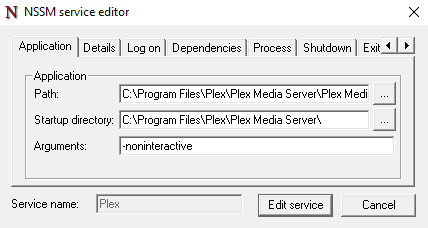
You might want to use the command line parameter -noninteractive when starting PMS. It suppresses all errors which have to do with the regular task tray icon on Windows. (which is not used when running as a system service)
grafik

At least you have no messages about a damaged database file in your logs. So that is a good thing.

There is currently an issue being tracked about PMS becoming unresponsive after a few hours/days. Plex keeps crashing/closing - #110 by sa2000
(The process is not crashing per se, which unfortunately means that the watchdog in NSSM won’t catch it.)

Last thing I heard about that is there was an issue found with the Microsoft compiler/linker, which required working around it. The workaround is expected to become available in PMS 1.28.1.xxxx

Thank you for the info on running Plex as noninteractive. Appreciate making my logs easier to read :slight_smile:

It definitely seems like it’s just becoming unresponsive. One strange detail is that when this occurs, I’m unable to reach Plex from any means (even Tautulli which I initially thought was continuing to work during this time). But if I use the host and browse to localhost:32400, I’m able to load the Plex webapp, but it fails to connect to load my server and just states it’s unavailable as expected.

Pretty sure that is exactly the issue I mentioned.

The server appears to have got deadlocked with last request it completed was at 12:24:28

I will be including you in the message thread for alpha build 1.28.1.6018 which we hope resolves the deadlocks - or may reduce frequency if there is more than one bug giving rise to deadlocks

Please scroll through the message thread to get to the latest alpha download links

Please Media Server 1.28.2 has just been released as a beta release

It has a fix for a deadlocks issue that was identified last week

  • Server could hang in certain circumstances (#13758)

This topic was automatically closed 90 days after the last reply. New replies are no longer allowed.