Plex hardware HEVC decoding not working with Quicksync (Multiple Graphics Adapters)

I cannot get Plex to hardware decode HEVC sources using Intel quicksync, although it is picking Intel quicksync to hardware encode H.264 on the output. It insists on using my CPU to decode the HEVC video. Subtitles are off. If I enable subtitles, the entire stream hangs, but I was not expecting subtitles to work on hardware anyways.

I know physically the hardware in my computer is configured correctly as I have this working perfectly using MPC-HC media player, and it WILL use the Intel quicksync to decode the same HEVC file I present to Plex.

I think there is a bug in the Plex Transcoder on Windows where it is not properly detecting and using the HEVC decoder hardware in the Intel iGPU.

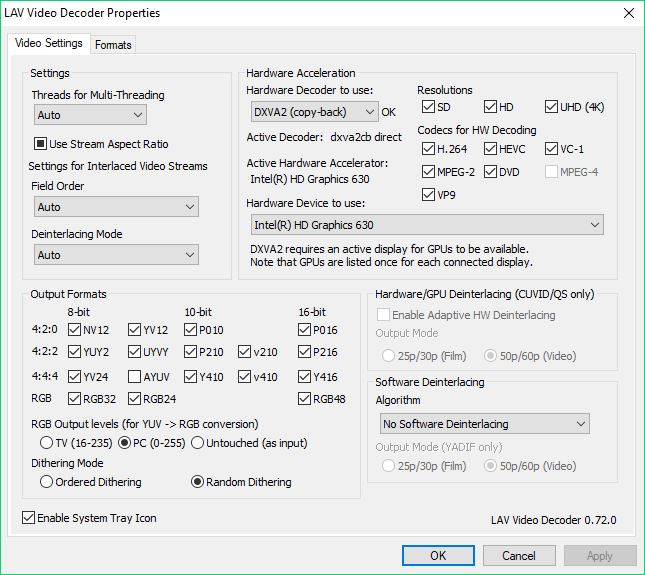
Here is a screen shot of my computer utilization using the MPC-HC application, using the latest LAV Video Decoder lib 0.72.

Here is a screen shot while Plex transcoder is transcoding the same video file to my iPhone. The Plex server status shows that HW is only being used on the H.264 encoding, there is no HW next to the HEVC, and it shows on the CPU/iGPU utilization graphs.

Is this a bug? Or do I have something misconfigured on Plex? I know for MPC-HC I had to do some configuration in LAV Video config to select DXVA2 Copy-back Intel Quicksync as my hardware decoder, but I see no such config in Plex?

Thanks ahead of time. Plex is aweseome! I just want to get HEVC (HW) to H.264 (HW) to work!

A few quick thoughts:

Are you running Plex as a Service? If so, it’s a known limitation of that configuration.

Do you have a monitor connected to the Intel graphics for that computer? If PMS is headless on Windows, hardware acceleration won’t work.

Lastly, it could indeed be a bug. I’m running into this with various AVC, HEVC and MPEG2 files when running PMS on Windows 10.

Not running it as a service, it is running under my logged in account.

Yes, there is a ā€˜dummy’ monitor dongle connected to the Intel HDMI port. I know this is working fine because the ā€œIntel HD Graphics 630ā€ device is selectable under the LAV Video config that I posted the screen shot of. You can see it is enabled and running on the MPC-HC video player.

I personally think that the Plex transcoder is picking the first DXVA2 graphics interface it finds, which in my case are 2 AMD 290x GPUs in crossfire. The 290x’s do not support HEVC. On my PC I have two available DXVA2 hardware video decoder interfaces, the AMD 290x and the Intel HD 630. I am thinking if Plex let me choose the interface I wanted to use for hardware decode, this would actually work. I can select this for the LAV Video decoder that MPC-HC uses:

To the Plex Devs, can an option be added so I can select which DVXA2 interface I want to use?

could you please provide debug logs of the server for a transcode that you expect to use the hardware accleration

See
https://support.plex.tv/articles/201643703-reporting-issues-with-plex-media-server/
https://support.plex.tv/articles/200250417-plex-media-server-log-files/

Please restart the server after enabling debug logging to get fresh logs created for the test. If debug logging is already enabled please restart the server anyway for the same reason

Do the test, provide info on what was being transcoded and what time and then capture the logs zip and attach

Plex Media Server Logs_2018-06-25_20-09-55.zip (804.0 KB)

Attached, I was playing back the file ā€˜The Fifth Element (1997) [UHD].mkv’ from my server., it was about 8:09 PM US Eastern when i hit play on my iPhone Plex app.

The MediaInfo on the file I was playing:
General
Unique ID : 138190195440799689868981811651540041564 (0x67F676AAB0874CB9C97CCF0181123F5C)
Complete name : O:\Movies UHD\The Fifth Element (1997) [UHD].mkv
Format : Matroska
Format version : Version 2
File size : 50.7 GiB
Duration : 2 h 5 min
Overall bit rate mode : Variable
Overall bit rate : 57.7 Mb/s
Movie name : Fifth Element
Encoded date : UTC 2018-03-17 15:08:39
Writing application : MakeMKV v1.12.0 win(x64-release)
Writing library : libmakemkv v1.12.0 (1.3.5/1.4.7) win(x64-release)
Cover : Yes
Attachments : cover.jpg

Video
ID : 1
ID in the original source medium : 4113 (0x1011)
Format : HEVC
Format/Info : High Efficiency Video Coding
Commercial name : HDR10
Format profile : Main 10@L5.1@High
Codec ID : V_MPEGH/ISO/HEVC
Duration : 2 h 5 min
Bit rate : 51.2 Mb/s
Width : 3 840 pixels
Height : 2 160 pixels
Display aspect ratio : 16:9
Frame rate mode : Constant
Frame rate : 23.976 (24000/1001) FPS
Color space : YUV
Chroma subsampling : 4:2:0 (Type 2)
Bit depth : 10 bits
Bits/(Pixel*Frame) : 0.258
Stream size : 45.0 GiB (89%)
Language : English
Default : No
Forced : No
Color range : Limited
Color primaries : BT.2020
Transfer characteristics : PQ
Matrix coefficients : BT.2020 non-constant
Original source medium : Blu-ray
Mastering display color primaries : Display P3
Mastering display luminance : min: 0.0050 cd/m2, max: 4000 cd/m2
Maximum Content Light Level : 10000 cd/m2
Maximum Frame-Average Light Level : 724 cd/m2

Audio #1
ID : 2
ID in the original source medium : 4352 (0x1100)
Format : TrueHD
Format profile : TrueHD+Atmos / TrueHD
Codec ID : A_TRUEHD
Duration : 2 h 5 min
Bit rate mode : Variable
Bit rate : 5 666 kb/s
Maximum bit rate : 9 144 kb/s
Channel(s) : Object Based / 8 channels
Channel positions : Object Based / Front: L C R, Side: L R, Back: L R, LFE
Sampling rate : / 48.0 kHz
Frame rate : 1 200.000 FPS (40 SPF)
Bit depth : 24 bits
Compression mode : Lossless
Stream size : 4.98 GiB (10%)
Title : Surround 7.1
Language : English
Default : Yes
Forced : No
Original source medium : Blu-ray

Audio #2
ID : 3
ID in the original source medium : 4352 (0x1100)
Format : AC-3
Format/Info : Audio Coding 3
Codec ID : A_AC3
Duration : 2 h 5 min
Bit rate mode : Constant
Bit rate : 640 kb/s
Channel(s) : 6 channels
Channel positions : Front: L C R, Side: L R, LFE
Sampling rate : 48.0 kHz
Frame rate : 31.250 FPS (1536 SPF)
Bit depth : 16 bits
Compression mode : Lossy
Stream size : 576 MiB (1%)
Title : Surround 5.1
Language : English
Service kind : Complete Main
Default : No
Forced : No
Original source medium : Blu-ray

Text #1
ID : 4
ID in the original source medium : 4768 (0x12A0)
Format : PGS
Codec ID : S_HDMV/PGS
Codec ID/Info : Picture based subtitle format used on BDs/HD-DVDs
Duration : 2 h 5 min
Bit rate : 36.4 kb/s
Count of elements : 3661
Stream size : 32.6 MiB (0%)
Language : English
Default : No
Forced : No
Original source medium : Blu-ray

Text #2
ID : 6
ID in the original source medium : 4769 (0x12A1)
Format : PGS
Codec ID : S_HDMV/PGS
Codec ID/Info : Picture based subtitle format used on BDs/HD-DVDs
Duration : 1 h 58 min
Bit rate : 32.3 kb/s
Count of elements : 2943
Stream size : 27.3 MiB (0%)
Language : English
Default : No
Forced : No
Original source medium : Blu-ray

Text #3
ID : 8
ID in the original source medium : 4770 (0x12A2)
Format : PGS
Codec ID : S_HDMV/PGS
Codec ID/Info : Picture based subtitle format used on BDs/HD-DVDs
Duration : 2 h 2 min
Bit rate : 21.2 kb/s
Count of elements : 2422
Stream size : 18.6 MiB (0%)
Language : French
Default : No
Forced : No
Original source medium : Blu-ray

Text #4
ID : 9
ID in the original source medium : 4770 (0x12A2)
Format : PGS
Codec ID : S_HDMV/PGS
Codec ID/Info : Picture based subtitle format used on BDs/HD-DVDs
Duration : 1 h 53 min
Bit rate : 169 b/s
Count of elements : 22
Stream size : 141 KiB (0%)
Language : French
Default : No
Forced : No
Original source medium : Blu-ray

Text #5
ID : 10
ID in the original source medium : 4771 (0x12A3)
Format : PGS
Codec ID : S_HDMV/PGS
Codec ID/Info : Picture based subtitle format used on BDs/HD-DVDs
Duration : 1 h 59 min
Bit rate : 28.8 kb/s
Count of elements : 2862
Stream size : 24.7 MiB (0%)
Language : Spanish
Default : No
Forced : No
Original source medium : Blu-ray

Text #6
ID : 11
ID in the original source medium : 4771 (0x12A3)
Format : PGS
Codec ID : S_HDMV/PGS
Codec ID/Info : Picture based subtitle format used on BDs/HD-DVDs
Duration : 1 h 47 min
Bit rate : 481 b/s
Count of elements : 48
Stream size : 381 KiB (0%)
Language : Spanish
Default : No
Forced : No
Original source medium : Blu-ray

Menu
00:00:00.000 : en:Chapter 01
00:02:36.489 : en:Chapter 02
00:12:11.772 : en:Chapter 03
00:24:17.414 : en:Chapter 04
00:32:14.599 : en:Chapter 05
00:40:05.277 : en:Chapter 06
00:48:16.810 : en:Chapter 07
00:53:23.200 : en:Chapter 08
01:00:16.613 : en:Chapter 09
01:07:16.741 : en:Chapter 10
01:11:16.730 : en:Chapter 11
01:21:54.534 : en:Chapter 12
01:27:25.615 : en:Chapter 13
01:38:29.778 : en:Chapter 14
01:46:35.305 : en:Chapter 15
01:52:26.364 : en:Chapter 16

Thanks for looking into this!

Thanks for the logs and info

The server uses a windows API to pick the default D3DADAPTER https://docs.microsoft.com/en-gb/windows/desktop/direct3d9/d3dadapter-default

May be there is a registry you can set Will have a look

It appears you can query the DirectX 3D APIs in order to pick an appropriate decoder based on what you are trying to decode:

https://docs.microsoft.com/en-us/windows/desktop/medfound/supporting-dxva-2-0-in-media-foundation

I only recently(literally last weekend) picked up a machine with a CPU capable of doing the decode and encode stuff with Plex, and I’ve been noticing that as well. Across the board in my case, I don’t always seem to be getting decode or encode operations happening. I don’t have the multiple graphics card issue you do, I got this machine just to be my Plex server, so it’s only using the onboard Intel 630.

I’m not 100% certain how accurate or what the GPU meters of task manager are measuring either though. I’ve been doing some additional testing with Handbrake and ffmpeg, and I can’t seem to get anything to show on video processing. I do get activity on 3D and video decode, which I find a little odd. The 3D in particular is why I’m not sure about the task manager. Either some of the functions are just lumped under 3D, or it’s filing them incorrectly.

2 Likes

Hi.

In my experience, plex will use the hardware decoding of the PRIMARY DISPLAY.

That means you must use the INTEL gpu as the primary screen on your windows desktop.

If you try this, you will see that I am right. I have had this exact scenario using simultaneous intel gpu and nvidia.

Yep, similar card, same problem. Sometimes it works, sometimes not. I get plenty of these in the logs.

[9508] ERROR - [Transcoder] [h264_qsv @ 047d24c0] Error during encoding: device failed (-17)
[9624] ERROR - [Transcoder] Video encoding failed

I’ve reached the point where I’m pretty sure hardware transcoding is having significant problems in Windows 10. Could be all Windows OS’s but I’m not testing any others.

Out of curiosity, your statement implies you think it’s specifically Windows 10, how come?
If someone could tell me they get full support under Ubuntu 16.04 or 18.04, I’ll happily install that and go with that instead, I just was under the impression you generally had to be on Windows to get full hardware support. I am pretty sure that’s true for nVidia cards(not the Shield, of course), not sure about Intel though.

I have a test machine running a Celeron J4005, which is a very entry-level Gemini Lake processor. It can hardware decode everything up to 10-bit HEVC, and accelerates encoding as well. As a test, I installed Ubuntu 18.04 on it (necessary to support Gemini Lake), with PMS. It’s successfully using acceleration on every file I throw at it so far. I haven’t done a full round of testing, so no guarantees, but it’s consistently using ā€œ(hw)ā€ for encode and decode in Now Playing.

No such luck in Windows, and I’d much rather run a Windows Plex server. I don’t know where the problem lies, but Plex hardware acceleration in Windows has been unreliable for me.

1 Like

Interesting, well if it comes to that to get it working effectively, it’s not really a big deal to me to run Ubuntu, so I may have to consider switching if I can’t get the Windows side working well. I’m going to test it some more this evening, but I think Plex may not have been indicating hw at some points when Windows was implying strongly that it was.

I put it in my thread about performance testing, but I have a guess that I’m seeing much higher CPU utilization on Plex then I expect because I think it might be doing a software scale. Even with the hardware decode and encode stages, a software scale is going to hit the CPU pretty hard.

But I seem to be somewhat more consistantly getting hardware operations then you under Windows?

On your Ubuntu install, what’s your CPU consumption been like during a transcode? I’m still seeing 40% @720, to 90% @1080, even with Plex indicating hardware for the decode and encode stages. Are you still getting significant CPU load under Ubuntu?

My Ubuntu and Windows servers have different Intel CPU’s, so there may be some apples-to-oranges comparisons unfortunately, but I’ll try to check it out over the next few days if I can. Not sure about the software scaling. I’ve been too busy to do much troubleshooting recently but I’ll see what I can do this week.

Here’s the word on my Celeron J4005-based Ubuntu system.

For 720p HEVC, typically it has around 40-50% CPU at the start of a file, then within a minute, falls to ~10% CPU usage. If I disable hardware acceleration (just for testing), it immediately tries to use 153% of CPU, so hardware acceleration is clearly working.

I have found some variation on the CPU usage. Some of my HDTV encodes force harder CPU usage than, for example, a Blu-Ray converted to HEVC. I’m not 100% sure why, and I can inspect the files for differences later.

Oh my Windows Plex Server, a Celeron G3930, it has some harder CPU usage for all files, up to 99% to start, but also settles down after a minute as expected, similar to the Ubuntu box. It seems to generally be higher though. GPU is clearly kicked in based on the info in Task Manager.

On a whim, I found a failure, where ā€œ(hw)ā€ doesn’t kick in for the transcode. This was a 720p HEVC. CPU stayed at 100% throughout.

That’s all the testing I had time for this morning.

Interesting stuff! I’ve been experimenting with libav and ffmpeg trying some manual transcodes with resizing, to see if I can get the CPU use down even more.

I’ve so far managed to get a 1080 source to SD (not quite what I’d be doing for Plex) where it’s using around 30-40% CPU, and I’ll say 30-40% on the GPU (primarily in the 3D, with some in the decode). There does appear to be explicit support for performing the scaling with Quicksync, and I think I’ve specified it correctly, but it’s somewhat difficult to be certain. I think though, it’s why my CPU is in the 30-40% instead of the 90%. If it’s correct, I’m a little disappointed, I was hoping for a larger offload than that.

I’m currently trying to followup on the ffmpeg IRC and mailing lists to see if I am using qsv with ffmpeg correctly, or if there’s still room for improvement (and presumably also room for Plex to improve, if that’s the case).

Feature-wise, unless you are doing H.265 encodes (which the G3930 supports in Quicksync, but I don’t think the J4005 does), it’ll probably be just the straight clock speed difference. In practice that’ll probably just translate to higher GPU % usage for the same encode between them. I suspect they aren’t so different with the h.264 encode engine.

The J4005 does indeed support full quicksync decode/encode. For a NUC I bought for $89 on sale, that’s a handy friends-and-family Plex server in theory.

The GPU’s are definitely very similar, they both have the Graphics 600 core. The CPU is weaker on the J4005, so I can’t rely on it to compare CPU load with the desktop Celeron on the other machine. So I guess it says something that the J4005 still has the lower CPU usage on average with Ubuntu. But that could be anecdotal, I really haven’t tried any troubleshooting or really putting the servers through the paces.

Good news, your comment about using a default adapter lead me to a solution that proves that my hardware setup will work, if the correct adapter setting is passed to the PlexTranscoder.exe application!

I spent this Saturday morning writing a shell wrapper application to replace the ā€œPlexTranscoder.exeā€ with my own. I renamed the original exe to ā€œPlexTranscoderOrig.exeā€ All my shell wrapper does is take the entire command line from Plex server, and I simply insert the ffmpeg command line switch that lets me select which DirectX 3D adapter I want to use. I leave all other options unchanged and pass the whole thing through to CreateProcess with ā€œPlexTranscoder.exeā€ renamed to ā€œPlexTranscoderOrig.exeā€, and my one extra commandline parameter added.

I look for ā€œ-hwaccel:0 dxva2ā€ and change it to ā€œ-hwaccel:0 dxva2 -hwaccel_device:0 1ā€, on my PC adapter 0 is my AMD 290x in crossfire, and adapter 1 is my Intel HD 630.

So now knowing this, can the Plex devs add an option to the Plex Server configuration where we can specify the adapter number to use for DXVA2, and if specified, the -hwaccel_device switch is added to the command line passed to the PlexTranscoder.exe when the -hwaccel parameter is also specified?

I have already proven this is the only Plex server code change required to allow this to work.

3 Likes