Hi @Xhaka - The specific remote I use is no longer available, but if you search Amazon for wireless backlit remote you will get results with similar devices such as this one…
@deactivated any reply to this please?
Just did some more testing with frame rates and noticed these differences compared to PMP:
-
Live TV from HDHomeRun, 720p source, plays back at 60fps
-
Live TV from HDHomeRun, 1080i source, plays back at 30fps
-
Dual monitor enabled (in mirrored mode, 1080p resolution on both screens), all sources play at 30fps even though the playback information overlay shows 60fps
-
Playback information overlay also shows transcoding from mpegts → mkv, with the reason “cannot direct play with protocol: hls, codec: mpeg2video. Reason: Live TV direct play is not allowed”
With PMP, all live TV would play at 60fps regardless of source resolution, and my locally stored videos that are 60fps would play at fps.
To recap: with my hardware, Plex HTPC seems to fall back to 30fps when viewing 1080i live TV, or when dual monitors are being used.
My setup:
- Windows 10 Pro x64 1909, with latest Windows Updates
- Intel i7-4770
- Using integrated GPU (Intel Graphics 4600), driver version 20.19.15.5171
- Using current version of PMS 1.22.3.4392, running on the same machine as the Plex HTPC client 1.2.0.2247
- Connected to TV using DVI → HDMI (audio over DVI is enabled in motherboard BIOS)
- Connected to second monitor using HDMI → HDMI
FYI:
Just gave it a quick spin. While a lot is working well including:
- All audio formats I could throw at it including DTS and Atmos 5.2.1.
- Logitech Harmony Ultimate – Works very well
Not a lot of checking but found one issue that should be easy to check.
Sample Jellyfish file does not play on new player but plays on the other two Plex ones.
jellyfish-400-mbps-4k-uhd-hevc-10bit
https://jell.yfish.us/
Plex for Windows—General : Version 1.31.0.2254-43df1e6e → PASSED
Plex Media Player—General : Version 4.29.2 → PASSED
PlexHTPC-1.2.0.2247-20f0f05d-x86_64 → Playback Error - An unexpected playback problem occured
v1.2.0’s new rendering engine has made it unusable on my mid 2010 Mac Mini 8Gb 1Tb SSD.
Both UI and video playback is extremely slow and choppy. Both PMP and OpenPHT still work perfectly. Still issues with app primacy; after launch finder is still the active app.
Only by clicking via mouse on the Plex environment is remote control via Harmony possible.
What are the chances of being able to make it prettier? I still use OpenPHT for my htpc purely because it has skins. While I am dead keen on switching to a newer app that supports all Plex has to offer, I wont be doing it until I can choose how it looks…
I get the same issue. PMP is fine, HTPC white screen on playback, with sound
Unfortunately it’s even worse on Windows as the application bar is visible at the top and the status bar at the bottom. I would only expect to only see these if I choose Maximised.
You will also note that the application doesn’t fill my FHD monitor either as there is a 5 pixel gap at both sides which is outside the application:
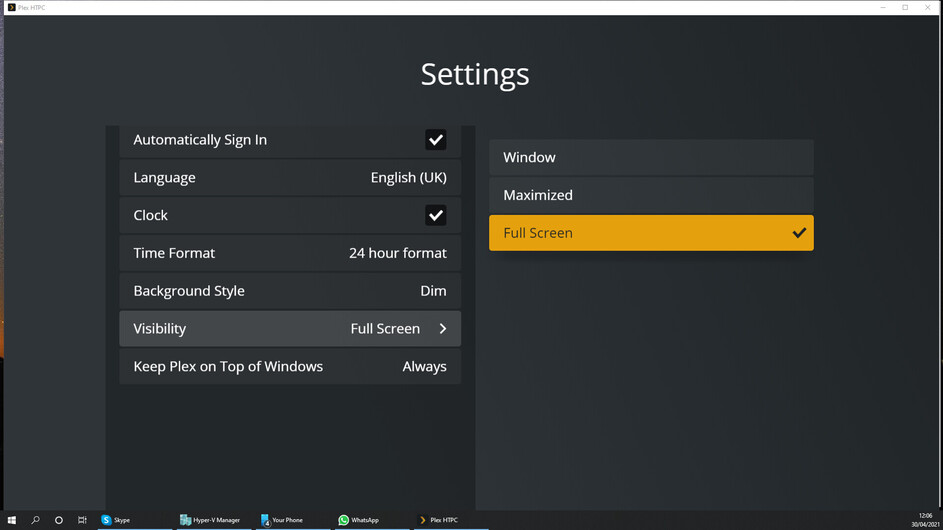
Then if I choose Maximised black bars are displayed at both sides inside the application’s frame:

It doesn’t seem to matter if I use either monitor or 1 or 2 although the above screenshots were taken on monitor 2.
Additionally, Maximized should be localised as Maximised as I have English (UK) selected as my language.
The bad requests just keep on coming till it crashes
Apr 30, 2021 15:28:57.005 [0x1134a95c0] ERROR - [Web] 03/05/2021 15:28:55:888 [spawn666:3uqpwvbpi24vyp9hyzd86txh] ERROR [Unhandled Rejection]: Http request failed: https://192-168-178-82.ee27b8bc11f34d43b3f6fe19dd7b0c6f.plex.direct:32400/player/proxy/timeline?commandID=6, status: Bad Request
Error: Http request failed: https://192-168-178-82.ee27b8bc11f34d43b3f6fe19dd7b0c6f.plex.direct:32400/player/proxy/timeline?commandID=6, status: Bad Request
    at I._reportResult (file:///Applications/Plex%20HTPC.app/Contents/Resources/web-client/packages_app_index_ts.js:1:48799)
    at I.fetch (file:///Applications/Plex%20HTPC.app/Contents/Resources/web-client/packages_app_index_ts.js:1:48426)
over and over and over again.
very glad that you finally changed your mind about HTPC’s !! i was dissapointed when you dropped support back in 2019. very good on first test…i want an option to “disable mouse” like on the old PMP !!
Hey guys,
If I set Audio Delay in the global settings then it doesn’t ever seem to be applied upon playback.
If I play a video and then click the three dots “play options” and set an audio offset it works.
Any idea why the global audio delay is being completely ignored?
Thanks
does the plex htpc use “nono-sgen64”?.. because cpu went though the roof right before plex htpc hang.
Still not better than PMP or the original PHT in UI. The page up and down buttons don’t work. Pressing the play button on an item should start playback. Right now, it doesn’t do anything.
when i enable refresh mode switching sound wont play at all!! when i disable it everything plays fine…i have no passthrough enabled on settings.
old pmp plays sound just fine with refresh mode switching on!
Could staff please explain why this is happening. I would really like to resolve this.
Installed Plex HTPC on my little PC connected to a TV and have a few thoughts …
-
The sysem is connected via HDMI to the TV for both Audio and Vidio. It does have another audio out too. Despite Plex HTPC being set to specicially output audio to HDMI at the start of every playback it plays about a second of audio to the wrong output … which then stops and audio switches to the correct output. Doesn’t happen with the normal Plex windows client.
-
Subtitle positioning is wrong. Everything is set to 1080p but the bottom middle subtitle positioning is too low and gets chopped off at the bottom. This does not occur with the same media and subtitiles on the normal Plex windows client on the same system with the same settings, only with Plex HTPC. Note the subititles are external SRT files.
A general note across both the HTPC ad normal clients … being able to set the library order to be picked up by the clients, and the default vew for the libraries, would be great as, having done a couple of installs this week, having to reorder and set views, in every case gets old fast.
Quick question: is there a way to be notified of a new version? There doesn’t seem to be an auto updater within the app, and the only way I’ve found is looking at the download link and comparing the release number.
There is.
Did it appear in a more recent version? 1.0 and 1.1 didn’t seem to pop anything up.
1.1 auto updated to 1.2 for me, however this only happened when I exited the app.
It did work, however I wasn’t notified of the update, it just happened after I exited.
I think there is certainly room to make it a little more graceful in the future.


