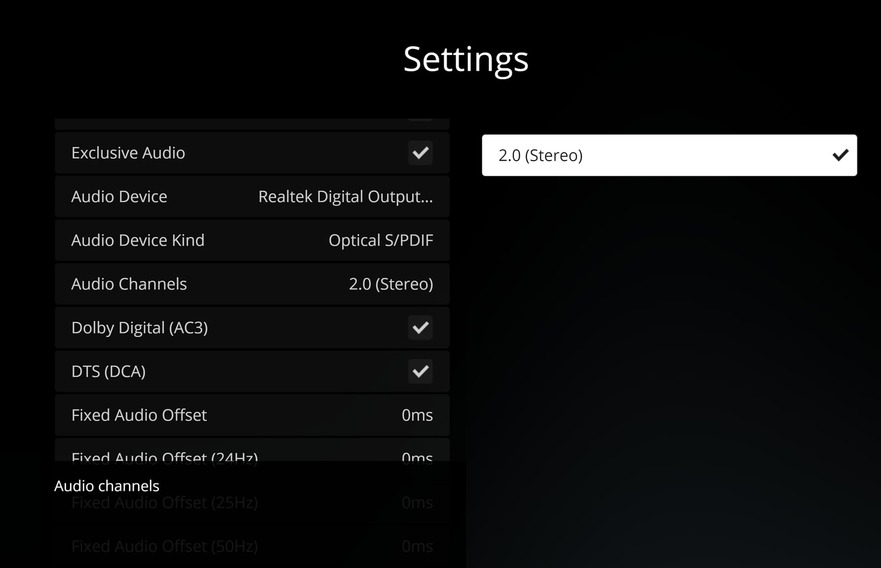
The Linux version (not yet released) now works with hardware decoding vaapi-copy and vaapi-egl (copy-back and no-copy respectively). The problem is detecting whether an EGL context can be used early enough. It doesn’t seem to work on Nvidia graphics drivers (still) and without it users are stuck with copy-back hardware decoding. The detection mechanism in PMP doesn’t seem to work likely due to the lack of x11 in mpv (see below). Maybe there’s a good detection mechanism out there but I don’t know of one.
Update to the layering work:
Mac/Windows appear to be working well. I have tested both quite a bit on my machines and others have tested this as well.
Linux:
I just have to say this: Xlib/XCB is a PITA! I’ve spent more time working with native window routines in Linux than I did in Mac/Windows combined and it’s still not on par with the other two.
Then there the problem of playback on Linux. The easiest/best video output mechanism in Mac/Windows is to give MPV an NSView*/HWND and let MPV render in that as it sees fit. There is an equivalent in Linux but this requires the x11 video output driver. The problem with this is that it is licensed with GPL where as most of MPV is LGPL. The crux is that GPL code is unusable in anything that’s not using a GPL compatible license as it infects everything it touches so this is a non-starter. I don’t know what the solution is going to be going forward. I don’t want to put this back into the Qt render pipeline but there may be no choice.
Did you mean --vo=x11 or --gpu-context=x11 for mpv? Or something completely different? If you mean --vo=x11 please don´t use it as it has no hardware decoding capabilities and is rather slow.
Sorry, I meant the gpu context. There are several code paths that go through the function of interest and I mixed which one I was looking at when making the post. Though in this case it may not matter as we can’t use either one because the code is terminally infected with GPL.
There were apparently plans in MPV to rewrite all the x11 code in xcb using a better license but sadly that didn’t come to fruition.
I updated to Windows 11 and lost all audio again - I’ve tried exclusive/non and toggling all formats and leaving them off, no audio on any of them. all other windows programs work fine
This is exactly as it should be. Optical has a bandwidth limit of ~1.5Mbps and that is sufficient for 2 channels and nothing more (eg. 48KHz * 2 channel * 16 bits/channel = 1536Mbps). Passthrough is achieved by sending COMPRESSED audio on the channel where the compressed bitrate is less than the optical bandwidth limit.
As per why passthrough may not be occurring in your case, no one can be of any help to you without logs.
Morning, so last night we had time to sit and watch a film from our own library on plex. After 5 minutes we decided that it was unwatchable because of juddery playback. I still have rate switching turned off and hardware switched on, if it is turned off playback won’t even start. Same problem with older TV shows that are in far smaller files. Direct stream is enabled for video and audio. Plex Media Server Logs_2021-11-16_08-36-47.zip (5.5 MB)
This morning tried again and same result. Also tried opening file in VLC, just navigated to the folder on the server from the same PC that HTPC is installed on so same hardware and network connection. It worked flawlessly, I was even able to seek with no problem.
I love plex for how it looks and how it organises media, I love the front end HTPC gives and really hope that whatever this is can be solved. As VLC works with no problems I have to assume that my synology server, network and client PC are not the problem.
100%, I don’t want anyone else’s experience to be worsened but I want mine to work as expected and advertised. If I was using this for free I wouldn’t even be here but I’m a paying customer like you, have been for years as I wanted to encourage development. Before this completely new server install and new version of plex I was using plex as a pretty catalogue for TV shows and films and as the files were stored on the same computer as I was viewing the films I just used VLC to playback. Now I have them all on a NAS and wanted to be able to use plex fully but still can’t.
We agree, it is the downside with plex htpc at the moment. so many different hardware \ software configurations and gpu drivers and then win 7, win 10 win 11, as well as each user case for display setup ie. 2k, 4k, 8k and LCD, Plasma, OLED, Projector etc. all these combined make for a long journey in product development. as it seems plex htpc doesn’t have the calling as much as Android, Roku, ATP etc. so I wrongfully assume there isn’t as much bandwidth for plex htpc, glad there are working towards the product and putting so much effort in to helping all of us and hopefully in time it will get there for everyone.
There are some other frontend gui you can use with an external player like vlc, mpc-hc, pot, etc. in the meantime, to give you watchable playback if that is your specific road block at the moment, the interface will not be as nice as plex, but for us they are the better option, until some of the issues get worked out.
Did you buy the HEVC codec for Windows or install the codec so HTPC can use it?
VLC bundles many codecs and only has to decode so the performance appears better. You only have a J4125 cpu on that NAS which is going to struggle with transcoding. You will have to curate your Media to support your devices.
Yes but plex doesn’t use it. I have everything set to direct stream so plex and the server don’t have any transcoding to do. All of my video media is encoded to 265 and wrapped as an mp4 to try and maximise device support.
My PMS is running from a dedicated i7-600k with 16GB RAM and a GTX 1080 card, the NAS is a Diskstation 1019+, and the machine playing the media on PHTPC is a Ryzen 5900 with a RTX 3090, all connected via gigabit ethernet and both machines are running Windows 10.
Since the start of September to this day I have been suffering with the juddery playback. Sometimes it starts 30 minutes into playback, sometimes 5 minutes, sometimes only after pausing, sometimes after skipping. However, NONE of these issues are present when playing in JRiver or Pot Player etc. The issue also does only seem to occur when refresh rate switching is on.
This is absolutely not a hardware issue, and like proper native HDR support still not being present in PHTPC despite being an industry standard, this issue is as equally bizarre & frustrating.