hmmmmm im getting Mar 03, 2022 09:38:49.429 [2984] DEBUG - [MPVEngine] Property ‘gpu-context’ set to ‘angle’
to sum up all that needs to be done is a simple .txt file named mpv.conf containing only the words gpu-context=d3d11 and placing it in C:\Users\XXXX\AppData\Local\Plex HTPC right?
Exactly. Did you also see the line cplayer: Reading config file C:/Users/XXXX/AppData/Local/Plex HTPC/mpv.conf in the logs? If yes, everything should work.
Note the mpv.conf is a simple text file but without the .txt extension. (extension is .conf, windows should warn you if you change it from .txt to .conf)
Well, that’s strange. Administrator privileges should not be needed. (On my system it works without them, and I´m also running win11) Would you mind reinstalling plex htpc and try again? (also delete the Plex HTPC folder in the AppData/Local dir after uninstalling if the uninstaller doesn´t do so)
unistalled everything manually wiping left behind bits aswell and reinstalled but still dosent seem to see mpv.conf and sets itsel to ANGLE .
many thanks for your help Mitzsch i think only thing left for me is to just just wait till gpu-context=d3d11 becomes hopefully default in next future build and hopefully that should work ok.
UPDATE
got it working in windows 11 explorer folder options have to be changed under view with unticked hide extension for known file types or windows wont set correctly.
Maybe it’s because I read it recently but when I read your first post I couldn’t help but recall this story and wondered if that was your problem: Remote access fixes two-day problem in 30 seconds • The Register Since it was, you may appreciate that story.
The setting of the gpu-context to angle occurs within the program itself so it sets a default. After this is when in reads the mpv.conf file so you can override it.
I have spotted a few UI anomalies, some of which I have been aware for a while, so I thought it was about time I put virtual pen to virtual paper and mentioned them
Apologies if they have already been raised:
a. The icon in the application bar is the default icon rather than the Plex icon on Windows when viewed in Windowed mode - although the correct icon is present in Task Manager:
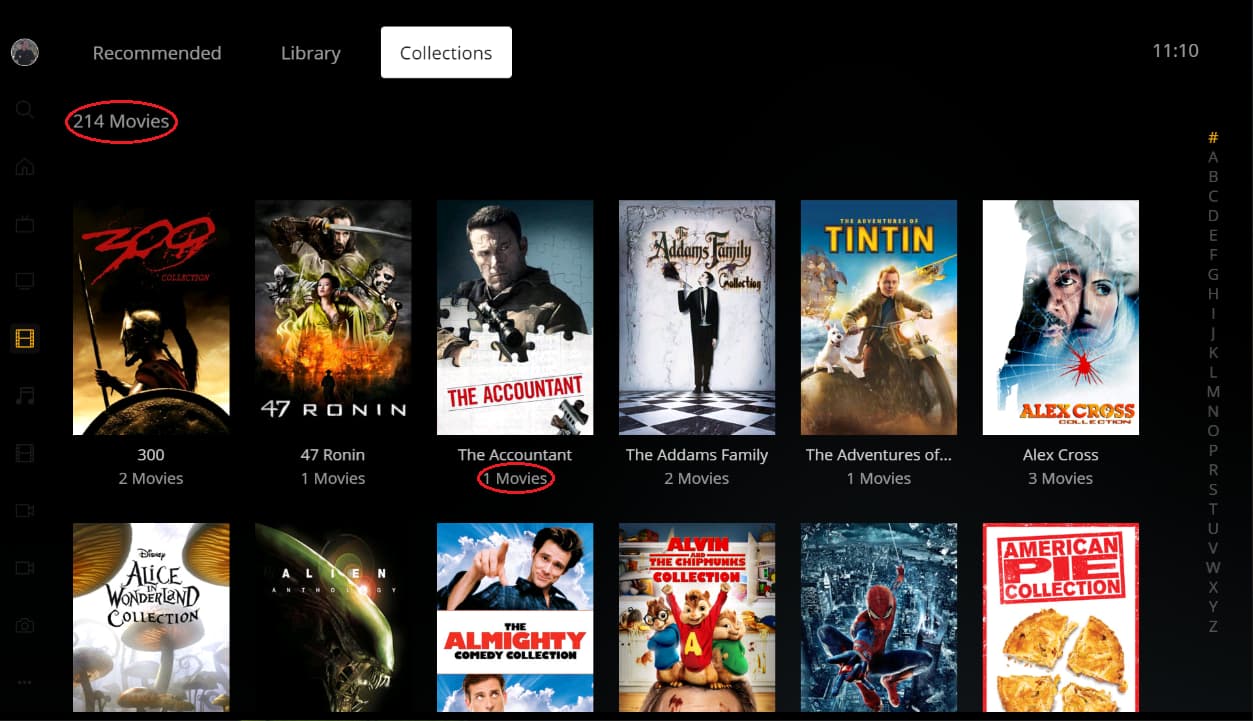
Plex HTPC states 214 Movies but is is actually 214 collections with a total of 485 movies across those collections. By comparison Plex for Windows doesn’t show the count when in Collection view.
c. A single movie uses the plural and displays 1 Movies rather than 1 Movie.
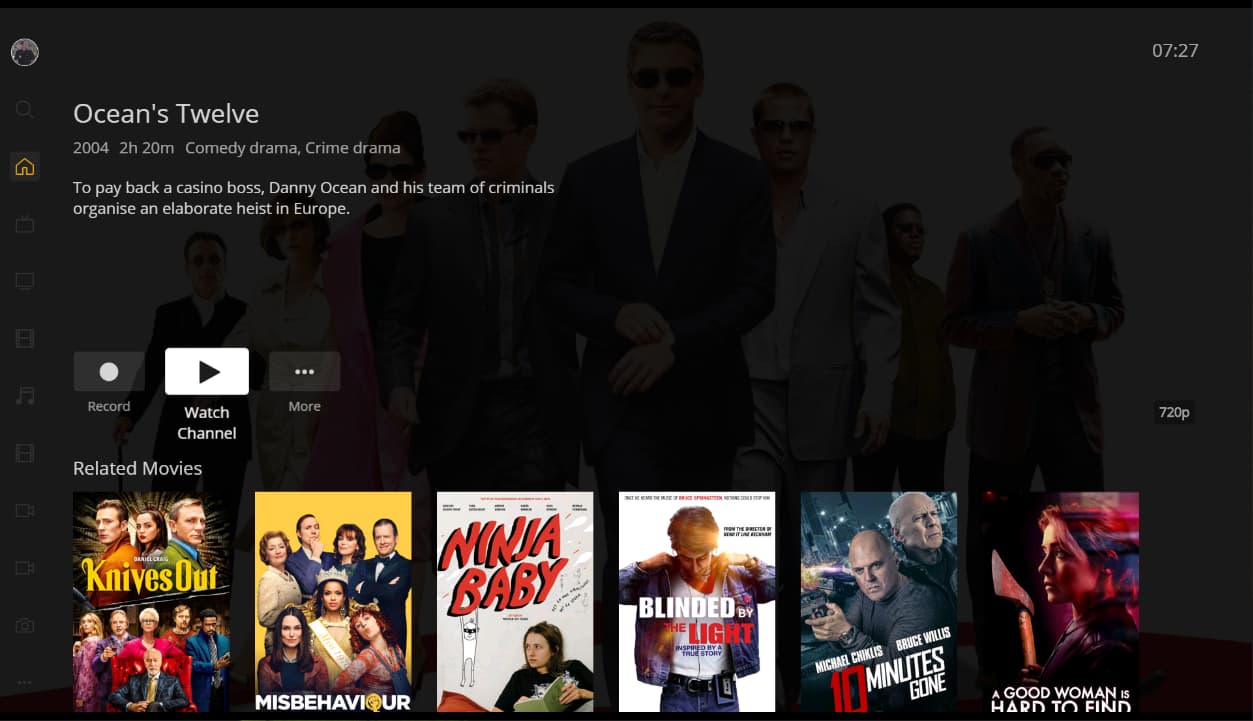
d. After searching for a Movie or TV Programme to record the information is quite basic:
I would have expected to see the following information as per Plex for Windows:
Channel Information
Start time of the showing
Day or date of the showing, if not today
By comparison Plex for Windows shows the resolution as SD and HD, rather then 480p and 720p for example.
d. It doesn’t make sense for the Watch Channel button to be present for a show that is in the future. Likewise it seems odd for the Record button to be present for a show that is currently airing when Allow partial airings is disabled.
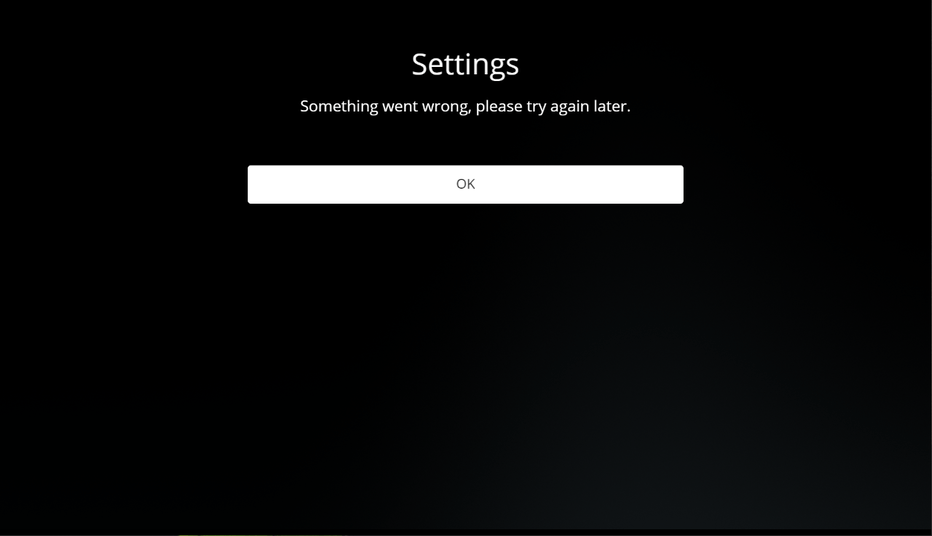
e. The … button which gives you the Settings option displays the following for the Settings screen:
Ah okay - I know it’s really minor but I thought I would mention it. Normally I use Plex HTPC full screen so don’t notice it, but for comparison with Plex for Windows and so I can monitor the “Recording not showing up on the Home screen” issue I currently have it Windowed
Big thanks @gbooker02 and the HTPC team, for me HDR support has been #1 on my wish list for a long time and I know it was a lot of work to get to this point.
Some of the older mpv github issue threads referenced manually invoking a series of other settings for proper HDR playback (e.g. d3d11-output-csp=pq, bt2020 target prims, d3d11-output-format=rgb10_a2) and then manually flipping on the windows HDR toggle.
Is the implementation in Plex HTPC different right now?
Adding the gpu-context=d3d11 is sufficient to get HDR output if you have enabled HDR in windows. MPV sets up a swapchain using the BT.2020 output color space (if you have such a display connected) and goes from there. You can fine-tune the settings if you like but the defaults are pretty decent.
I forgot to mention earlier that this version has LCMS2 built-in to the MPV so it should understand the icc-profile* directives as well.
In a future version (may not make the next version but we’ll see) we are looking at defaulting to the D3D11 gpu context since no one has (yet) reported any issues with it. Out of caution we are going to add some video quality profiles which switch back to using ANGLE if someone does have issues with D3D11.
So I’ve been hoping it gets fixed for the last couple of updates, when I turn on my system, the audio device switches randomly between my pc recognizing my TV or my AV receiver as the speaker. Because of that, Plex goes back to Autoselect Device and then does not passthrough the audio bitstream, I have to go reselect the device everytime. Would there be a way to have like ‘‘approved devices’’ where it defaults to one of them and if both not there then it goes back to auto. Or to have another option to passthrough the audio without selecting the device?
We just recently tracked down the chain of events in the code that leads to this situation. It happens to be an interaction between several code-bases which is why it wasn’t easy to track down. The sequence that’s more common among users is:
TV/AVR turned off
Computer is restarted for a software update (or Plex HTPC is otherwise restarted)
TV/AVR turned on
Plex HTPC is on the Autoselect Device
While your sequence is different, similar actions end up being taken in the code resulting in the same outcome.
I just want to thank everyone for their hard work. 1.12 with dx11 is handling my “worse case” files like a champ. High bit rate 4k HDR on a 1080p screen. Maximum quality.
To the person having trouble with mpv.conf, make sure you enable “show file extension” so that you aren’t creating an “mpv.conf.txt” file.
Gave the HDR support a test drive last night…had massive amounts of dropped frames with d3d11 enabled in the mpv.conf (and hardware acceleration turned on in the UI), for both vanilla h264 content and HDR h265 content. Windows 10, AMD Ryzen APU system (HP T640), everything up to date as far as I can tell. Didn’t have this with the original ANGLE setting.
Anyone have any initial things I could look at? I can grab logs and mediainfo if it’d help (and/or open a separate thread).
Question - reading the linux snap install script, I noticed this little nugget of code:
if [[ $1 =~ "htpc" ]]; then
  app="htpc"
else
  app="desktop"
fi
The script is taking the path to the snap and parsing the filename, and doing some different stuff whether or not it finds htpc or desktop in the filename.
Is there a Desktop Plex Snap somewhere that I’m not aware of?? Could def use the desktop version more than the HTPC build on my laptop.
A nice feature to add would be remote streaming quality setting per server. I have a bunch of friends that share their servers with me. However, each one is of different quality, performance wise. Some I like to have 480p, others 720p, and the best performers set to direct stream. It’s a pain to switch one master setting each time I go to a different server.
I’m running into 2 different issues, music will play but no sound at all and any video with aac as the sound codec is silent as well. I have tested Version 1.10 - 1.12 on Windows 10 and these issues are present in these versions. Version 1.09 it plays music but has a crackling sound every couple of seconds or so. Version 1.08 music plays perfectly fine with no crackling sound. Also anything after version 1.09 if a video has aac as the sound codec there is no sound during video playback. Versions 1.08 and 1.09 aac sound in a video works perfectly fine. Sticking with version 1.08 for now