Hi,
Long term plex user (and lifetime plex passer) here. I have been using PMP on my TV as a media center interface for some time now and was excited to see the resumption of development of a HTPC focused desktop client. I have tried the current releases and noticed 2 things that are broken / working differently to PMP that are stopping me from switching over as otherwise the new HTPC version looks great.
- Audio - The settings seem to have changed slightly from the older PMP so that now if I want to select any passthrough options I have to choose HDMI as the audio connection. I use an Optical SPDIF. When I choose optical I have no options for passthrough and output is locked at 2.0 ( I have 2.1 / 3 channel with a center and left right). If I choose optical then I get no sound on movies as I cannot set passthrough options. If I choose basic then I get locked into only 2 channels being sent to my receiver. If I choose HDMI I get no audio as I’m not using HDMI audio.
Could I request that someone take a look at the previous app and at this one and see if some of the functionality on audio configuration can be restored as it makes the new app unusable.
- Scrolling libraries now loads library content incrementally in a infinity scroll pattern that is very common on the web. This means that when trying to scroll down scrolling will abruptly stop and then load more items.
Previously the entire library would load and you could scroll down through to the end and rendering of images would stop at a point when scrolling and resume when you stopped for performance. This is more like a virtual scroll approach used on the web where all items are loaded but only those visible are loaded into the DOM and are dynamically switched out. This removes the need for the incremental loading pauses.
This second approach seems more appropriate for a HTPC connecting to a locally hosted service (plex) as you don’t need to load small chunks to optimise bandwidth or anything in this scenario.
If you wanted to stick with the chunked loading to speed up initial library display maybe just do 2 chunks? A small amount to fill the initial screen and then automatically load in the rest of the library in the back ground? Would mean you get fast first load and then fast scrolling through the library.
I am more than happy to help test, provide more details or clarification or quickly chat with any of your devs to clarify on both items if that is useful. I am a developer myself so could hopefully help to get a good clear definition on these so they can be looked at.
If you’re open to outside freelancers I’d be happy to take a look myself and compare the old and new apps although QT is not area of expertise.
Feel free to message me directly if needed or useful.
I noticed since switching over from PMP to HTPC that I can no longer use my play & pause buttons on my Logitech remote control, I can’t just got play anymore from the main screen on the episode or movie to start watching, have to enter into the show screen to use the play button on screen to start, these worked perfectly fine with all other versions on PC.
I have to use the enter or ok button to pause or play the show.
Can someone look into this also
Thanks
Incorrect. You have options for AC3 and DTS passthrough as those are supported on Optical connections.
That’s because optical only supports 2 channel uncompressed audio.
Ah, ok so why would I bother to write this post if it was “incorrect” would you like a screen show to prove how incorrect it is not?
Let me repeat when Optical out is selected there are no options available for setting pass through. They are not there in the UI. Perhaps they should be but they are not.
Regarding rhe 2.0 channel limit, if i use plex HTPC, my receiver registers 2 channel input and does not use my center speaker. If I use PMP it registers 3 channel input and it uses my middle speaker. This may well be related to the lack of pass through configuration as plex transcodes ac3/dts down to 2 channel.
I took the time to write this post as a long time user who is excited about the new product and wanted to give some feedback. Being told “no you’re wrong” is not the best way to engage with your community.
“because optical only supports 2 channel uncompressed audio.”
“S/PDIF can carry two channels of uncompressed PCM audio or compressed 5.1 surround sound (such as DTS audio codec or Dolby Digital codec); it cannot support lossless surround formats that require greater bandwidth.” (wikipedia)
You will also find on the web test reports showing that 5.1 DTS and 5.1 Dolby Digital over optical works (eg: Our TV Input Tests: Audio Passthrough - RTINGS.com)
And if I am “here” this is because I had it working on my own setup. Until recently… But a few days ago I had to factory reset my Android OTT box and re-install the plex client and it is no longer working and I see the transcoding happening on the server (the 5.1 stream being converted to mp3)
Of course if you guys think that Optical implies 2 channels I understand why it does not work anymore.
Not disputing that S/PDIF can carry 5.1 uncompressed AC3/DTS audio.
However, this thread is specific to the Plex HTPC client.
The Plex client for Android devices is very different than Plex HTPC. It uses a different playback engine (Exoplayer) than Plex HTPC (mpv.io) and is supported/developed by a different group.
If you need assistance with an Android / Android TV device, please open a new thread in the android-mobile or android-tv section of the forum.
Doing so will avoid confusion / dilution of the discussion for Plex HTPC.
Thanks.
I have the same (?) problem with the HTPC app. It’s not passing through AC3 or DTS signals to my receiver over an optical link. If I try to it’s just silent. PMP works fine passing through the audio. Tried multiple settings in the Audio settings section. It does show passthrough checkboxes but they don’t seem to actually work.
I’ll show you one instead:
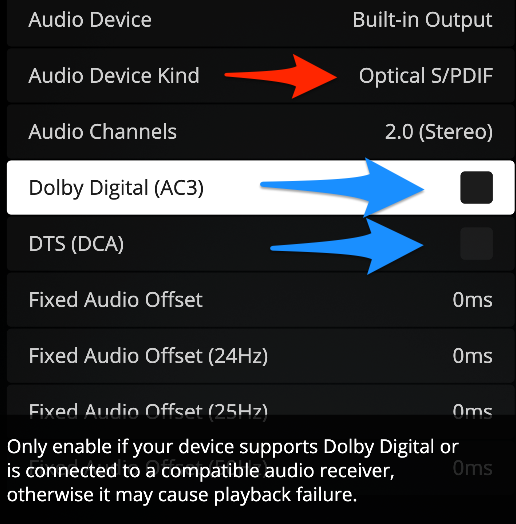
Notice that optical is selected (red arrow) and how the passthrough options exist (blue arrows).
We would need to see logs including such a playback attempt to diagnose this further.
Yep I didn’t have those options, they just were not there.
My HTPC is current packed up as I’m moving house but I will grab the latest version when I get unpacked and go back through the options again to validate.
As I mentioned at the start of this post, I’m excited to see an updated and maintained HTPC app, I’m not here to pick a fight or argue, I am just trying to provide a bit of feedback on what is blocking me as a long time user from moving to the new app.
I will add an update in the next few weeks once I get unpacked again and can take screenshots/check settings.
Well the HTPC app on an Intel Mac is staggeringly good, better than the ATV4K app [ducks under a desk emoji], but I’m seeing the same issue with the Optical/SPDIF choice not working.
tl;dr
my guess
when trying to passthrough DTS audio to Optical/SPDIF device
HTPC log says TranscodeToAC3Enabled is being passed
so right after spdif_dts is loaded by MPV ( yes! )
it then tries to load lavcac3enc and fails ( no! )
partial Plex_HTPC.log
Jun 21, 2022 12:54:36.517 [0x7000039f7000] DEBUG - [MPVEngine/mpv] ad: Codec list:
Jun 21, 2022 12:54:36.517 [0x7000039f7000] DEBUG - [MPVEngine/mpv] ad:     spdif_dts (dts) - libavformat/spdifenc audio pass-through decoder
Jun 21, 2022 12:54:36.517 [0x7000039f7000] DEBUG - [MPVEngine/mpv] ad: Opening decoder spdif_dts
Jun 21, 2022 12:54:36.518 [0x7000039f7000] DEBUG - [MPVEngine/mpv] ad: Selected codec: spdif_dts (libavformat/spdifenc audio pass-through decoder)
Jun 21, 2022 12:54:36.518 [0x7000039f7000] ERROR - [MPVEngine/mpv] lavcac3enc: Couldn't find encoder ac3.
Jun 21, 2022 12:54:36.518 [0x7000039f7000] ERROR - [MPVEngine/mpv] user_filter_wrapper: Creating filter 'lavcac3enc' failed.
Jun 21, 2022 12:54:36.518 [0x7000039f7000] ERROR - [MPVEngine/mpv] cplayer: Audio filter initialized failed!
Jun 21, 2022 12:54:36.518 [0x7000039f7000] DEBUG - [MPVEngine/mpv] mkv: deselect track 1
Jun 21, 2022 12:54:36.518 [0x7000039f7000] INFO - [MPVEngine/mpv] cplayer: Audio: no audio
My Configuration
- Plex HTPC-1.19.1.3076 on an Macbook Pro 16 (2019) macOS 12.4 Monterey
- Cal-Digit TS3 Thunderbolt Dock w/ Toslink Output
- Logitech 5.1 speaker system w/ DTS & AC3 DAC has Toslink Input
- PMS- 1.27.0.5897 on QNAP TS-451+ x86_64 - QTS 4.5.4.2012 en-US
- One subnet LAN, a few switches, 4K external HP Monitor
What I Did
- My PMS is set for Direct Play Direct Stream
- Set the Mac system sound output device to the Macbook speakers to keep HTPC away from the SPDIF interface during setup.
- Started HTPC > Settings > Audio >
- Exclusive Audio - ON
- Audio Device - CalDigit Thunderbolt 3 Audio
- Audio Device Kind - OPTICAL/SPDIF
- Audio Channels - 2.0 (Stereo)
- Dolby Digital AC3 - checked
- DTS - Checked
- Tried to play a film with only DTS audio.
- Tried to play a film with only AC3 audio.
- Tried to play a TV show with AAC 2.0 audio
What Happened
- Silence, no indication of any signal reaching the DAC on all three media.
- The
Plex HTPC.log file shows SPDIF output is accepted and that a decoder is loaded by the MPV engine, but right after that it tries to load an AC3 encoder into the filter tree and it fails there, resulting in
INFO - [MPVEngine/mpv] cplayer: Audio: no audio
What I expected
- I should have heard sound from the two films in DTS and AC3
- The Decode LED on my DAC should have lit up indicating DTS or AC3 audio on those two.
- I know this hardware chain plays DTS and AC3, as it works with Plex Media Player.
- I should have got silence from the AAC video like I did. This was correct and expected that encoded AAC can’t be decoded by my DAC when sent directly to the DAC bypassing the Apple mixer via the “Exclusive Audio” checkbox.
A Workaround
- It works great if I just choose HDMI like the OP stated.
An Unexpected Joy
- Plex-HTPC took a film with a single DTS-HD MA track and stripped out the MA part, sending my DAC a pure DTS track to play. That caused a ■■■■ eating grin for about an hour until I realized that Plex Media Player has been doing it for years.
Plex HTPC.log.zip (32.7 KB)
<3
this is true, but was a bit unix
You’re not incorrect. What you experience is also true. 
Understood. I’m here because the answer is fun.
You were all correct. Plex explained it in an article, under the Audio Channels subsection:
https://support.plex.tv/articles/audio-configuration/
Number of speakers is ignored when passing through. It’s ignored because the point is to not touch the audio. And when it’s not passing through, Optical can only transmit uncompressed PCM stereo by design.
So why list more than 2 speakers if Plex can’t address them and can’t send them data?
Regardless, I think I was getting no sound, and I posted my log.
Hope everyone had a nice weekend
Hello,
I have the same problem of audio with Plex HTPC.
I used the optical spdif output for the audio.
If I choose Optical S/PDIF → No sound
If I choose HDMI → I have sound but only in stereo (2.0)
With Plex Media Player audio functionn correctly.
I Choose my audio card, Optical S/PDIF avec my movies played in 5.1
Tested with Plex HTPC 1.20.2.3110-6f190192
I just saw that there is a new version of Plex HTPC.
With this version and by selecting Optical S/PDIF, the Audio Channels parameter still indicates 2.0 (Stereo) but I have my movies again which are played in 5.1.
Audio seems to work like with Plex Media Player with this new version (1.21.1.3131-2a5b8107).
Thanks.
