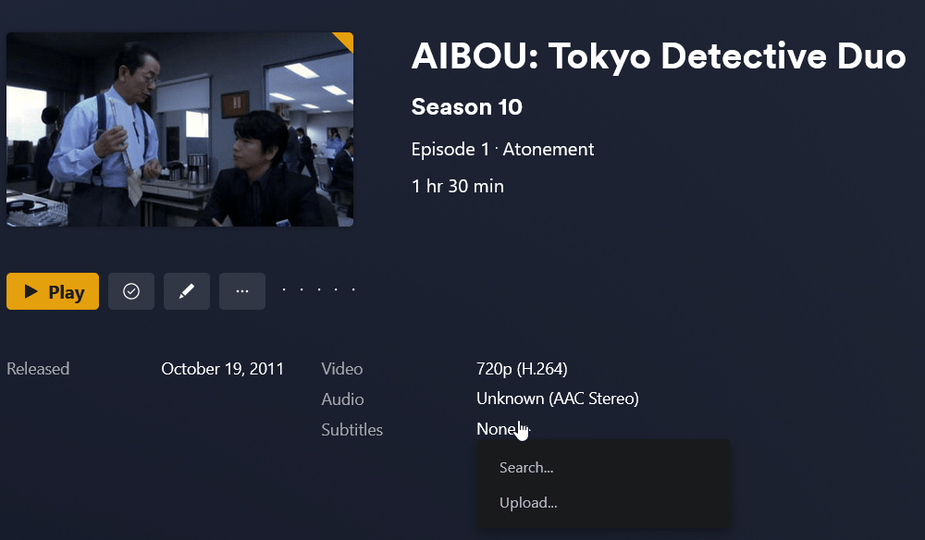
Server Version#: 1.32.3.7089
Player Version#: Web 4.100.1
I have added the Subtitles according to the Adding Local Subtitles to Your Media post. However the server is refusing to detect them. Adding them manually by uploading them works, but I would like to avoid that as I have 11 seasons of 18 episodes that I would have to do that with.
For context as to why there are 2 subtitle files with for each episode. I started with SRT and then converted them to ASS to see if the problem was SRT specific.
Scanner: Plex TV Series
Agent: Plex TV Series
Use local assets: enabled
I do not have a preferred language for subtitles selected in the library as I don’t care about auto selection.
None of the existing posts regarding subtitles seem to use the new agent and I would rather not have to switch to the legacy agent to get subtitles to appear.
Anyone know what I am doing wrong?
Did you scan the library and refresh the metadata?
If you did, try refreshing the metadata for just one item and see if that shows up
Did you scan the library and refresh the metadata?
Yes. I refreshed the library each time I added the files. I even tried removing them, and then adding the files back with a metadata refresh between each step. I also just tried a scan of the library.
If you did, try refreshing the metadata for just one item and see if that shows up
I would if I could, but as you can see the Refresh Metadata option in the ... menu is grayed out.

I just added a new episode and checked the logs after adding the subtitles. Aside from in the in the main server log file the only mention of the SRT file that I can find is in Plex Media Scanner Matcher.log
May 29, 2023 17:58:53.059 [140562984147776] DEBUG - Scanner: found local sidecar subtitle “/data/tv/AIBOU/Season 10/AIBOU.S10E03.Late.summer.jpn.srt”
May 29, 2023 17:58:53.059 [140562984147776] DEBUG - [FFMPEG] - Opening ‘/data/tv/AIBOU/Season 10/AIBOU.S10E03.Late.summer.jpn.srt’ for reading
May 29, 2023 17:58:53.059 [140562984147776] DEBUG - [FFMPEG] - Setting default whitelist ‘file,crypto,data’
May 29, 2023 17:58:53.060 [140562984147776] DEBUG - [FFMPEG] - Format srt probed with size=2048 and score=100
However there is still no sign of any subtitles in the web interface.

I don’t recall ever seeing my “refresh metadata” grayed out like that
You might have to post a full set of logs and wait for an employee to review them
You can’t Refresh Metadata on a single episode.
You will have to do this on a season or the whole show.
While you’re at it: go to the top level of the show (by clicking on the show’s title).
Now open the context menu of the show and see whether you have Match or if you have Fix Match as a command in there.
Which one is it?
Refresh the item, then server logs please.
The greyed out Refresh Metadata normally means something went wrong with the refresh, just reload the browser and it should allow you to refresh again.
Ok, I don’t know what the hell happened but when I checked my server this morning the all the local subtitles had been recognized. The grayed out Refresh Metadata is no longer grayed out. I also just added a new episode and local subtitle file and Plex recognized it right away without me even having to refresh metadata.
So I guess I should mark this as solved?