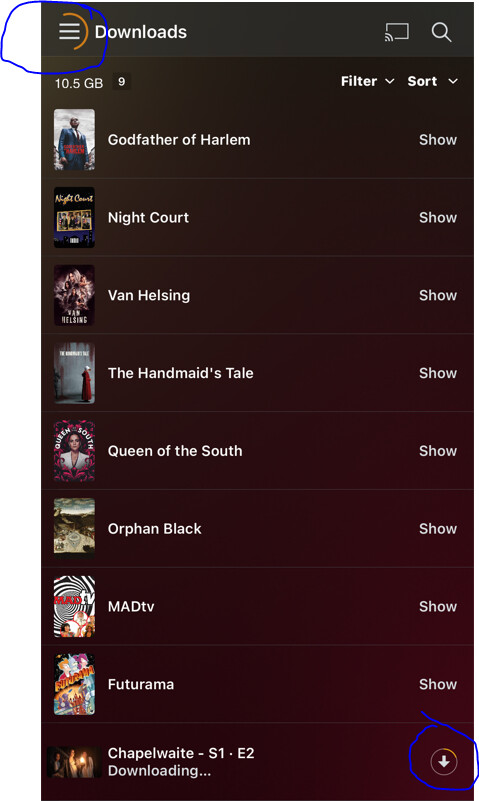
So if I have this right…
When the download is being prepared by the server the app says “downloading…” and shows no progress indicator.
When the download is downloading the app shows “downloading…” and shows no progress indicator,
When the download is done the app shows the whirly symbol, “downloading…” but no down arrow next to it…
That cannot possibly be the UX as it was designed?
With the old Sync functions:
I could see on the server all of the items I’d scheduled to sync, it showed whether they were Pending, Transcoding, Downloading or Done.
I could see on the app all of the items I’d scheduled to sync, it showed whether they were Pending, Transcoding, Downloading or Done.
Well hopefully someone can shed some light. This is what you should be seeing, it shows overall progress, but does not differentiate between “downloading” and “transcoding”.
I just returned from a trip where I attempted to use the Downloads functionality in iOS. My experience was that the download would start, but doing anything else on my phone seemed to cause the download to restart. It looked like if Plex lost absolute priority, it started the whole process over, so I never actually got a single download to work. Very disappointing.
It means it has stalled somewhere for some reason. The top left will continue spinning if download is “active”. But it looks like yours stalled for some reason because there is no progress.
On my iPad Pro 11 M1 (2021) using the latest beta 7.24.1 (1350) the new Download section does not work. The selected film never ends to download (it says downloading 1 of 1 with 0 progress.).
I reinstalled multiple times the app and always the same issue. I ended up with reactivating the old Sync feature.
I recall that couple weeks ago I wanted to try the new Download feature but it wasn’t working.
On my iPhone 13 Pro Max the new Download feature works correctly, I do not know what is wrong on my iPad.
Having a similar issue here - Downloads consistently fails … on my iPad, running the latest Plex App Beta, and iOS 15.1. I switched back to Sync - and it worked, right away. So it really does seem to be Downloads related. BTW, Sync also worked in the background (screen saver on), but Downloads supposedly doesn’t!!!
Any logs that you are still needing? More than happy to help, get to the bottom of this.
I just don’t understand what it is doing most of the time. Last night I added 4 new episodes to Plex, and this morning i get this. Is it redownloading everything again? Is this just a numbers bug? A general bug? What is happening?
This is from a playlist made to download recently added episodes.
@DavidIrwin Your logs show that the app is having trouble making a secured connection back to your server. Can you play that movie from your server, I only need about 30s, then grab me that log. Id’ like to double check that the connection is working.
Also note that transcoding and downloading are no longer sequential with Downloads. Once some of the file is transcoded, it should start downloading so you will see 2 lines in the server activity window. On the client, the spinning circle means it’s thinking, it should change to that arrow icon when it starts transferring. The client does not indicate transcode status. That arrow is the downloaded progress indicator, The outside ring will indicate 0 to 100% by how much is orange. We know it’s hard to tell. Something for us to look into in the future.
@Anijake The app does recheck the files so although it says downloading, it may not actually be re-downloading that file. What do you see on the items page for that playlist?
All the stuff is downloaded correctly, just didn’t know what it was doing. I don’t think that is a good status indicator. Should only show what is actually downloading. It’s quite confusing.
Depending on what you select for “downloads” it will always refresh the list and if it sees, based on your criteria, it needs to download further episodes it will do that automatically.
This is what I love about the feature! You select to download a select number of unplayed episodes and it will keep it current without having to think about it. A really great feature!
I have tried to play the original file (Snake Eyes) and that played fine, also I swapped to trying to download other things (sorry if this messes up the logs) but that include the film Free guy which also played fine.
@DavidIrwin Your logs indicate there is DNS rebinding on your server. During playback, the app is able to get around this, but that doesn’t seem to work for Downloads. I will look into why it’s different for Downloads. If you can clear up the DNS rebinding issue, Downloads should start working for you.
@Soruk Not sure what’s going on for you. Still reviewing your logs.
Ah, rebind!
I’d completely forgotten about that as a potential issue, thanks for the hint.
I just added “plex.direct” to the domain whitelist on my router’s DNS settings (I use OpenWRT with forced DNS going to Cloudflare & Google)…this has now resolved the new download feature for me.