@anon18523487 — Did this last set of logs provide anything useful?
Thanks!!!
@anon18523487 — Did this last set of logs provide anything useful?
Thanks!!!
We’re still investigating. I see the errors and where it’s failing, but can’t identify why.
Hello! Any update on the troubleshooting? I’m having the same issues as Hawkinsb as well. I recently bought a brand new ipad and tried on that device with the same results as the iPhone. Thank you for helping!
It is, admittedly, pretty frustrating that I can literally download NOTHING successfully on my iPhone. The download feature simply does not work for me, and I can provide logs 100% of the time, but the issue still lingers. I’ve changed settings, tried different content, etc. And in every case, each time I go back into the Downloads menu, the items start redownloading. Very frustrating…
So I discovered something by accident this evening. If I download only shows that were recorded using live TV on Plex, my downloads finished successfully. They also don’t keep restarting when I go into the downloads menu.
When I try to download a show from my library that was not recorded in Plex, the constant redownloading begins — even on the shows recorded in Plex that were previously successful.
Virtually all of my content that was not recorded using Plex is stuff that was encoded using Handbrake historically. So there definitely seems to be a media component to whatever bug is causing my downloads to continually restart.
I just tested your theory and have the same result. I only have one media file in my library that wasn’t run through handbrake and it downloaded successfully without any errors or download looping
Well unfortunately tonight I tried to add some more downloads using stuff Plex had recorded from live TV. When I did, the app immediately started redownloading everything I had already successfully downloaded previously. 
That is quite odd. I can’t see why a file created by handbrake would not work.
I can’t seem to download anything that needs to be transcoded. It would go through the transcoding process and say “Error downloading this item”
I just updated my Server to the most current version and updated the plex app on my iPad as well. It seems to be working, finally. Can you give it another shot and see if it’s working for you? I’m about to try on my iPhone next.
Jumping onboard here to say I’m also having issues and would love some help in understanding what’s going on.
Downloads have stopped working since they were renamed from Sync to Downloads and I can’t understand why.
Attaching my logs from this evening where I tried multiple times to download to my iphone. FYI im seeing the same issues on my ipads too.
Plex Media Server Logs_2022-02-14_19-49-47.zip (5.3 MB)
As the error message is really vague “Error downloading this item” i’d really appreciate some help in understanding what exactly the issue is. I’ve looked over the logs and still non the wiser as to what the issue is.
Is Downloads ever going to be as good as Sync ? 
Thanks in advance
Downloads is a totally different feature than Sync. It wasn’t just renamed. I need the log from one of the devices after reproducing the problem. Your server logs don’t reveal anything.
Same, can’t download anything on my android phone
tried with a new lib with personal movies, no change
Plex Media Server Logs_2022-02-14_21-19-26.zip (4.2 MB)
@LissaPlex Still restarting downloads all the time for me.
@anon18523487 Here is another clean set of logs. I’m still seeing previously completed downloads restart when I add additional downloads. In this case, the order was that I downloaded successfully an episode of “60 Minutes.”
Restarted my server and app cleanly. I then started a download of “The Goonies” which did not seem to target re-downloading. While Goonies was downloading, I started a download of “20/20.” When I added the “20/20” download, the “60 Minutes” episode started re-downloading for no apparent reason.
Server version (Windows): 1.25.6.5545
iOS App version: 7.28.1
Logs attached for both…
Plex Media Server Logs_2022-02-14_20-51-02.zip (2.5 MB)
PlexDebugInfo-hawkinsb-7.28.1-1 (2022-02-14 20.50.34 -0500).zip (3.4 MB)
@hawkinsb My Windows Server is running 1.25.5.5492 and I don’t have any available updates it says
@hawkinsb I see where it is re-downloading that episode. Very odd. I have 1 potential theory on why this is happening. When you downloaded the episode originally, is it possible that it was not matched. Now, the episode is matched, so Downloads thinks it’s a new file so it’s grabbing the new version.
Could you let it finish, then downloading something else and see if that episode of 60 minutes downloads again? If it only re-downloads once, my theory could be possible. If it re-downloads multiple times, I have no idea what’s going on.
@LissaPlex 1.25.6 is the beta. You need to change the updater to look at the beta channel to get that version.
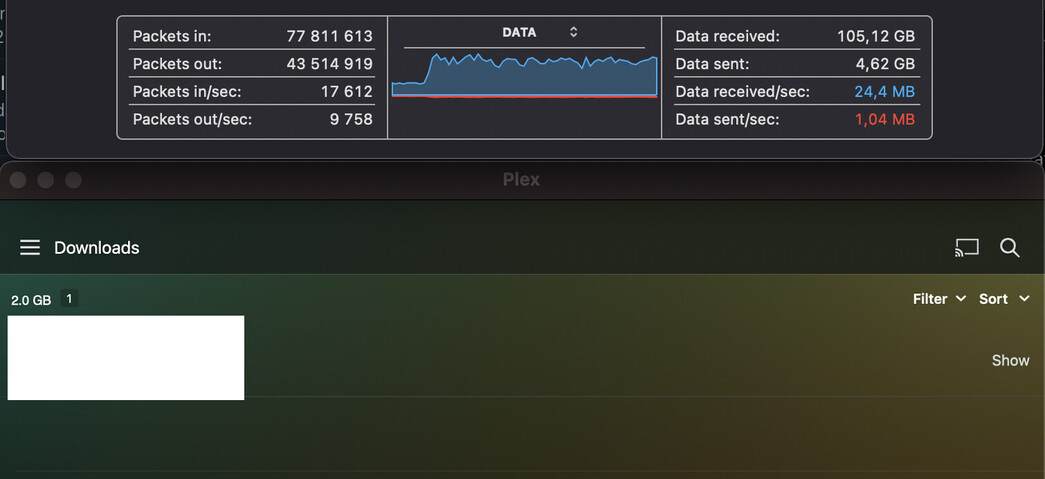
What the frell; I see the same thing - constantly trying to download and gets nowhere. Got fed up uninstalled plex - didnt help. Reinstalled plex and cancelled all downloads and uninstalled plex again - didnt help.
Without plex installed, machine reboots and connects to remote plex server and starts downloading while never finishing. I must admit that having to use my firewall to stop an uninstalled app from rendering my limited bandwidth unusable is a few stops beyond unacceptable… Do I need to call an exorcist or can we have sync back?!?
Edit: so I tried installing, checking all downloads were still deleted, signed out of plex, uninstalled plex and rebooted - Macbook still starts downloading from plex server. So I decided to try throwing bandwidth at it, no dice, seems like bottomless queue or whatever. After a while I re-install plex, sign in, check that there are no active downloads listed, and try adding one show with “Next unplayed episode” and after a while the download actually starts progressing
How can I clear this phantom queue that only my operating system and/or the remote server seems to be aware of??
(I tried asking Plex client for the debug logs, but it didnt give me any, maybe its stuck in the download queue as well…)
You need to send these logs to yourself somewhere (via email, save to a cloud drive, something). Then extract the log from what you use. I personally send it to Google Drive then download the log back from there.
Can you also get your friend to send me the server logs. I don’t see how a Download can happen if you’ve uninstalled the app on your end. There is no queue, Downloads is controlled entirely by the client, if the app is gone, there is no queue.
I’m no wizard, but seems plex app offloads downloads to the nsurlsessiond process on a macbook, as shown in the screenshots that is the process that uses the bandwidth. And it does absolutely persists even after plex is told to quit, force quit, deleted from the system and/or signed out. (and that is the only process that has a socket to the plex server after plex is uninstalled, firewalling the plex server ip also halts the downloads so i’m pretty certain nsurlsessiond is doing plex downloads)
After a lot of downloading it finally settled down today, so I changed the setting for one show to download the next 5 unplayed episodes instead of next 3 unplayed episodes. I would have expected that to be about 4gb to download. Macbook did enter hibernation as I forgot to plug in charger, so I assumed at worst it would have to restart the old downloads and finish two new ones. It has currently downloaded 18gb and still going strong.
Are there any tools to scrub the logs? I notice there are a bit information I would have some reservations of sharing publicly. As for the server logs they are already lost to time, but could perhaps arrange a test case and make sure to keep the logs for that. Seems the issue will re-create itself at will.
Edit: ait, will prep a testcase and pm you some logs soon:tm: