Hi My plex app on my Ipad keeps crashing when watching tv or movies. about 50% of the time i can play film or tv shows to the end without issue but 50% of the time it will crash.
Any ideas whats going on?
Im running the latest version on Ios (6.6) and PMS 1.18.4.2171 On an iMac.
Why is there no reply from dev after 26 days ? The ipad app crash 50% of the time on long sessions, mostly around a hour. Dev should let run the app with some video for 2 or 3h and see the crash in live.
Logs on ipad don’t show any error. I have wait 2 min before i restart the app and i clearly see when it has crash.
Before there is only repeated lines due to playing, no error.
After the crash i see logs from app restart (like Application did finish launching with options: (null)) .
Nothing between.
I’ll check if i see something next time on server log.
Ipad is 2019 model (ipad 7 ?), latest plex and ios 13.x. Latest Plex server too.
No problem on Plex with any other device (Apple TV, Iphone, PS4, Smart TV, android box…), only ipad.
Please let it run on a basic ipad for some hours and i can bet you will see the app crash after maybe 1h. If i find something weird into the logs, i’ll send them but you should try to reproduce it to fix it faster.
I think that’s a TestFlight thing (I’ve seen it on some other apps too), if you’re on the beta. Unfortunately, Apple doesn’t pass much useful data back in those crash dialogs. We’re tracking it, but it’s been tricky to track down.
i’ve sent the logs direct from plex app itself, via help & support > debugging > share debugging data > sent to ios-beta (assuming this is still valid email).
I sent some today.
There seems to be multiple types of crashes;
app will crash to springboard with the share logs dialog
this can happen during playback, while browsing library, or even when plex is not even active
app will stop playing with spinning circle indefinitely
sometimes force quiting app and reloading plex will let video resume
other times, video will not resume at all even after full phone restart.
the only way to get video to work is play a different video
crashes have happened with direct play and with transcoding
crashes have happened with automatically adjust enabled and disabled
crashes happen almost daily
crashes have been happening for year+
crashes are not consistently reproducible
crashes generally tend to happen either after a pause (perhaps after screen turn off)
or after resuming a partially watched video
I have a iphone 7+/128gig currently on 13.3.1 (normal ios release)
I have a ~dozen ios analytics dumps if you want them.
Try with 2 or 3 TV show 40 min in a row. For only 1 show there is only 50% chance it crash. Crash appear nearly never before 40 min, it’s more around 1h and more the time go, more you have a chance to see the crash appear.
Aside from the logs, can you also share the crash report? If possible, share both at the same time.
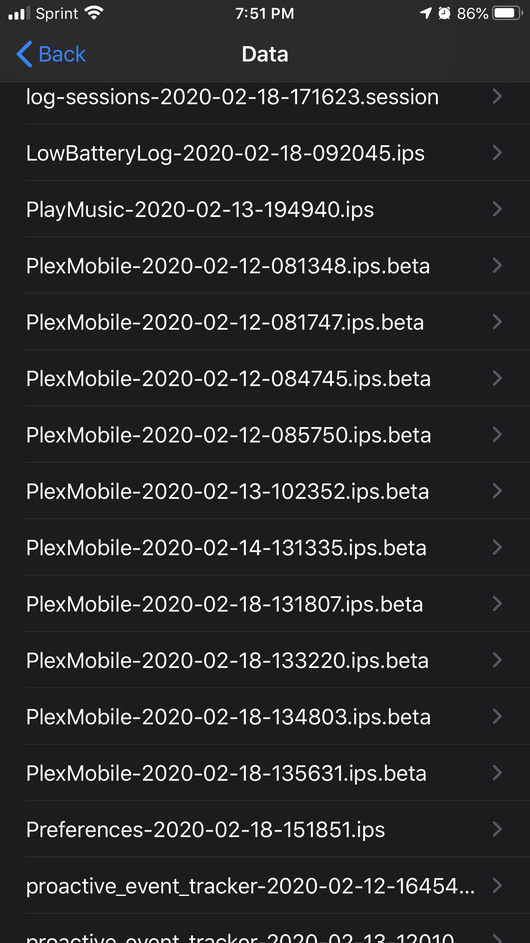
You can get it from iOS Settings -> Privacy -> Analytics & Improvements -> Analytics Data, then look for PlexMobile with the date and time when the crash happened, tap on the crash and then the Share button on the top right.
It’s what @TeknoJunky has been doing and provides very useful info.
I have no crash report for the last time it crashed, weird. But why don’t you use something like crashlytics?
I’m a iOS dev myself and craslytics is a must have, Running after logs from users is a real nightmare. And I don’t see any information in the plex log about errors. Maybe craslytics will show more.
@hbrunotv we use Crashlytics, but some crashes are not sent. Mainly crashes that happen when iOS kills the app: when it runs out of memory, when the main thread is blocked for more than 15-20 seconds, when the app takes more than 15 seconds to launch (in the didFinishLaunchingWithOptions: method), when you keep the app doing things after a background task has expired…
The crash reports @TeknoJunky provided showed me that the app is sometimes blocking the main thread for a long time to cache in disk the hubs of the Home screen of the app. Unfortunately, those don’t make it to Crashlytics
If you don’t see a crash inside your device, maybe yours is different and was sent to Crashlytics. Checking now… yours I only see a crash on Feb 12th. One I’m trying to understand by the way One where you tried to play something from a season pre-play screen. But I guess that’s not what you’re referring to?



 One where you tried to play something from a season pre-play screen. But I guess that’s not what you’re referring to?