You’re running PMS directly on the DS918+, no docker, virtual machine, etc., correct? It is best to avoid the overhead of Docker/VMs/etc on a low power CPU such as the Celeron in the 918+. I think it will also interfere with the ability to use hardware accelerated transcoding (I can’t say for sure, as I’ve never run PMS via docker/vm/etc on my 918+).
For the transcoding, what settings do you have in PMS Settings → Transcoder?
Try leaving Transcoder Quality = Automatic, and make sure the Use hardware acceleration when available box is checked (select “Show Advanced” to make this visible).
Now play something that transcodes or force a transcode by lowering the quality during playback (ex: force 480p playback of a 1080p video).
With Plex Web, go to Status → Dashboard from the Home page. Click on the gold box thing (hamburger bar?) to the right to show details. 
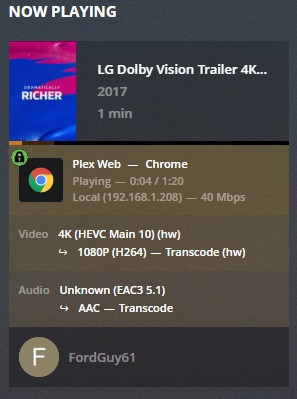
What do you see? If transcoding is being accelerated, you’ll see (hw), like in the picture below.
A video transcode has two parts: First, the video is decoded from its native format; Second, it is encoded into the a new format. Both parts may be accelerated. That is why you see two (hw) in the pic below. One for decoding from HEVC and one for encoding to H264.
Note that audio will always be transcoded on the CPU. VC1 video will also be transcoded on the CPU (some older Blu-ray discs have video in VC1 instead of H264).
You should avoid video transcoding whenever possible, especially with 4K material. The iGPU ASIC in the Celeron can handle one 4K transcode and two or three 1080p transcodes. However, there are some instances where PMS will transcode video on the CPU (such as with VC1 video) and the Celeron in the 918+ just doesn’t have enough horsepower.
I run PMS on a 918+ and it works quite well for me. However, I rarely transcode video. My primary client is a Nvidia Shield, which direct plays almost everything.
My setup:
Nvidia Shield <—> Denon 4300H <—> LG B7 OLED
PMS 1.15.6.1079 on DS918+
