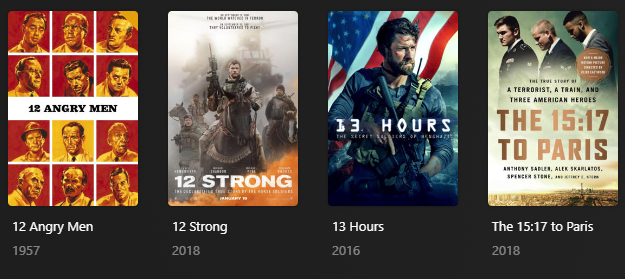
Server Version#: 1.30.0.6486
Player Version#: 4.87.2
Plex is not reading the movie year from the mata data of the files. All movies are properly taged with their release dat but PLEX is making up a date for “Originally Available”, need a fix for this.
MKV or MP4 container?
If MP4, is the library configured to read embedded metadata?
Plex does not read metadata from MKV containers. Information such as movie release date is pulled from online sources such as TheMovieDB.org and IMDB.com.
Plex will read metadata from MP4 containers if configured to do so (although I do not know if it reads the release date).
All mp4, PLEX was having to much of an issue with MKV.
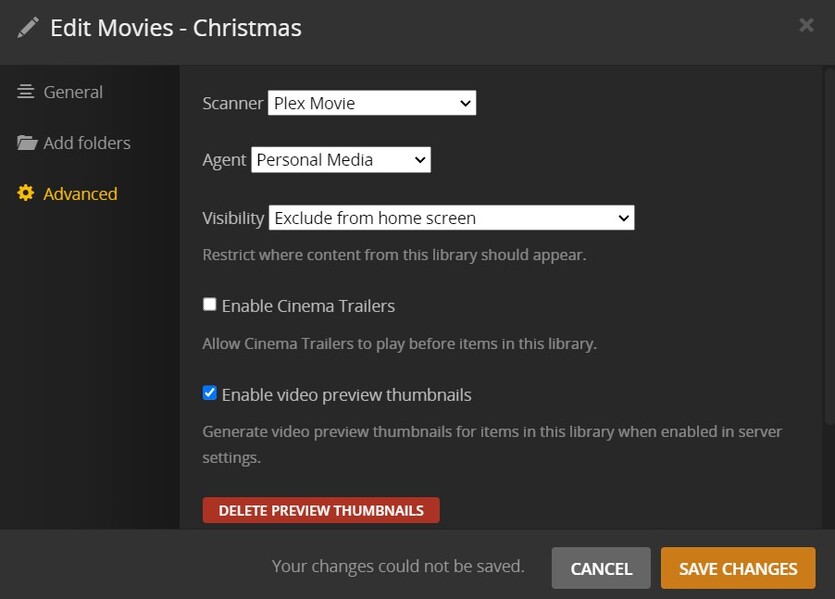
I am sure the issues is with the setup in the "edit Movies-Advanced- Scanner and Agent. I really wish they would make that easier to figure out. I just want to use all my personal meta data. I tage all my files corectly to avoid any issues. If I set that to get the dates right the thumbnail is wrong. This has always been an issues. I just want to use all my meta data, and have it do everything as I tag the files.
That looks like you are using an Other Videos library.
Plex does not perform any matching against online databases for Other Videos libraries. Artwork, metadata, etc is what is embedded in the file.
Also, for Other Videos libraries, Plex displays the artwork using the wide aspect ratio, not a movie poster ratio.
Try using a Movie library instead.
Create a test folder. Copy over three or four movies, then point a Movie library at it. Use the default Plex Movie scanner & agent, and configure it to prefer local metadata. See how that looks.
The majority of my files are MKVs. Maybe 1/3 are MP4/M4V (from when I used iTunes years ago).
I do not have Plex configured to read embedded metadata.
I have had trouble with Plex reading embedded artwork from MP4/M4V files. Some movies would appear with no artwork. I could always manually select a poster. I could never track it down as to poster size/type/etc.
I rarely have an issue with the metadata supplied by Plex. Descriptions, release dates, etc are always correct. If I want a specific poster that is not available online, I toss it in the folder with the movie (Use local assets + poster.jpg).
FYI I have been using META to tag my movies for many years now. Plus I make home movies and I use this software to tag them. I love it, works great. its only $10 and thats for a lifetime, all new versions and updates.
So do you know why 3 movies go under 1 movie? this cant happen, not good at all, how do I fix this. its happing in several places. taribel. I have way more movies then are showing and it turns out they’re under other movies! how do I find where they are and fix? For example, I have 10 Christmas Vidieos and its only showing 2. the other 8 are no longer showing up and no way to see them. They all have there a differant title, year, etx, why would they not show up?