They are on the other side of the planet. They don’t get on til my night time.
Have you actually tried removing the exclamation points in one file or making the 4 a 44 in that one file you said worked?
They are on the other side of the planet. They don’t get on til my night time.
Have you actually tried removing the exclamation points in one file or making the 4 a 44 in that one file you said worked?
No. That file is working fine so I don’t want to mess with it. I’ve tried spelling out the number on one of the episodes and that works but, I still need to know why it works for some and not others and what the reason for this hiccup is. If it works without issue for some of them, I shouldn’t have to rename any of them to have them working properly.
then one that doesn’t work anyway. like
[Anime Time] One Piece - 0835 - Run, Sanji! SOS! Germa 66!
i’m curious if it will show up correctly if you change it to
[Anime Time] One Piece - 0835 - Run, Sanji! SOS! Germa 6!
Curious: Why aren’t we asking them to name the episodes correctly, per the naming guidelines?
For absolute order.
One Piece (1999) - S01E0835 - Run Sanji! SOS! Germa 66!.ext
Or, for aired order:
One Piece (1999) - S19E56 - Run Sanji! SOS! Germa 66!.ext
Also, the show name and season folders are out of whack.
I’ve tried this and it still doesn’t work. Plex just indicates the original file is unavailable and it hasn’t added the episode.
I already have. It is just curiosity at this point for me so waiting when I can talk to metadata team
Fair enough. You can lead a horse to water, blah blah.
@mr_mousey just for completeness and I forgot to mention. You can use .plexmatch hinting when not following naming guides. https://support.plex.tv/articles/plexmatch/ you need to set it up for how you name things.
That would be something I would consider if Plex hadn’t parsed any of the 1074 episodes correctly at all. But, it did. It’s just those handful of episodes that aren’t working. Something appears to be broken somewhere. Spelling out the name resolves the issue however, I want to know why I need to do that at all when there are other episodes with the same naming format that worked.
I am curious what is going on but it is not “broken”. While did figure out your non-plex naming. Your naming is still not technically supported out side of the .plexmatch hinting.
From my test server.
With this naming:
test_tv/   <--- Library points here, name not important
└── One Piece (1999)
    └── Season 01
        └── One Piece (1999) - S01E0835 - Run Sanji! SOS! Germa 66!.mkv
My test TV library shows this (using absolute ordering in this example):
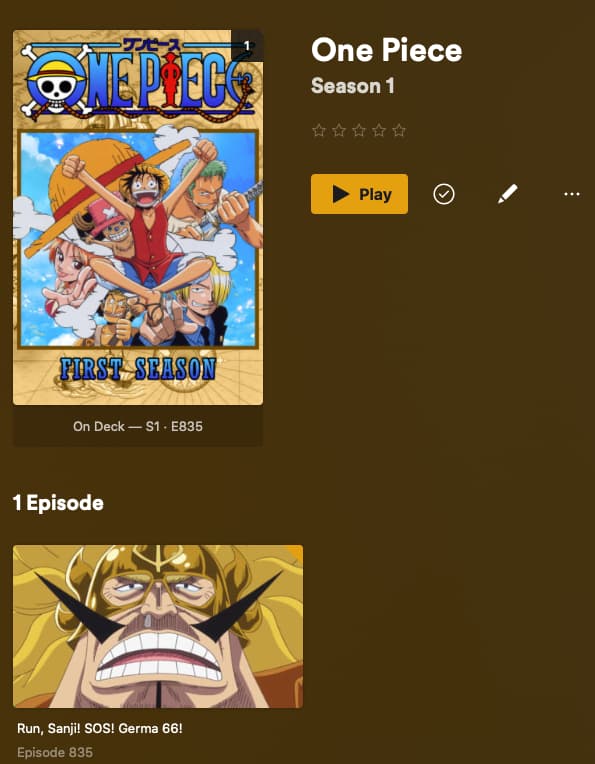
And with this naming (using TVDB aired ordering):
test_tv/   <--- Library points here, name not important
└── One Piece (1999)
    └── Season 19
        └── One Piece (1999) - S19E56 - Run Sanji! SOS! Germa 66!.mkv
This is the result.

I understand the desire to do things one’s own way, but these naming conventions exist for a reason. Likewise, I understand that your naming worked for many of your episodes. However, that doesn’t mean that the naming is correct; it just means that the scanner was able to, against all odds, somehow make a match.
You’ll have far fewer issues in the future if you correct your naming now and get into the habit of following Plex’s conventions. There are utilities which can help you with this task. Trying to bend it to your will will not work out well.
I’m curious as well. Broken may not be the correct word however, there is an issue somewhere and I’d like to know what and why it is. Has the metadata dev team gotten back to you on a possible root cause and resolution?
While I do appreciate your input, I’m not trying to bend it or anything to my will. All I did was simply place my media on the drive for my Plex Server after I acquired it, like I did with most of my media. You’re right, Plex happened to match most of my files without any intervention from myself. So it stands to reason that it should have no problem with those files it’s having a problem with now. As I’ve stated before, going through all of the naming documentation on the support site, there is no mention of exclamation marks at all. Whether it is allowed to be used, not allowed or if it would cause any type of problems. At the end of the day, something is happening with these files causing Plex to not be able to parse them correctly and I would like to know what and why that is. It’s as simple as that. I could easily solve this problem another way without having to go back and rename over 1000+ files or using the .plexmatch system. But that still doesn’t resolve the root of the issue. I’m not looking to just throw a Band-Aid on it and move on.
I actually really want to understand why it is happening, because there is no problem with any other episode with two exclamation marks and no numbers nor is there an issue with episodes I have which have just 1 number in between them. It’s only these episodes which have 2 numbers between the exclamation marks that’s causing an issue. It’s not hurting anyone to have the necessary back channel team(s) look into this and provide an answer. If anything it will help some other users who may be having the same issue with other shows. The resolution of this can actually be documented on the support page helping other people and reducing the number of other potential people trying to open up other threads should the face the same issues in the future. At the end of the day, I’m about learning, growing and helping people.
Unfortunately they have not. I think the person who knows best is actually out this week so I may not hear soon.
But I must tell you and I hope I did not give the impression this is likely to be “fixed”. The whole purpose of the plexmatch is so you can use whatever naming method you want if not the standard.
I am still curious about it so is why I am willing to talk to our metadata team about if the exclamation marks have anything to do with issue.
I forgot to ask if that screenshot was after a another “scan for files” and if removing the exclamation points does make it show up
Thanks for the update. That’s all it is at this point for me, curiosity as to why it is happening. And hopefully something good comes out of this that can help everyone, dev teams and users alike should something like this occur in the future with another show. Please let me know as soon as your hear something.
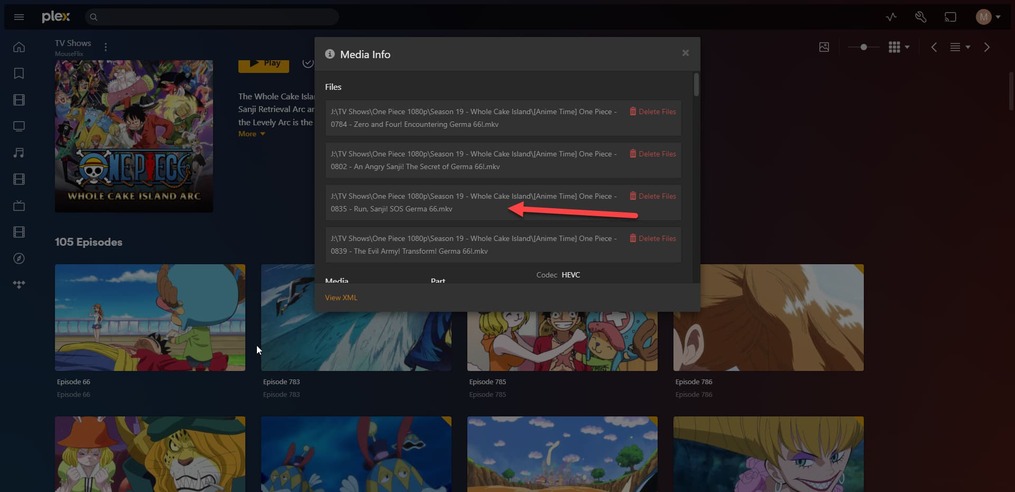
To answer your question, the screenshots were after I had changed the name of the file to only have the 1 number and a new scan was completed. I didn’t try removing the exclamation marks but I can try now and see what happens.
Thanks
I just tried removing the 2 exclamation marks and it still wouldn’t detect it for some reason after scanning.
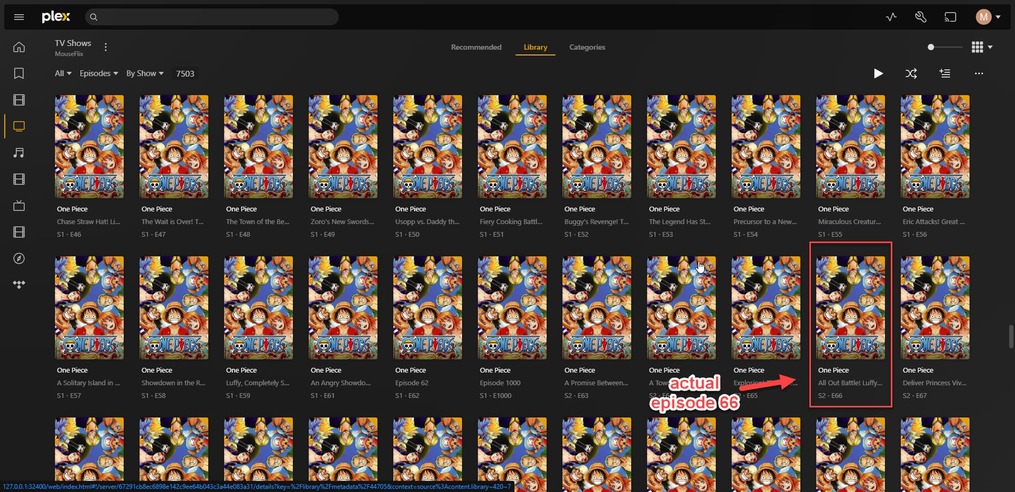
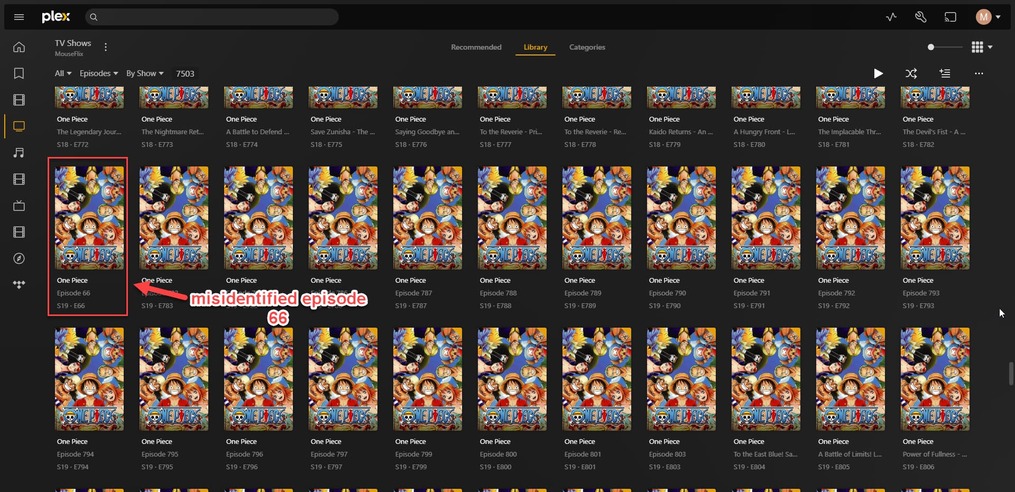
may try viewing the main library grid by episodes and filtering on duplicates. I wonder if it merged those if it thought multiple files were episode 66
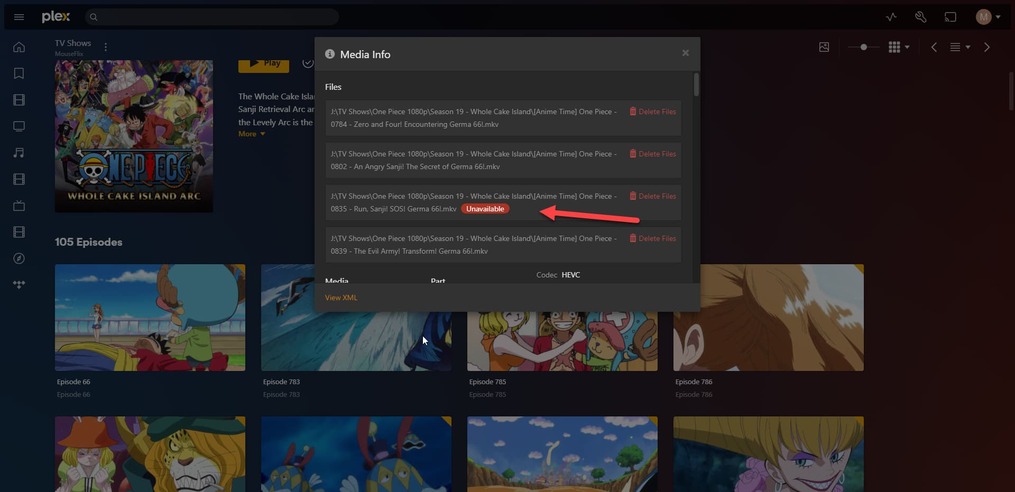
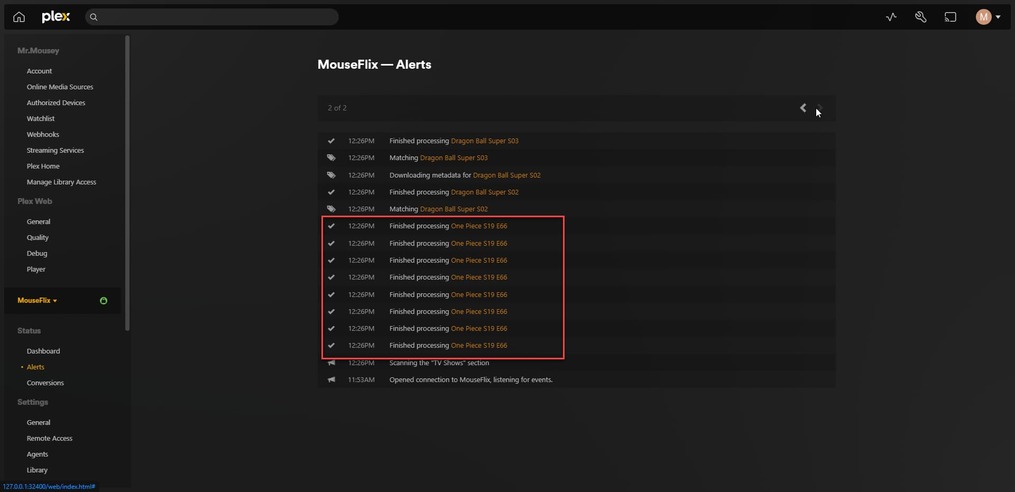
It did merge multiple files into 1, that’s what the last screenshot depicts. It’s the “Get info” for “Episode 66”. As you can see there, there are 4 files there, all with the number 66 in the title. I went to the main library and sorted by episode, I don’t know how to filter on duplicates however here are the results.
Hi @BigWheel has there been anything from the metadata dev team as of yet?
Sorry they are not back yet
the filter on top left. Default is All