Server Version#: 1.22.3.4523
Player Version#: 1.25.0
My OCD is kicking in and I’ve seen other people comment on such things years ago here.
I’m adding Miami Vice '84 and Season 1 starts off with a multi-episode, back to back in the same file. Tiny Media Manager/Plex won’t recognize it properly and I’ve tried S01E01-E02, S01E01-02, etc. I’ve also tried splitting the files and they insist, when using TheTVDB.com, on calling E02 Heart of Darkness, which is the third episode. That’s incorrect.
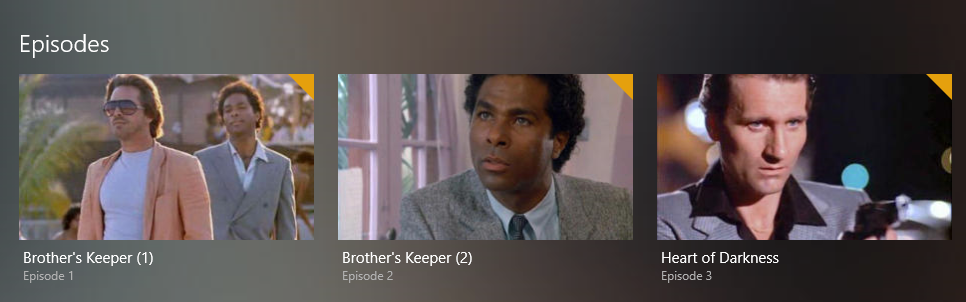
S01E01 is Brother’s Keeper (1)
S01E02 is Brother’s Keeper (2)
S01E03 is Heart of Darkness.
What’s further perplexing is that in Season 2, the exact same thing happens:
S02E01 is The Prodigal Son (1)
S02E02 is The Prodigal Son (2)
S02E03 is Whatever Works
I split the files…and it works perfectly! WTF is going on?!
One more bit if info: I initially tried one file and incrementing the episode numbers one off on purpose to try to have it all line up. I was left with S01E23 not being renamed when I cleaned it up, but it all showed up in Plex correctly before I started tweaking it. Someone said “Plex doesn’t care” so maybe it’s just going to have to be messed up on the back end and I’ll walk away if Plex likes it. Maybe it’s a Miami Vice issue, I can’t be the only person ripping this show to Plex.
<Show Name> - sXXeYY-eZZ - optional text.ext
Where XX is the season number, YY is the number of the first episode and ZZ is the number of the last episode in that file.
Episode ordering
If you have a certain order in mind, verify which source is organizing the episodes that way. For most shows, the information should be similar on The Movie Database and TheTVDb – though that’s not the case for all shows.
Sometimes, using the DVD order from TheTVDb will reflect that double-episodes were released on disc as a single track.
When you identified the ordering you like, set it for that show…
Using the current-generation Plex TV Series agent:
Edit the show ()
Go to the Advanced tab
Set the episode ordering option according to your file / preferences
You might need to refresh the show’s metadata for the change to take effect
Using a legacy agent (e.g. The Movie Database or The TVDb):
Slightly different approach; I cannot currently find it
If you’ve been “experimenting” with names and moving things around, Plex has matched the individual episode and will try to maintain that match. So it can happen that after rearranging an episode, Plex will remember it already knew that as a different episode and keep it.
TL;DR: after severe reorganization of files, it can help to perform the Plex Dance procedure to get Plex to overcome its memory
In addition to what @tom80H mentioned, it appears for this show you’ll want to use TheMovieDB (TMDB) for the episode ordering as that looks to match up with what you are expecting and you won’t need to split episodes apart.
Thanks guys. As I mentioned in my post I did the formatting that’s worked in the past but I may have confused it with so many changes. I’ll try to get Tiny Media Manager to use TheMovieDB (may not in my free version) and then the Plex dance if all else fails.
Update 1/2: I was using TMDB all along through Tiny Media Manager. All I had to do was look at the website and it shows the double episode in Season 1 as one episode, while the one in Season 2 is listed as two episodes. Ah hah.
Update 1/11: I’ve revisited this and unfortunately the episodes are still messed up.
I did what I believe to be the “Plex Dance” by:
–Copying the media to another non-scanned part of my NAS
–Deleting the source files
–Updating Plex via Plex Server
–Copying Season 1 back into the correct NEW folder
–Deleting all info save for the MKVs
–Renaming the MKVs properly
–Using Tiny Media Manager to update and rename properly
–Updating Plex
See attached. You’ll find that in my File Manager, as correctly performed by TMM, E01, E02 and E03 are all named properly as pulled from The MovieDB.org.
In Plex however, it thinks E02 is the second part of E01 and throws off the rest of the episodes by 1. Heart of Darkness should be the second episode, not the third.
It doesn’t matter to Plex what order you selected in TMM in order to name your files (simply because it has no means to know how you configured TMM).
What matters to Plex is which agent you have selected – and if the agent is Plex TV Series, what episode ordering have you set for it (e.g. The Movie Database (Aired), TheTVDb (Aired), TheTVDb (DVD), TheTVDb (Absolute)).
You’ll find that information when editing the library in question in Plex (⋮ > Manage Library > Edit → Advanced)
From the looks of it you’re either using the legacy TheTVDb agent or the new Plex TV Series agent set to use TheTVDb (Aired) episode ordering.
As a side note…
If you want Plex to pick up those episode thumbs, you need to name them exactly as the episode file (except for the file extension) – e.g. Miami Vice - S01E01 - Brother's Keeper.jpg; no -thumb suffix needs to be added to the file name.
@tom80H Episode thumbs have always been ok, but good point.
That aside I did locate the Plex agent setting in the web interface (I use the app on my Windows 10 box, but found it easier that way) and it WA set to TVDB. I’ve since changed it and updated my libraries but it hasn’t corrected itself yet. Is there another step I should do?
Configure the agent back to TheTVDB. You’ll need that, as you’ll need the DVD ordering.
Then, name your S01E01 files as:
Show Name - S01E01 - part1.ext
Show Name - S01E01 - part2.ext
Then, edit the show itself, and in its advanced settings, configure it to use DVD ordering. Then, refresh metadata for the show. You may need to Plex Dance those files.
This should result in the ordering you want.
I’d recommend combining those episode 1 and 2 files to simplify things though.
Ultimately, I’d recommend changing your library over to the new Plex TV Series agent and scanner though. I’m not sure the legacy TVDB/TMDB agent will see much development going forward. When you do change the library over to the new agent and scanner, you can still choose the ordering for individual series, it’s just named a little differently.
[Edit]
I mis-read the original description; “aired” order is what is needed if episode 3 should be “Heart of Darkness.” I also mis-read the part about the file already being combined.
argh
Preferably update your library to the Plex TV Series agent.
Then refresh the library’s metadata for that change to take full effect and wait for the refresh to finish.
Last, edit the Miami Vice show and set the episode ordering on the Advanced tab to TheTVDb (Aired). You might need to refresh the metadata of that show one last time for the episode order change to take effect.
I changed the library to the Plex TV Series Agent.
I refreshed the Metadata for my TV Shows library.
Fired up Plex and it worked! BUT…now some of my other TV shows are messed up, like Plex thinks C.O.P.S. the cartoon is a completely Cops show.
Rather than globally changing the settings, can I set them by TV show to get it recognized properly? The settings right now fixed Miami Vice, but what about the other TV shows that get borked up? Like Hogan’s Heroes has different season icons now too.
I really thought Tiny Media Manager did this when I used TheMovieDb.org, but apparently I have to use similar scrapers for both TMM and Plex,
Also, should I be setting the Episode ordering to TheTVDb (Aired)? The Episodes are numbered from here:
Plex is very much unaware of what you do with TMM – except maybe if TMM will also rename your files. That is unless you specifically configure Plex to prefer embedded metadata. In that case Plex will try to take some embedded metadata from mp4, m4v and mov files.
As for your bad matches:
Plex is all about proper naming/organization of your files to recognize them properly.
Sometimes it can help to include the ID of a show in its folder name, e.g.
TV Shows   <- the folder linked to your tv-show library
  C.O.P.S. (1988) {tmdb-4265}
    Season 01
      C.O.P.S. (1988) - s01e01 - The Case of the Stuck-Bum Blimp.ext`
      ...
Where .ext is a placeholder for your file extension.
It looks like from whatever changes I made today with your guidance, Miami Vice Season 1 is fixed, so I’m copying the other four seasons back on my NAS.
I’ve always used Plex’s app on my Windows 10 Pro machine and it doesn’t have the same options available as logging into Plex via the Web. I may manage things this way from here on out.
I saw some of the other TV shows got borked up, but I was able to select them and “rematch” them to the correct titles.
My current settings are:
Scanner: Plex TV series
Agent: Plex TV Series
Episode Ordering: The Movie Database
To close out this topic:
Are those the recommended settings you use?
Do I even need to use Tiny Media Manager?
Under what circumstances are the right time to a) refresh a show’s metadata, and b) update the library? I’m looking for best practice, as I’ve always ripped to my NAS, used TMM to rename the episode files and metadata, and then right-clicked the Plex Media Server icon in my system tray and selected “Update Libraries”. What we’ve been doing here is a little different process.
Thanks very much for your help, it helps when I write it all out.
Regarding #3, what’s your simple process when you add a new show? That just outlined mine and I don’t want to update a library before I’m supposed to.
And really, what’s the scanner vs the agent (both Plex TV series) doing if the Episode Ordering is set to The Movie Database, which in this case, had the correct listings for Miami Vice all along when I renamed the files with TMM? I’m now understanding that it was not enough (usually was, just not in this case) and I had to have Plex set to use TheMovieDatabase.org.
TMM is useful for ensuring your file names are standardized but thats it.
The Scanner refers to the file system scanner for how it searches for and parses files.
The Agent refers to the metadata source. The new Plex Agent combines TVDB and The MovieDatabase
The other options you where seeing for agent/scanner are the legacy options.
As for the episode ordering that allows you to use the Plex Agent and define which sorting/source you prefer for episode ordering
#3) I ensure that all filenames are standardized and are in the correct folder structure (TMM is useful for that), Then I manually invoke a library scan.
I use FileBot to get the names correct. I see no reason to use anything else. Plex’s matching engine works best if the file names are as close to perfect as possible with nothing extra in the name.
I have virtually all my movies in the form:
“MovieName (year).ext.”
and I have 99.8% perfect match for all 4000+ movies in my library the last time I did a fresh install. The remainder of the movies (0.2%)did not match for pretty good reasons but, mostly, it is simply age or rarity that caused the lack of a match.
It is like when “Deep Throat” told Woodward and Bernstein; “follow the money.” In this case it is “follow the file naming guide.”
Keep your naming as simple as possible and follow the naming guide exactly and you will have nearly no mismatches.
BTW: I do not have multiple episodes in one file or multiple files in one episode except for a few TV shows with two or more episodes in one file and, for that, I use the simple naming. If say season two’s first two episodes are in one file you might think that
“SeriesName - S02e01e02.ext”
Is correct and it will work but I just simply name it:
“SeriesName - S02e01.ext”
and then the next episode becomes:
“SeriesName - S02e03.ext”
Plex does not care if an episode is skipped.
You can also edit the metadata to have a synopsis of both the first two episodes in episode one’s metadata.
Naming, like almost everything else, should adhere to the K.I.S.S principal and not doing anything “special” in the file name.
 )
)