Server Version#: 1.31.3.6868
Player Version#: If I knew where to find that, I’d tell you.
I’m adding all ten seasons of Curb Your Enthusiasm. I’ve gone to add library folders and I’ve selected the base folder V:\Television\Curb Your Enthusiasm.
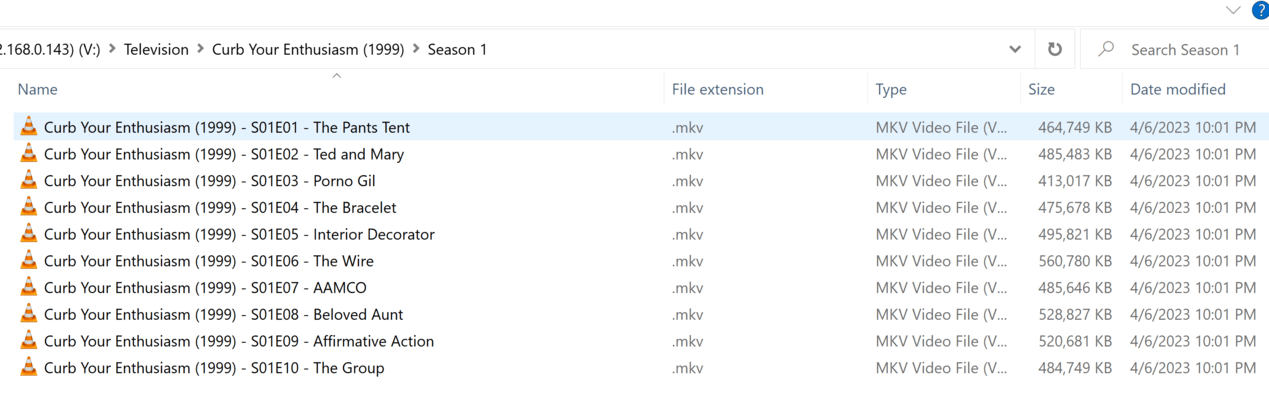
It adds seasons six through ten and skips the first five. I’m going to try to upload a screenshot of the file naming structure here so you can see it’s (as far as I can tell) within Plex standards.
Hey, that worked! Anyway, all of the seasons of the show are named that way and Plex hooked onto S06 through S10 no problem but for some reason didn’t like S01 through S05, even though the formatting is exactly the same.
But then! If I go back and add, say, the folder from S01 manually, it grabs it just fine. Here’s the TV show library after adding season one myself:
So it’s like, it doesn’t want to just add them all. It wants me to work for it. I can’t figure out what’s going on or what I need to do or change to make it happen.
Don’t add individual show folders to your library. Instead, only add the actual library folder. In your case that should be V:\Television.
By adding the show folder, Plex will not be able to properly identify your files and has most likely merged the other episodes/seasons to some of the ones you get to see in your Plex library.
Allright! So that worked, almost! I went through my files in each folder to make sure they were appropriately labeled, I cleared out all the stuff from the TV library and then I re-added the main V:\Television folder. Everything came through perfectly…
…except for the one show I chose to use for the example of how it wasn’t working. Curb Your Enthusiasm did not get pulled into the library, despite being properly labeled, as you saw. What’s stopping it?
Ohhhhhkay…so, we have a bigger problem, apparently.
I just went into the folder to triple check that the folder and file structure was good for Curb Your Enthusiasm and they’ve all disappeared. I have the root folder V:\Television\Curb Your Enthusiasm\ and all of the “Season” folders are GONE.
I checked in the recycle bin for the shared folder on the NAS and on my desktop and they’re not there, either. They have been completely wiped from my collection. I did a search of the entirety of my 16tb storage for keywords of certain episodes and no results were returned.
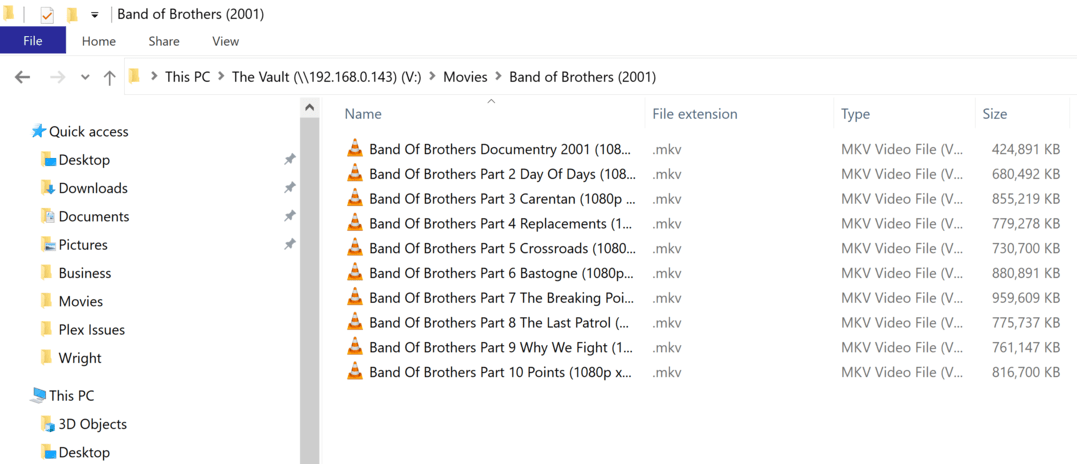
It used to contain all of the episodes for the mini-series and a separate sub-folder for the documentary. It also used to appear in my Plex “TV Shows” library.
Now, for some reason, it appears to have been re-categorized as separate movies:
I downloaded seasons one through five of Breaking Bad. They downloaded directly into my “Movies” folder, in a sub-folder called “Breaking Bad yadda yadda yadda”. A few days later, it became known to me that it’s best for Plex to separate movies and tv shows into their own respective folders. I took Breaking Bad Yadda Yadda Yadda and moved it into the new Television folder, where I proceeded JUST YESTERDAY, mind you, to properly categorize and re-name EACH EPISODE, in their own folder now properly titled as “Breaking Bad (2008)”. V:\Television\Breaking Bad (2008)\Season 1\Breaking Bad (2008) - S01E01 - Pilot.MKV" and so on and so on.
Well, what I’ve now just discovered, in all the current madness, is:
Oh cool! That’s awesome! This folder is empty! Well that’s great, because it only took me an hour to get everything named correctly and set up!
But where are the actual episodes? Why, they’re back in the Movies folder in the “Breaking Bad Yadda Yadda Yadda” folder, and all the names have been reverted to what they were originally before I took the time to clean them up!
Am I losing my mind, here? Or can someone please help me figure out what in the hell is going ON!?
Band Of Brothers IS named badly, as far as that screenshot is concerned. What I forgot to mention is that I did with Band Of Brothers what I did with Breaking Bad in the comment above. I renamed them all properly, to Plex Standards, and moved them into the Television directory. They somehow found their way BACK to the MOVIES folder where their names were reverted back to how they originally came when I downloaded them.
That seems like it might not be very likely, considering these files have been fine until Plex started managing them, at which point they disappeared, got moved, renamed, etc. I kinda gotta assume that Plex is doing something to the files.
To be clear, this is on a 16tb RAID0 SSD and there’s way more files on it than just the movies and television shows. The movies and television shows are the only ones being affected by this bizarre behavior, and those are the ones that Plex is working with. So I’ve really got to safely deduce that something Plex-y is going on.
If he has the DVR configured and pointing to the same TV/Movie folders with just the right delete settings on it will silently go deleting for things marked already watched.