Plex keeps buffering a lot on Plex Web, Smart TV

Server Version#: 1.22.0.4163-d8c4875dd
Player Version#: All players are updated
Synology Nas: DS220+
DSM Version#: DSM 6.2.3-25426 Update 3

I have Plex Media Server installed on my Synology Nas and I have a Plex Pass.
I have this setup for about 3 weeks, didn’t notice any problems and in fact everything was loading fast and no boffering however that is only the case when i wacth from Plex Windows App and Plex android App. Recently I tried watching from my Samsung Smart TV and coulnd’t even load the episode an error poped up:

There was an expected error.

But after some time it started playing the episode however it took a lot of time to load and kept buffering. So i decided to open Plex media server directly from my Nas and tried to play the epsido there but it also took to long to load and kept buffering and the same thing happend in plex web app.

To try and figure this out i watched the graph that shows real time band width and when i played from Plex Windows App

that spike loaded like 80% of my episode.
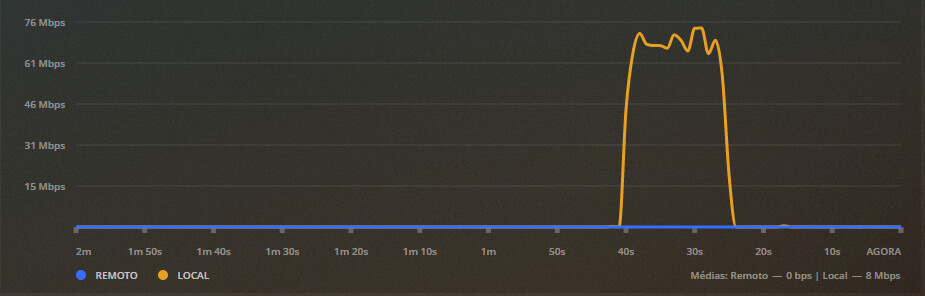
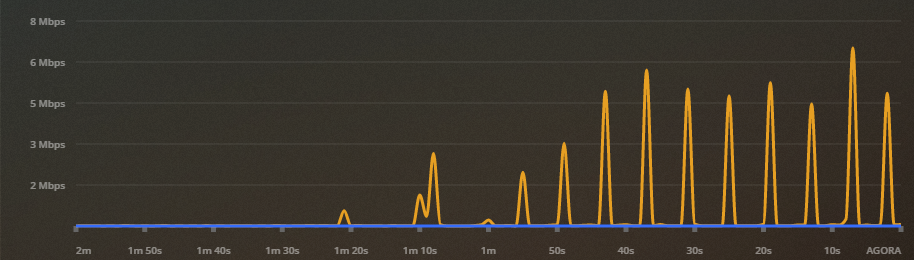
In contrast to when i played from Plex web app

it took 1 minute and 20 seconds to even load the episode and it then started buffering.
In my Synology Nas I do have one disk not working so the volume is degraded but I don’t think thats the problem.

I have Hardware Accelerated trancoding active in my settings, secure connections has preferable and remote acess is OK.

I will leave the logs here for when I played the episode from Plex Windows App (Plex Media Server.log) vs when i played it form Plex web app (Plex Media Server(1).log)

Thank you for the help.

You are running into the limitations of the Plex Web and SmartTV clients and running Plex on a Synology NAS.

See this post:

The Plex app on Samsung & LG Smart TVs is also limited when it comes to subtitle support.
Enabling subtitles can result in transcoded video and buffering.

See this post regarding the Plex for LG app. AFAIK, the Samsung app has the same behavior.

Regarding the bandwidth graphs, what you are seeing is normal. Plex does not stream video at a steady rate. It sends the stream to the client as fast as possible until the client buffer is full. Once the buffer empties to a certain level, the client asks for more data and Plex refills the buffer.

Clients have different sized buffers, so some cannot queue up as much data. That is why you see one big spike for Plex for Windows and many smaller spikes for Plex Web.

I think i understand i disabled subs and it started playing however subs in that show are a must so what can i do?

For exemple in most episodes I have audio: (OPUS Stereo) and subs: English (PGS) and this combination is the one that I have seen not to work.

I also tried with external SRT, ASS subs with AAC Stereo and it worked really fine.

Is my only option to switch that show’s audio and subs or is that something I can do?

You have some options.

You can have Plex download subtitles from the Internet or you can download them and manually add them to your media folders. The Using Subtitles section of the Plex documentation has information on this option. Personally, I find this a bit hit and miss. There may be dozens of available files for a given movie or show and their quality can vary wildly. Others seem to have better luck. You can give it a try for yourself. It does not cost anything but your time. You can use tools such as Subtitle Edit to fix timing, spelling, etc errors.

Another option is to curate your media - use video/audio/subtitle formats that do not transcode, or at least do not require that subtitles are burned into the video stream based on your client capabilities. You can use tools such as Handbrake, XMedia Recode, Subtitle Edit, and MKVToolNix to modify your media. Basically, you pre-transcode it so Plex does not have to do so.

The Smart TV app is likely the most restrictive. You’ll need to use SRT subtitles and audio that does not transcode.

A third option is to use Plex clients that better handle various media formats.

Plex for Windows/Macintosh is preferable to Plex Web as it will direct play most media, including tonemapping HDR to SDR (you can play 4K HDR media on a non-HDR display and Plex Media Server will not have to transcode it).

The Android & Android TV apps will direct play subtitles even if the audio & video are transcoding. This may be a better option than using the Plex Samsung app. There are many options and price points. An Amazon FireStick 4K is ~$50 USD (and frequently on sale for less). A Nvidia Shield Pro is ~$200 USD.

The AppleTV 4K and various Rokus are also popular clients. I do not have hands on experience with them, so I do not know how they handle subtitles.

It seems crazy to spend hundreds or thousands on a new TV and then have to spend more money on a capable client, but many do so.

I have a 2015 Nvidia Shield. It direct plays everything I throw at it and will passthrough audio to my receiver. FYI, if you buy a 2019 Shield, get the Pro model. The non-Pro (tube) model has problems with 4K HDR media when using the Plex app.

A friend who streams remotely from my server (DS 918+) uses an Amazon FireStick 4K. Many times the audio and video are transcoded due to bandwidth limitations. She can still enable subtitles without experience buffering as the FireStick uses Plex’s Android TV app.

You’ll have to figure out what works best for you given your media, clients, and usage. It may be one of the above, a combination, or something else.

This topic was automatically closed 90 days after the last reply. New replies are no longer allowed.