Server Version:1.16.0.1226 & 1.15.8.1198
Player Version: Latest
I run plex in a docker container and have tested the official plex docker aswel as the linuxserver.io container with the same issue.
It seems since about a week plex crashes within the container.
When it happens the plex web interface seems to be responsive for around a minute or two, and then becomes unresponsive.
Even though the web interface is responsive it cannot start any video
The container itself stays up and keeps running, but can’t be shutdown, removed or killed
The only resolution is to restart the whole docker host.
I am runnign on a Fedora host, first using version 29, but currently using version 30
Both versions experience the same issue.
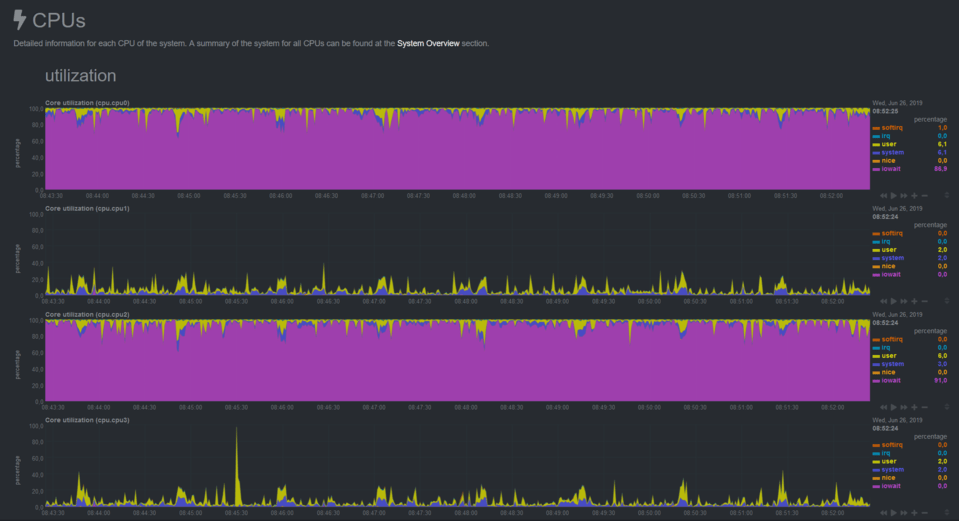
When the problem occurs I see the IOWAIT on two (of 8) cores goes up to 100%
I’m not sure whether this is the cause or a result
Since the webinterface is still responsive I can still download the plex logs:
Can someone help me troubleshoot this issue?
With kind regards,
Giblet
I’m having the same issue, as well as once I restarted my container I can no longer connect securely and half of my local devices can no longer connect. Persists after deleting preferences.xml and starting new as well.
not entirely the same issue here, I’m on unraid Plex docker (linuxserver.io) Version:1.16.0.1226
my Web UI is fine, its my device apps that I am having issues with, Which sounds like Plex forced an update server side to everyone and did not get cleared or was rejected by GooglePlay and Apple App Store for the client side apps, probably because there was a bug and that guy left to a place where its warm, sandy beaches, and lots of sunscreen, VACAT!!! and ruined Friday Night! for 2000+ users’
I am not entirely sure what causes the container to crash (eventually)
Could be someone starting a video/transcode using an app.
Since the webui is still responsive for a few minutes after playback has “crashed” it seems to be something related to a stream or transcode service
There we go, another crash
And again, the webinterface is working perfectly fine, starting any video stream (direct or transcode) doesn’t work, and I can’t remove/kill the container, so I have to do another host reboot.
Also the view inside netdata shows one of the cores pegged for IOWAIT at 100%
htop shows that one of the CPU cores is pegged, but doesn’t show a process using 100% CPU, that’s because it’s IOWAIT and not actually utilizing the core..
IOTOP hardly shows any disk IO, which again is because it’s IOWAIT
I have checked htop on the host to see if I can find the container process that hangs, it can’t find anything when searching for plex.
Going back to version: 1.15.6.1079-78232c603 see if the problem occurs there..
After my last comment the server crashed yet again (on the 1.15.6.1079-78232c603 of plex)
So I have completly redone my plex docker container, threw away all data, recreated it from scratch.
It seemed to be stable for a day or so, but has crashed again around 4:26 this morning
I have attached the logs
This is a time of which I’m sure no-one is using plex
The image in netdata is the same, two cores pegged at 100% with IOWAIT
Again, not sure if this is cause or result of the crash.
I have checked for database corruptions, none were found
I suspect the actual problem might not be Plex itself, I think Plex is crashing due to something just not sure what, anyone who can shed a light on this?
Even though I don’t seem to be experiencing a memory issue, such as in: Memory leak since 1.15.x on 300+ Plex Server Instances
I have still reverted to 1.14 to make sure it’s not this problem.
I have also disabled DLNA since I’m not using this anyway.
And another crash on version: plexinc/pms-docker:1.14.1.5488-cc260c476
More and more sure it’s not directly related to Plex but caused by something else…
Just need some help to figure out what is causign this… anyone who can make something of the logs?
You would have to upgrade to at least 1.16.0.1220 to at least get past all the known crash issues. Release notes are on the beta announcement but it’s available to non plex pass users.
Thank you for your response! I really appreciate it!
My troubles started on version 1.16.0.1220, but I can always update to this version again.
I will update to the latest en let you know when it crashes again
I thought the fix for UPNP had made it into the release, looks like the EPG is taking precedence so you might want to disable it on your router till it rolls out.
So I thought it was the host. but the crashes happen on both my hosts…
I’m at a complete loss as to whats causing them, and they are getting more frequent
And another log attached, hopefully someone can take a look at these and find anything.
This is literally the only container that’s having issues, on multiple hosts.
Curiously… when the “crash” occurs… I can restart the Freenas host, which provides the storage for Plex, and after the reboot Plex works again, for a short time…