Plex library folder organization (root or individual letter)?

Hi. I’ve tried Plex years ago but when I added my media server’s “video” folder, it crashed. Tried again and it just hung. My video folder is, in total, 94k files totally 36.2 TB. I downloaded Plex recently, figuring the latest and greatest will likely be more robust.

I also decided to prevent it from taking years to scan the library instead of pointing to d:\media\video, I’d start hierarchically. My organization is like:

D:\Media\Video
D:\Media\Video\Anime
D:\Media\Video\Anime\A
D:\Media\Video\Anime\B (..etc)
D:\Media\Video\Movies
D:\Media\Video\Movies\A
D:\Media\Video\Movies\B (..etc)

So I made a library “Anime-A” and pointed to the A folder. The thing I’m worried about is, I never got far enough in Plex to actually use it. Will it just collate the contents of all libraries into a list of titles or will I have to browse by library to view titles? If the former, cool. If that latter, that’ll be awkward. Would it be better to point right to the root of anime? I see the library asks about if it’s movies or tv shows or whatever so I assume it’d be better to at least break the libs down to that level. So like if I decide to make a catch-all anime library (anime being the most prolific collection of media), it’d be reading the root anime folder which is 88k files @ 30.5 TB.

I had posted about this three years ago, I was told to stick to individual libraries for each letter folder. Is that still valid with the current Plex or do you think it can handle the root?
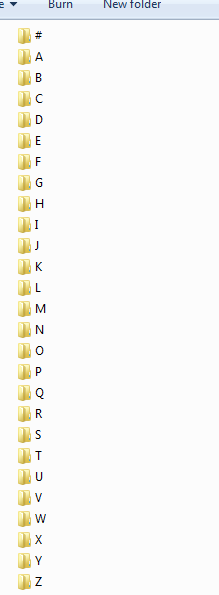

You can add more than one directory to a library. You could have a library called “Movies” and add the “Movies\A,” “Movies\B,” etc directories. Not sure if there is a limit. I’ve added three or four. Never tried twenty-six.

Instead of throwing the entire /Movies (or TV Shows, etc) at Plex, I would add a few subfolders at a time, let Plex process them, then add some more. FWIW, my movie folder has 650+ movies and Plex imported it just fine all at once (it is not broken down by letter like yours).

To speed up building the libraries, you could disable chapter thumbnail and video preview thumbnail generation when first importing media. Plex will still download artwork, metadata, etc. You can re-enable thumbnail generation after importing all your media.

You must break libraries down by type: movie / tv show / other video. If you do not, Plex will not correctly identify the media, organize it correctly, download correct metadata, etc.

For example, if you put TV shows into a movie library, Plex will not correctly recognize seasons or episodes numbers. They might end up under the same show name or each episode might be listed as an individual movie. And if an show name matches a “real” movie, then it might have the movie’s artwork, description, etc.

This applies to Anime as well. You will need to separate anime movies from anime tv shows.

Plex is especially picky with TV shows. You should follow the recommended naming & organization structure. See Plex Media Preparation guidelines. Also, Plex matches against thetvdb.com, so if you run into issues, make sure you follow their naming for show name, episode numbers, etc.

One bad apple could have done this.

Again, a single bad file could cause this.

I wouldn’t do this. Besides do you know what a huge PITA that would be to have 26+ libraries just for one type of media. I can’t speak for the other devices but I would hate to navigate that on my Roku. Navigating 30-40+ libraries. No way, not for me!

As you have already stated. Make sure you separate your movies and tv shows.

D:\Media\Video\Anime <- What is this? Movies or tvshows? Dont combine the two.
D:\Media\Video\Movies

I use the folders a,b,c,etc BUT point plex to the ROOT of those folders.
Capture
I found the speed with plex is like night and day when I separated my movies by letter.

You can do this with movies, but not with tv shows.

With TV shows, you’d need to add each ‘index letter folder’ to the library individually, or you’ll get major mismatches and unpredictable behaviour.

Of course, movies.

Can you explain that a bit more. Never-mind. For tvshows anyways I just have a whole mess of them in a single drive and point plex to the root.

I don’t expect Plex to understand anime, so I don’t care if movies (anime movies) and regular series are mixed in that folder. As long as I can browse by folders, I’ll be fine with that. I keep “real” movies in a separate folder but also alpha separated. TV shows I’ll need to move because they are interspersed in the root video (so like \media\video\game of thrones sits next to \media\video\movies for example). So what I gather from reading this, I’ll not sort TV by alpha and just move all into their own folder that I will point the TV Shows lib to.

It’s disturbing to hear a faulty media file can throw the whole system off the rails. I noticed there is a command line way to view lib contents and I further noticed it shows results realtime as it scans so I suppose if it hangs, I can dump the lib contents to find the last file it was working on then move that show’s folder out and restart. Hopefully it’ll play nicely though, because with ~88,000 episodes I don’t want to have to deal with that a lot lol.

Thanks all.

If you are on windows you can use ffmpeg to scan and check for errors.
I’ll dig it up if you want it.

Oh, cool. I didn’t know ffmpeg could be used for that. I have it already, I use it for some encoding. What parameter would I use to tell it to scan for a corrupted file?

ffmpeg.exe -v error -i "FullPathAndFilename" -f null -

Thanks a lot!

This topic was automatically closed 90 days after the last reply. New replies are no longer allowed.