Hey guys,
So i’ve run into a bit of a hiccup with plex.
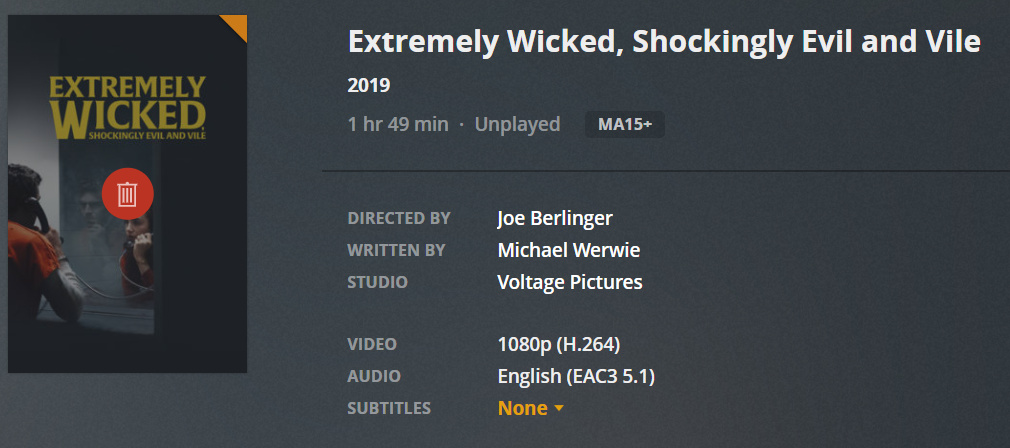
Yesterday everything was working perfectly, then today I look and several movies have been marked for removal with the red trashcan icon.
My movies are hosted on Google Drive and I am using NetDrive 3 to make the folders recognisable.
I’m really confused as to what is happening:
The files still exist in the host folder.
Plex had no problem recognising and playing these files yesterday.
The files are still playable in the host folder.
Scanning the folder is having no effect (using both plex movie scanner and plex video files scanner)
When clicking on more info it does not show any signs that the file does not exist - i.e. saying unrecognised or non-existent or similar.
My library is split across two folders and it seems that only the files from one folder are having this issue. However, as i mentioned above the files are playable when accessing them in GoogleDrive and using NetDrive 3.
Like i said something has changed overnight and im not sure what it is.
The trash can means Plex cannot find the file. If you don’t have “empty trash after every scan” enabled then it adds the icon as reference to which mediaitems in database will be removed if you empty trash.
I have never used Google Drive or NetDrive so don’t know how they maintain their mount, but the scanner logs would likely be helpful in seeing why it cannot find files after a scan if you added them all back. if they became unmounted it could be something simple like a drive letter change when mounted again.
you also seem to have a ton of movies nested many deep in another movies folders for some reason.
In the Eight.Legged.Freaks.2002.Sci-fi folder. If you are just using the H:\1Copy Movies Shared Drive\ as the library folder you should take all of those out of the Eight.legged… folder
Nov 08, 2019 08:55:57.226 [12832] VERBOSE - Adding file for scanner: "H:\1Copy Movies Shared Drive\Eight.Legged.Freaks.2002.Sci-fi\Extremely.Wicked.Shockingly.Evil.and.Vile.2019.mkv"
then the same thing again in another sub-sub-folder for Public.Enemies.2009.Drama\
you should not have paths like this.
H:\1Copy Movies Shared Drive\Eight.Legged.Freaks.2002.Sci-fi\Public.Enemies.2009.Drama\Sleepy Hollow 1999 ‧ Gothic\The.Birdcatcher.2019. Drama\The.Death.Of.Dick.Long.2019.‧ Drama\The.Shack.2017.mkv
then there are bunch in this folder which seem to have many of the same files H:\1Copy of Hollywood service\ like Extremely Wicked… can you take a screen shot of the get info page in Plex. does it have it listed twice?
Those folders you’re referring to haven’t existed since 2 days ago when I deleted them. Not sure why the plex scanner is still identifying them? It’s not showing them in my NetDrive 3 mount either. (only listed once)
I have attempted to use NetDrive 3 to load the GoogleDrive as a ‘physical’ drive on my laptop too and those folders are not showing up there either, not that it should because I deleted them in Google drive.
I might try to completely uninstall and reinstall Plex and it’s files, I am away from the main sever for at least the next 10-11 hours so any other suggestions, that i might be able to execute on my laptop, would be appreciated
I am referring to the sub-folder and the sub-sub folders. They have been removed from GoogleDrive entirely. (What was weird when they existed is that they only contained a copy of the movie the folder was named after. i.e. folder Eight.Legged.Freaks.2002.Sci-fi, it only contained the movie Eight.Legged.Freaks.2002.Sci-fi. Not any sub-folders or any other forms of media)
Files reduced to 989 after going nuclear.
Will attach logs when Plex is finished processing what is there now. Plex Media Scanner.log (249.7 KB)
I am so lost now. I can’t see any errors.
WTF is going on?
Update
I downloaded raidrive in order to see if it was a Plex scanner issue or if it has something to do with NetDrive 3. This was because of the latest log. It seems, that even though i can access the mounted drive folders and play media off of them, plex and netdrive are having difficulties communicating with one another because raidrive and plex can communicate fine, and all 1329 movies are identified. This is a complete roller coaster at the moment. If anyone with any experience with NetDrive can help out that would be great, because while raidrive works it is not nearly as fast as fetching files in comparison to NetDrive.
Cheers guys, and a special thank-you to @BigWheel for giving me some great hints, looking at the log files absolutely helped and mentioning that i should delete the PMS folder in APPDATA and delete the registry were really good hints at ruling things out. Problem is not entirely solved yet but I am definitely on the right track now.