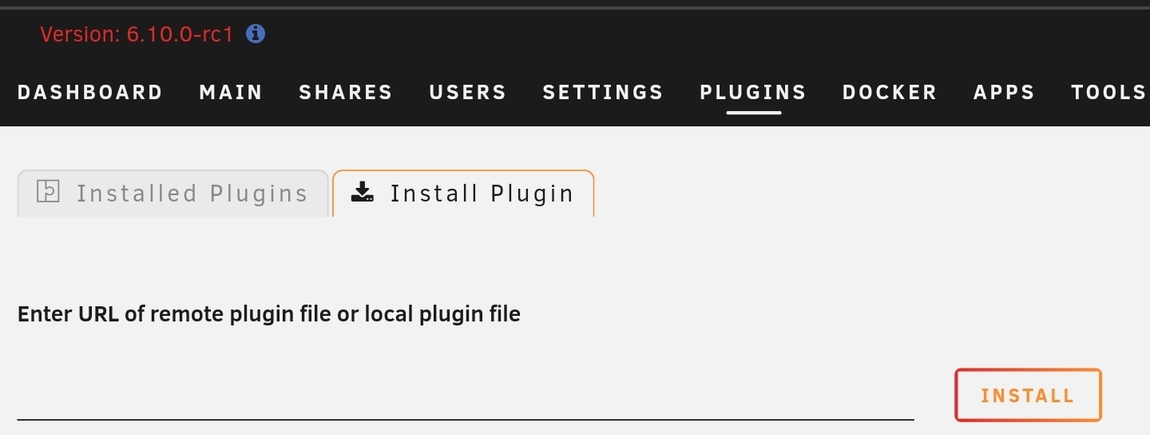
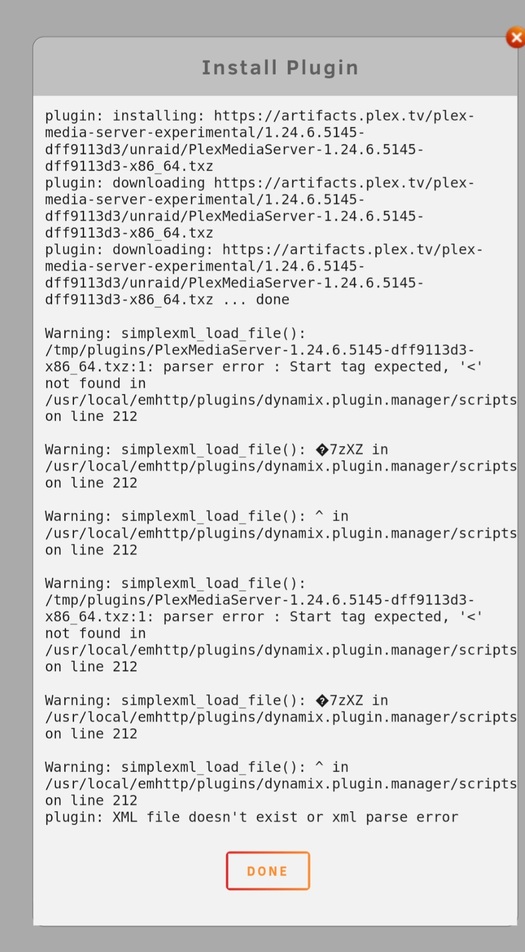
Would someone mind posting how to install the unraid package posted in this thread? I tried via the usual package install UI but I get errors during the install. I’m on the 6.10 RC
Hey !
I quickly tested this build against my NUC 11 (Iris Xe / Tiger Lake) which refused to work for months.
Maybe I need more tests, but I couldn’t make it crash with the usual HW transcode test I do, so great job!
The transcoding speed is amazing on Iris Xe, with very low CPU usage, on 4K 10-bit HEVC conversions to 1080p AVC.
Tone Mapping is still disappointing as I got two same errors right at starting the transcoding:
[992119.247490] Plex Transcoder[829710]: segfault at 0 ip 00007f70c3eb49ab sp 00007ffc881683a0 error 4 in libstdc++.so.6.0.29[7f70c3ea0000+103000]
[992119.247504] Code: 10 00 00 00 5d e9 05 35 ff ff 0f 1f 44 00 00 f3 0f 1e fa 0f b6 07 84 c0 75 4d 55 53 48 89 fb 48 83 ec 08 48 8b 05 0d 49 16 00 <80> 38 00 75 20 31 c0 ba 00 01 00 00 f0 0f b1 17 75 2e 48 83 c4 08
That’s still a progress, as Plex is still usable and the server don’t requires a reboot anymore.
Same as above! I tested this build against my home NAS, (i5-11400, Rocket Lake), and it looks like hardware transcoding is working for everything but x265 HDR content.
I was getting a slightly different error than geeoff above.
System:
[208525.500813] i915 0000:00:02.0: [drm] GPU HANG: ecode 12:1:8ed9fff2, in Plex Transcoder [689561]
[208525.501868] i915 0000:00:02.0: [drm] Resetting rcs0 for stopped heartbeat on rcs0
[208525.501914] i915 0000:00:02.0: [drm] Plex Transcoder[689561] context reset due to GPU hang
Plex:

plex                  | beignet-opencl-icd: no supported GPU found, this is probably the wrong opencl-icd package for this hardware
plex                  | (If you have multiple ICDs installed and OpenCL works, you can ignore this message)
I really appreciate everyone’s work on this!
warning if you are not already aware, installing these test builds can have an extended startup delay due to database changes.
the larger your database, and/or the slower your cpu/disk, the longer it will take.
it took 10+ minutes on my server.
2:04AM Opened connection to SauronPlex, listening for events.
1:48AM Connection to SauronPlex closed.
be patient, wait until it finishes, or you could risk causing unnecessary issues with your database.
Hello TeknoJunky, thanks for the input, however in my NAS, 1.24.6.5145 didn’t work…
The previous two test versions in this thread worked fine.
I decided to remove the current installation, and install it again claiming the token, but now waited for more than 30 minutes, the CPU usage during this period in the NAS was about 2 to 3%…
My database is not large 125GB, NAS is a DS218+ running DSM 7.0.1 RC.
As soon as I downgraded to 1.24.4.5081-7000, it worked again, so I suppose there is something wrong with it.
So decided to test the preview because hype and curiosity and it works great, like @geeooff said, no more crash on regular transcoding but segfault on HDR tone mapping. This is maybe the last issue on Tiger Lake as I’m not able to reproduce other old issues so looking forward to the tone mapping fix.
Amazing job
working fine here (hw transcoding) when using linux 5.13 / ubuntu 21.10 with intel rocket lake (11500)
Looks like there is something wrong with the latest Qnap x86/x64 installation package.
Unable to install it
Is there any ETA when this version is going to be released to the BETA channel? Tested on Ubuntu Server 20.04.3 LTS (GNU/Linux 5.11.0-37-generic x86_64) with a i5 11600k an no more green artifactsssss!! THANKSSSSSSSSS A LOT! Really looking forward now to this version to be posted on the beta channel! Cheers!
Initial usage appears to be fine, however prolong usage is when issue start to appear - especially when it comes to DVR/LiveTV.
Unable to set to channels to view in HD, the server shows transcode to SD and Playback errors slowly creep in. Eventually can’t watch any DVR/LiveTV unless I performa a restart of the PMS server… then its fine for a while - but creeps back like Freddie or Jason or Michael Meyers. ('til the season)

I am beginning to think the issues to LiveTV/DVR are related to the different players as I get various levels of success/failure depending if I am watching web, to client, to app.
For example, I recorded a live stream instead of watching it live. The playback was fine in web, client and app. However watching a live TV stream in the web browser was more successful than the client or app. I would still get playback errors on all three options, but less so on the web player.
There is still an issue of the LiveTV stream transcoding HD to SD with no options to change it to HD, but recording the stream preserved the HD. I’ve observed audio transcodes from AC3 to OPUS when the transcode goes to SD,
I am testing on a fresh build. I am accustomed to accessing the local web app instance after install to sign into my Plex account so I can then use the hosted app. Is there a workaround?
Edit: Found my own obvious work around. I installed 1.24.4.5081 and then 1.24.6.5145 overtop.
Edit 2: 1.24.6.5145 hardware transcoding works until I enable HDR tone mapping. Progress nonetheless!
i5-11400
Ubuntu 21.10
5.13.0-19-generic
NEO 21.41.21220
Thank you.
Anyone else seeing random white/black dots or pixels while using hardware transcoding? I’m running this latest beta, but also saw it with latest non-beta version of plex. I’m on 11400 rocket lake with 5.11 kernel
Experience with 1.24.6.5145-dff9113d3 and first time with new transcoder:
No Tone Mapping:
- HW: transcoding works
- HW: 4k → 4k is okay but motion is very blocky and minor pauses, making 4k → 1080p much better looking with no pauses
- HW or SW: Image is no longer dark and washed out, definitely watchable but whites/highlights can be over exposed
- SW: On first glance seems good, using 170% CPU 4k → 4k and 150% CPU 4k → 1080p
Tone Mapping:
- HW: doesn’t work, falls back to SW
- 4k → 4k: Uses around 700% CPU but seems to perform well compared to before when it would pause a lot
- 4k → 1080p: Also seems to perform much better
Other:
- I had a 1080p movie get stuck after a few minutes twice without transcoding (playing original). Seeking doesn’t help. Have to stop/start or switch to transcoding. Not sure if it’s the media or something else
- 4k SW+tonemapping paused 6min or so in and CPU usage dropped to below 200% when it’s usually around 700%. Nothing else was running on the system. After a while it went back up and played fine.
System info:
Intel i5-11500, 16GB ram, Ubuntu 21.04, 5.11.0-37-generic
Update from my Intel NUC Pro 11
OS: Ubuntu 20.04.3LTS
Kernel: 5.14.12-051412-generic
Have had some major problems with server crashing, but after I got updated intel-media-va-driver-non-free to intel-media-va-driver , the server seems more stable .
7 streams testing:
4 locally on LAN with transcodes running from Chrome.
1 transcoding externally on IOS via Plex app, running
2 streaming normally on IOS via Plex app, running.
Had one issue ( seems to be the same though ), but 1 user when transcoding had problems still with transcoder error: Transcoder failed , conversion failed and transcoder exit due an error.
Else I havent seen any problems.
When I had intel-media-va-driver-non-free installed - I also personally had PMS stalling on the server on 4 transcodes.
Now I have this installed:
intel-gmmlib/now 21.2.1 amd64 [installed,local]
intel-igc-cm/focal,now 1.0.40+i620~u20.04 amd64 [installed,automatic]
intel-igc-core/now 1.0.8744 amd64 [installed,local]
intel-igc-opencl/now 1.0.8744 amd64 [installed,local]
intel-level-zero-gpu/now 1.2.21182 amd64 [installed,local]
intel-media-va-driver/focal,now 20.1.1+dfsg1-1 amd64 [installed]
intel-ocloc/now 21.40.21182 amd64 [installed,local]
intel-opencl-icd/focal,now 21.37.20939+i620~u20.04 amd64 [installed]
libdrm-intel1/focal,now 2.4.107-1028 amd64 [installed,automatic]
So far so good today - been running all morning till now.
Update: Got an external transcoder error:
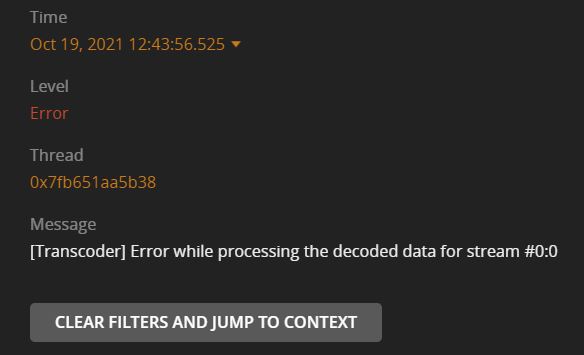
Still having a crash issue with 1080p media.
I can reproduce the crash all the time and it requires to reboot the complete server again.
[ 182.787688] i915 0000:00:02.0: [drm] Resetting vcs0 for preemption time out
[ 182.789103] i915 0000:00:02.0: [drm] GPU HANG: ecode 12:4:28fffffd, in Plex Transcoder [3881]
[ 191.074473] i915 0000:00:02.0: [drm] GPU HANG: ecode 12:4:28fffffd, in Plex Transcoder [3881]
[ 191.075501] i915 0000:00:02.0: [drm] Resetting vcs0 for stopped heartbeat on vcs0
[ 191.076048] i915 0000:00:02.0: [drm] Resetting chip for stopped heartbeat on vcs0
[ 191.267814] i915 0000:00:02.0: [drm] ERROR Failed to reset chip
[ 191.267824] i915 0000:00:02.0: [drm:add_taint_for_CI [i915]] CI tainted:0x9 by intel_gt_reset+0x24c/0x2d0 [i915]
[ 191.371861] i915 0000:00:02.0: [drm] Plex Transcoder[3881] context reset due to GPU hang
[ 196.117795] Fence expiration time out i915-0000:00:02.0:Plex Transcoder[3881]:3fc0!
I rebooted the server, replicated the issue and when it crashed I have downloaded the log.
the issue only appears to be when I stream from another network (example: Mobile 4G)
if I use a vpn to my home network, or use the local network at home, I don’t have the issue.
Can someone take a look at it ?
Crash log
update 19Oct 18h08
it also happens locally, when I use the app.plex.tv site, error code s3015 but the gpu didn’t crash (no messages in dmesg).
TimeOct 19, 2021 18:09:03.409
LevelWarning
Thread0x7fa9de11eb38
Message Caught exception trying to convert extra data attribute ‘originallyAvailableAt’ with type 1 and value ‘2021-08-20’ ~ bad lexical cast: source type value could not be interpreted as target
and
TimeOct 19, 2021 18:09:31.695
LevelWarning
Thread0x7fa9de685b38
MessageCould not convert “state” (“error”) to the correct type
update 2
when using the plex app on ios, it seems more stable.
I only get these warnings:
TimeOct 19, 2021 18:21:05.280
LevelWarning
Thread0x7fa9ddb91b38
Message[Transcode/D6BA1781-AB0F-4DA9-A3AD-27068E926630] MDE: unable to find a working transcode profile for video stream
Yes, i do!
i5-11600k, unraid - linuxserver.io container.
I’m seeing the following crash while transcoding - both with the previous version and this beta -
[858142.584360] caller os_map_kernel_space.part.0+0x77/0xa0 [nvidia] mapping multiple BARs
[858143.141327] Plex Media Serv[1252651]: segfault at 7f616debde80 ip 00007f6169d53512 sp 00007f616deb2850 error 4 in libcuda.so.470.57.02[7f6169938000+1543000]
[858143.141340] Code: 00 4c 8d 35 f8 d8 32 01 eb 1c 0f 1f 40 00 66 2e 0f 1f 84 00 00 00 00 00 89 d8 48 83 c3 01 3b 05 e4 d9 32 01 73 44 49 8b 2c de <80> bd 20 2e 00 00 00 74 e5 48 8b bd 18 2e 00 00 48 85 ff 74 12 80
Been happening for the last several versions (since 1.23.x) and seems to be particularly when enabling subtitles.
Running on Ubuntu 20.04.1 LTS, x86_64 w/ an nvidia gpu and the latest drivers.
Hey, how are you testing this release with your config?
I have the same setup/container but couldn’t quite figure out how to update it to test. I’ve read the instructions up top but when I do that the container won’t start (unraid says there’s an error).
Edit: I have the container running after dpkg -i plexmediaserver_1.24.6.5145-dff9113d3_amd64.deb and I’ve updated VERSION to 1.24.6.5145-dff9113d3 but Plex doesn’t seem to see that. It still thinks I’m on 1.24.4.5081.
Is /version a file that should be present instead of VERSION in the container?
The container logs show:
Atempting to upgrade to: 1.24.6.5145-dff9113d3
https://downloads.plex.tv/plex-media-server-new/1.24.6.5145-dff9113d3/debian/plexmediaserver_1.24.6.5145-dff9113d3_amd64.deb:
2021-10-20 20:26:20 ERROR 404: Not Found.
which seems fine as it obviously doesn’t exist there.
beignet-opencl-icd: no supported GPU found, this is probably the wrong opencl-icd package for this hardware
(If you have multiple ICDs installed and OpenCL works, you can ignore this message)
In the Plex logs there are no errors:
Oct 20, 2021 20:57:27.095 [0x14c0685c9b38] DEBUG - Request: [192.168.0.51:44534 (Subnet)] GET /video/:/transcode/universal/session/d3bde43f31316e68-com-plexapp-android/base/00103.ts (7 live) TLS Signed-in
Oct 20, 2021 20:57:27.095 [0x14c0685c9b38] DEBUG - [Transcode/d3bde43f31316e68-com-plexapp-android] Asked for segment 103 from session.
Oct 20, 2021 20:57:27.095 [0x14c0685c9b38] DEBUG - [Transcode/d3bde43f31316e68-com-plexapp-android] Returning segment 103 from session
Oct 20, 2021 20:57:27.095 [0x14c0685c9b38] DEBUG - Content-Length of /config/Library/Application Support/Plex Media Server/Cache/Transcode/Sessions/plex-transcode-d3bde43f31316e68-com-plexapp-android-e7930ac5-51fb-46b7-b3bd-aa86afe5851d/media-00103.ts is 1012695 (of total: 1012695).
Oct 20, 2021 20:57:27.099 [0x14c06a397b38] DEBUG - Completed: [192.168.0.51:44534] 200 GET /video/:/transcode/universal/session/d3bde43f31316e68-com-plexapp-android/base/00103.ts (7 live) TLS 3ms 1012695 bytes (pipelined: 52)
Oct 20, 2021 20:57:27.099 [0x14c06a397b38] DEBUG - Removed transcode data consumer, active count 1 => 0
Oct 20, 2021 20:57:27.302 [0x14c068afeb38] DEBUG - [Transcode] Transcoder segment range: 0 - 197 (197)
Oct 20, 2021 20:57:27.302 [0x14c0685c9b38] DEBUG - [Transcode] Transcoder segment range: 0 - 198 (197)
Oct 20, 2021 20:57:27.513 [0x14c06868eb38] DEBUG - [Transcode] Transcoder segment range: 0 - 198 (198)
Oct 20, 2021 20:57:27.513 [0x14c0685c9b38] DEBUG - [Transcode] Transcoder segment range: 0 - 199 (198)
Oct 20, 2021 20:57:27.740 [0x14c068afeb38] DEBUG - [Transcode] Transcoder segment range: 0 - 199 (199)
Oct 20, 2021 20:57:27.740 [0x14c0685c9b38] DEBUG - [Transcode] Transcoder segment range: 0 - 200 (199)
Oct 20, 2021 20:57:27.982 [0x14c068afeb38] DEBUG - [Transcode] Transcoder segment range: 0 - 200 (200)
Oct 20, 2021 20:57:27.982 [0x14c0685c9b38] DEBUG - [Transcode] Transcoder segment range: 0 - 201 (200)
But I’m not sure I’m actually running the version specified (it says it updates fine but how can I verify?)
I’m running an i7 11700K
You might want to post your issue in it’s own appropriate thread if it your issue was happening on previous issues. This test build was mainly to address 11th gen igpu’s and clearly you have an Nvidia dedicated GPU.
