So, i was trying to figure out why files were deleting for me and now I figured it out.
You are correct, apparently by default, the “Allow media deletion” is ticked. HOWEVER, as i am new and was not aware of this, when i deleted an incorrectly scanned TV Show (with the intent to delete the scanned library information, not the media), it specifically said “This does not affect the media files”. Therefor, as a Noob, i was under the impression that this was in actuality the case…now i have lost YEARS of TV Shows gathering, which i can start all over again, because a; the option was on by default and b; even with that, the warning specifically told me it would not affect my media files and as a noob, i didn’t know better than to trust that message…
So, how often do you empty the Recycle Bin?
(I’m hoping you don’t NOT move stuff to the Recycle Bin, or delete it automatically, if you do - I want a look at that Bin before I pull the plug on it - for painfully obvious reasons)
I just had 1100 movies get deleted from my NAS and this is the second time this has happened… WTF plex? Ive checked and not even admin deletion is checked… im getting tired of this… good thing i have backups… but5 its still a pain in the ass.
Wow, a bug that doesn’t record what it did in the log files. Who woulda thought?
Anyway, I’m here for the same reason everyone else is; my ENTIRE media library disappeared from the NAS box since this morning, but nothing else is missing. Can’t prove it was Plex, but there doesn’t seem to be any reason that anything else would pick specifically on my media folder and leave the other folders on the same volume alone. Oddly enough, though, it didn’t get the TV shows I had on a local drive, so it seems like it might be some odd interaction between Plex and NAS.
I did enable “Allow media deletion” the other day, thinking it would be handy to delete poor quality files and duplicates from the client. Also, yesterday and this morning, my client (PlexKodiConnect running on Raspberry Pi) crashed a lot more than usual. I’d tell it to play something (ISTR Simpsons S30E02 was one of them) and it would act like it didn’t hear the click. Then I’d do it again, and after pausing for several seconds, I’d get the frowny face icon and the RPi would reboot.
I have (I think) attached my log files. Only “delete” message is from a few days ago, and says “Failed to delete session directory”.
The same thing just happened to me for the second time - everything in my movies folder (which is on a drive pool comprised of 5 12TB drives) is missing, roughly 1800 movies and 20TB.
The first time this happened I chalked it up to some sort of user error, though never could figure out what happened. However, once again, it has now happened again. Reading through this thread it is clear that there is some reoccurring problem. I am attaching my logs, but it also seems clear that logs do not capture this, per the above chain. Logs: https://drive.google.com/file/d/1BHSHqcKfagsPQqKqHwaISlUigiFjahK9/view?usp=sharing
@anon18523487, I am happy to help cooperate in figuring this out in any way possible. I love Plex, but at this point am nervous about continuing to use it, despite having paid for a lifetime membership.
Thanks. I’ve actually kept my ‘server’ off since this happened, in an attempt to limit writing to the disks. Not sure if this would help or not in figuring this out, but if there are any specific tests you would like me to run before I turn it back on and start recovering it all please let me know.
About a year ago, on another board (for a not to be named here Linux distribution,) the poster was bound and determined that his Windows system had been hacked because his media files had all been moved/renamed/deleted/or_otherwise_mangled.
From the outside looking in, all of this just reeks of some Windows tool that’s designed to oh-so-helpfully index and/or organize media files.
I have this media deletion problem as well. I probably have the logs, but i don’t have specific dates/time when my files were deleted.
Synology 1517 - 1st Plex Media Player (set to record TV)
Nvidia Shield Pro - 2nd Plex Media Player (main plex player, Separate Sever Login Credentials w/ only Read Access)
HD Homerun
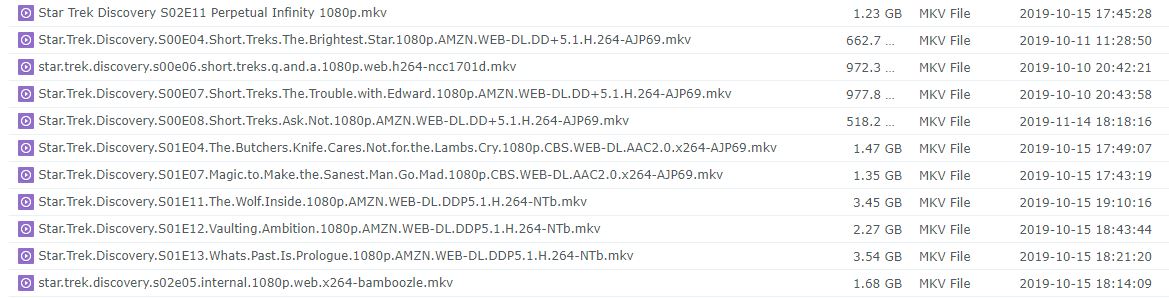
I have the problem where only specific shows or seasons in certain TV shows deleted…specifically Big Bang Theory and Star Trek Discovery. I used to have them record those two series when they were airing new shows. My TV libraries and TV recorded libraries were in two different folders. I noticed the problem when certain seasons and shows of Big Bang Theory were being deleted. After Big Bang Theory ended, I deleted it from my DVR Schedule from Synology Plex Media Player. After that, Plex stop randomly deleting my Big Bang Theory shows.
However, very specific Star Trek Discovery shows are still being deleted. I have back up copies of those shows in folders not scanned by Plex. I long since deleted the DVR scheduling of Star Trek Discovery since it only aired once. And I set everything in my DVR schedule to retain all episodes and never to delete. But I’m still seeing the same specific Star Trek Discovery episodes being deleted. I have been tinkering with Plex settings after each deleting, but I haven’t been able to narrow down the issue.
FYI - These are the only episodes specifically being deleted every time.
I come to conclude the issue is related to the configuration of my Plex Media Player on my Synology. I might shutdown that media player since I use my Nvidia Shield Pro on a regular basis. I still see the deletion after upgrading my Nvidia Shield 2017 to Nvidia Shield Pro 2019.
I uploaded my logs. I don’t know if the logs capture the events. But it does occur periodically. I uploaded my logs from both my plex media players.
Although my issues are not as serious as others, i hope you can narrow down the issue. I’ll keep posting logs when i see the deletion.
How did you determine that? Plex is definitely interested in understanding and fixing. So far, no one has posted logs / proof which makes it impossible to track down and fix.
Conversely, I’ve been using Plex for 6+ years and have never had it delete anything I didn’t tell it to…
I looked over your logs and I can’t find any mention that the files are being deleted. Something you can try is to set the files to read only. This way, they can’t be deleted. If something tries, you should get an error and maybe that will help identify what is causing it.
I looked over your logs and I can’t find any mention that the files are being deleted. Something you can try is to set the files to read only. This way, they can’t be deleted. If something tries, you should get an error and maybe that will help identify what is causing it.
I set half of the files on that list to read-only and others I left alone. I keep you posted if i see the deletion occur again.
[Q] is there any case where Plex would not see or record a deletion? Like when applying an update. I think the incident is occurring as frequent as Plex updates to my Synology.