There is nothing in a Plex update that would touch your media files. There are only 2 times when PMS can delete your files. 1 - you choose the delete option from within a Plex app, like Pelx Web. However, there is always a confirmation. 2 - the keep or delete option mentioned earlier. There is no confirmation. Both of these processes are logged and will be seen when they happen. There is no other time a “delete” command is performed by PMS. This is why I am very skeptical when a user claims PMS deleted something unknowingly. Not saying it’s not possible, but so far it’s always been found to be something else. Often something else has removed the files and when PMS does a library update, it sees the file is gone so it removes it from your library so it appears that PMS deleted it.
NVIDA SHIELD PRO - Plex Media Server Logs_2019-12-18_06-50-12.zip (3.7 MB)
SYNOLOGY - Plex Media Server Logs_2019-12-18_06-51-32.zip (6.3 MB)
New Logs. The file deletion occurred again with exactly the same files I mentioned earlier. The deletion occurred in the last 12 hrs of the creation of the logs.

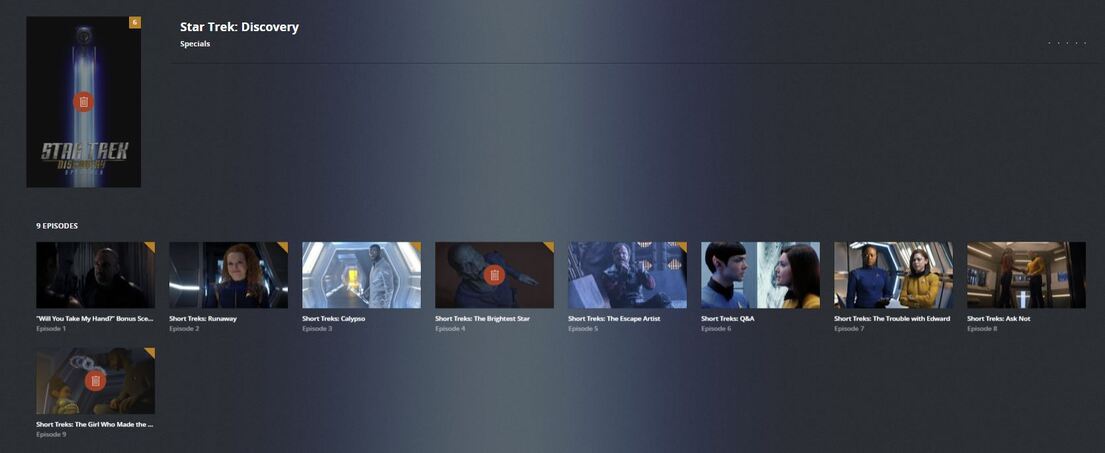
The “Specials” episode files were renamed [file permissions set to read & write]
Season 1 - [file permissions set to read only]

Season 2 - [files permissions set to read & write]

These are the files that are left after the deletion.

None of the modifications I made since the last deletion made any difference. It’s some kind of schedule that always target these specific episodes only.
I checked to see what Plex was doing in the background and discovered this. I don’t know if it’s related to what’s causing the deletion.

There is nothing in a Plex update that would touch your media files. There are only 2 times when PMS can delete your files. 1 - you choose the delete option from within a Plex app, like Pelx Web. However, there is always a confirmation. 2 - the keep or delete option mentioned earlier. There is no confirmation. Both of these processes are logged and will be seen when they happen. There is no other time a “delete” command is performed by PMS. This is why I am very skeptical when a user claims PMS deleted something unknowingly. Not saying it’s not possible, but so far it’s always been found to be something else. Often something else has removed the files and when PMS does a library update, it sees the file is gone so it removes it from your library so it appears that PMS deleted it.
I know what you’re referring to. Usually, when i manually delete something from Plex Web Client it ends up in the synology recycle bin. But these deletion are never there. I’m at lost where these files disappear.
Anyway, I hope you can find something. Let me know if you want any other info or if you have any other suggestions. Any, i’m going to restore those files. Pretty sure i’ll see the deletion in 2-4 days.
Crazy idea: create ‘per Season’ folders, just like the naming guides are requiring.
Dec 18, 2019 02:03:20.911 [0x7fd876151700] DEBUG - Garbage Collector: Deleting expired unwatched content for Star Trek: Discovery (policy: -3 before 2019-12-15)
Dec 18, 2019 02:03:20.952 [0x7fd876a1b700] VERBOSE - WebSocket: processed 1 frame(s)
Dec 18, 2019 02:03:21.083 [0x7fd876151700] DEBUG - Garbage Collector: Deleting episode 4 - (beyond window of 3 days old)
There you go. Found in the log of your Synology PMS (Plex Media Server.1.log)
Check your settings there.
Crazy idea: create ‘per Season’ folders, just like the naming guides are requiring.
I would try that to end this madness, but I’m hoping that you guys can use my logs to discover any bugs in Plex or if it’s a setting issue on my end.
I do have many TV series bundled in season folders, but I also have many TV shows not bundled in season folders with over 500 episodes that never gave Plex an issue.
Not a bug, wrong user setting. See above.
Edit TV-Show → Advanced → Keep […]
You obviously set it to “Episodes in the past three days”.
And this was linked 4 days ago, which you might have discarded since you haven’t recorded it.
https://forums.plex.tv/t/plex-media-server-deleted-my-files-need-help/70120/118?u=coxeroni
The keep settings still apply to all kind of shows.


Dude please, do as I said and don’t focus on the DVR part.
Go to TV Show level, → Edit → Advanced and look for keep. On your Synology btw. not the Shield.
I can easily see, that they are not recorded 
If you ignore what I am saying, you will have this fun every 3 days. Your call.
Dude please, do as I said and don’t focus on the DVR part.
Go to TV Show level, → Edit → Advanced and look for keep. On your Synology btw. not the Shield.
I can easily see, that they are not recorded
If you ignore what I am saying, you will have this fun every 3 days. Your call.
I’m looking…don’t see it.

Not TV Shows. Star Trek Discovery, Show level. The setting is per show, as described in the support articles that were linked to you.
Right here, click on the pen 
found it…why this option even enable. Thanks Coxeroni!

You’re welcome. You probably enabled it by accident. And in the end you were right: Plex really deleted your files! (But you told it so ).
You’re welcome. You probably enabled it by accident. And in the end you were right: Plex really deleted your files! (But you told it so
).
You’re probably right. It was probably back when only the first episode of Star Trek Discovery was broadcast on live tv. Since then I’ve downloaded the episode. I’ve kept my downloaded files and HD Homerun files separately on my Synology and Plex. I didn’t realize that Plex would merge my DVR settings into my regular TV folders. That’s the only time I used that “Keep for 3 Days” option.
Plex doesn’t care where the show comes from, as the setting is simply per show in the respective library. I guess this is one of the reasons why people tend to create separate libraries. One for DVR’ed stuff and another one for where ever the rest comes from. There you could have set the keep settings only in the DVR library for ST:D and this would have not affected the other entry in the download library.
Nope. It is globally, per server.
Ok sorry, then this is not an option
Well he seems to split DVR and non-DVR across servers, so it might still work.
DEBUG - Garbage Collector
I wished there some sort of recycle bin for that Garbage Collector.
Ok sorry, then this is not an option
Well he seems to split DVR and non-DVR across servers, so it might still work.
it didn’t in my case. I have a separate folder for TV Shows Recorded and TV Shows. Whatever setting that was set in my TV Shows Recorded affected my settings in TV Shows in Plex. It’s a global thing.
Glad it was only a setting issue. I can’t imagine how people lost whole movie libraries. I never had that happened ::knock knock::
Plex server is trying to use the recycle bin, if there is one available for that volume.
This can sometimes fail if the volume is located on a network share. Some NAS vendors have implemented their own version of a trash can, which you might have to enable first.
i do have it enable, but Plex doesn’t use it for the “Keep the past 3 Episode” option for Garbage Collector. Manual deleting through the plex client, it does move it to recycle bin.
Can that be fix in a future update?
Which server? Shield or Synology?
