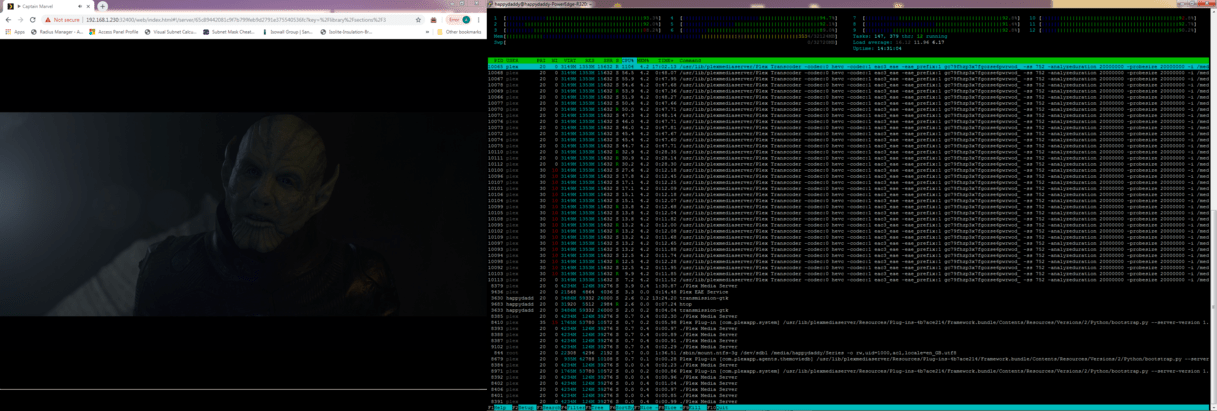
Another release with this issue unpatched. It would be great to be able to use a current build on my server instead of something from December. Any ETA this is getting a bit ridiculous.
I’m thinking of downgrading too  not surre whats better, burning my server or plausible security holes.
Can I ask what version was still ok? Also how do you test new releases? Separate docker with same appdata and media or just same media?
Also I want to add that inbuilt plex dasboard dos not show that subtitles are converted, should it? as some state its conversion issue.
Yeah it is ridiculous, but apparently no one at plex cares about being ridiculous 
Who cares about paying customers nowadays anyway 
Last version without high cpu usage when transcoding srt to ass subtitles is 1.14.1.5488.
I can confirm that 1.14.1.5488 does not have this problem, and next tag on docker hub 1.15.3.876 starts doing this:
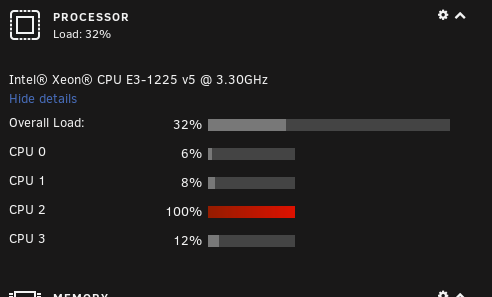
Tried out linuxserver’s container, also host, bridge networking. Nothing fixed it, just rollback to 6 months old release…
Plex, please help out paying customers…
This is crazy… come on plex, love your product. Please get it fixed 
Lol 
@ChuckPa, how can we contact people with decision power in your company? It’s ridiculous!
Have any of you stepped away from docker and used the current native app as a test ?
There are those who swear by docker. I do nothing but swear at it. (never works for me).
My suggestion:
- Install the native app (1.16.3)
- Setup a minimalist section with least amount of media indexed
- Test to see if the condition still exists.
- If it does, then contact.
Incidentally, I was just testing this exact question to answer questions in the Unraid threads on my i7-7700. None of us can replicate but we’re also running newer updates.
I DO sense a theme here. It seems Docker hosts have this problem (This thread and Unraid).
I run native and cannot replicate.


It’s not a docker issue. I got this issue on windows. Tried ubuntu, same issue. There are 7-8 threads around here with the same issue.
If it is SO prevalent, why can’t I reproduce it when following the instructions to replicate exactly as given?
Perhaps you can help me replicate? If I can replicate it, I will write it up.
- Transcode video and SRT to ASS.
I don’t have time to troubleshoot anymore with 2 million kids in the house, I just downgrade. Tried every version since 1.14.1.5488 and all of them jumps to 100% on one core while transcoding srt to ass and stays at 100%. 1.14.1.5488 does not. CPU passmark 2300/10000.
We don’t ask for input or judgment about containers, if it doesn’t work for you, you shouldn’t use it.
Containers work for me and for many people around the world, not only for Plex but for anything! Thousands of companies use that technology, if it was so bad, it would be known.
Especially it works with 1.14.1.5488 in docker but no version after that.
So it means you didn’t even tell anything to your devs?
It’s kind of annoying especially when you said in an early post on this thread that you’ve managed to replicate it and that you’ve sent all the information about it to them.
Are we taken for fools? It very much looks like it!
You have all the information in the thread:
A mkv container, h264 video, SRT subtitles in the MKV, subtitles set to automatic in your plex web client! That’s how you test it!
And for your information, I can easily transcode 5 to 6 1080p streams in hardware using my crappy container and my crappy GPU when I use the 1.14.1.5488 version.
Are you done?
- I cannot write up a detailed Steps To Reproduce for Engineering if I can’t reproduce it myself.
Feels like you don’t want to lose time just trying to understand what is written by dozens of people here. You have all the information in the thread:
A mkv container, h264 video, SRT subtitles in the MKV, subtitles set to automatic in your plex web client! That’s how you test it!
- I don’t take you for fools. Although you don’t seem to know how to read Tautulli output above showing I did precisely that.
If you are unwilling to cooperate and help me help you, there is NOTHING which anyone can do.
As we explained a lot of time, it’s not Docker related. Debian 10 VM with KVM here (Nvidia GPU passthrough).
Just to try, I installed th latest release of PMS on my computer (Arch) and I have been able to reproduce the exact same problem with default settings…
The file : MKV, H264, SRT
Without subtitle : < 5% CPU usage from PMS
With subtitle : 100% CPU usage
You never asked for us to help you reproduce it so that you can tell your devs about it until 5min ago! That’s what I call being taken for a fool for the past 3 months when many people are complaining and nothing new happens!
I’ve seen the Tautulli screenshot. It looks quite similar to what we I have although apparently it doesn’t create the bug for you so you are lucky or there are external factors that makes it work for you that I’m not aware of.
I will ask AGAIN.
Please help me figure this out? How do I reproduce?
- I have H.264, 27 Mbps video
- It has SRT sidecar subs.
- It plays without CPU loading issue.
- There are no problems in VMs, QNAP (Debian), or Fedora.
What’s different?
Doesn’t work in a VM: Plex Media Server process uses 100% cpu (SRT->ASS Conversion) - #98 by arakmar
Doesn’t work on plain Ubuntu or windows: Plex Media Server process uses 100% cpu (SRT->ASS Conversion) - #93 by SVKTV
I don’t know what to tell more than all the things that were already posted on this forum. My cpu is an intel NIC i7, embedded GPU (5 to 6 transcoding sessions in parallel using HW transcode), 32GB or RAM, flash storage. Maybe it’s Intel the problem and you have an AMD ?
Maybe someone can post an extract of a failing video with its subtitles? You’re the expert, you know how the product is architectured, you should ask the questions to be able to reproduce it.
Is this confined to the newly released Debian 10 ?
I am running an i7-7700
